


Executive Summary
Have you ever downloaded and installed a large Android application that had very few actual UI elements or functionality? Recently, FireEye Labs mobile security researchers have discovered a new kind of mobile malware that encrypts an embedded Android application with an attachment in an asset folder – concealing all malicious activities within a seemingly benign application.
The malware app disguises itself as the Google Play store app, placing its similar icon close to the real Google Play store icon on the homescreen. Once installed, the hacker uses a dynamic DNS server with the Gmail SSL protocol to collect text messages, signature certificates and bank passwords from the Android devices.
The relationship between the main application, the attached application and the malicious classes are shown below.

Fig. 1. The relationship of the masked app and the embedded malware.
The malware package name is com.sdwiurse and the app title is “google app stoy.” Android users can’t remove the app once the device is infected because the “uninstall” function is disabled and the app continues to run as services in the back-end. These services can be killed manually but will restart once the Android phone is restarted.
Owing to the unique nature of how the malware is packaged, as of June 13, 2014, the Virus Total score for this app is only 3 out of 51 anti-virus vendors. Because most vendors only use signature-based algorithms to detect malware, they fail to detect the malicious content concealed within apps that appear to be basic or run-of-the-mill.

Fig. 2. The Virus Total detection out of 51 AV vendors. The score was taken on 06/13/2014.
The app we observed only has 711 lines of code but is over 1.7MB in size upon downloading. The single largest file, named “ds,” is embedded in the asset folder and is 597KB. After decryption and decompression however, the real dex package file expands up to 2.2MB with the full malware. The little amount of code in the superficial app is one of the evasion techniques used by the hackers to mask the malicious classes that swell the app’s size.
User Experience
After installation, a new icon of “googl app stoy” is shown on the Android homescreen. The icon is the same as “Google Play” to confuse users into clicking it. Once clicked, the app asks for administrator privileges of the device as shown in figure three.

Fig. 3. The newly installed icon on the Android desktop and the activation page.
When we observe the app in action, the sole user interface for the app contains pops up saying “Program Error” and “It’s Deleted!” when translated to English from Korean. Next, the app terminates and a notification message appears reading “Unfortunately, google app stoy has stopped.” After this occurs, the app icon on the homescreen is removed, tricking the user into thinking it’s gone as shown in figure four.

Fig. 4. The misleading “uninstalling” page and Toast message.
However, when opening “Setting->Apps,” we can still find the app in the “Downloaded” tab and “Running Apps” tab. Furthermore, in the “Downloaded” tab, the app cannot be stopped or uninstalled:
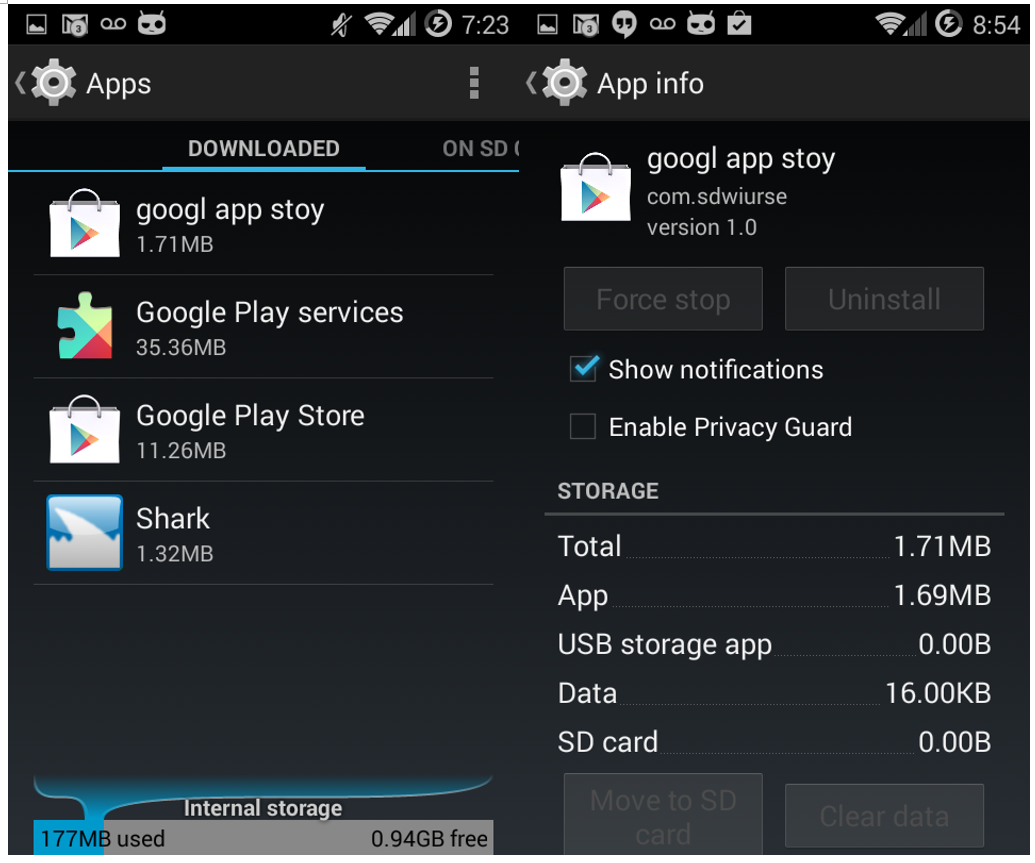
Fig. 5. The app can’t be removed in the “Settings-Downloaded” page.
In the “Running Apps” tab, there are five services running that were started by the malicious app:
1. uploadContentService
2. UninstallerService
3. SoftService
4. uploadPhone
5. autoRunService

Fig. 6. The 5 background services started by the app. You won’t discover them unless digging into the long list of “Running App” tab.
Decryption
The file is encrypted using the javax.crypto package of Java Cryptographic Extension (JCE) framework as shown below.

Fig. 7. Decipher code.
The cryptographic algorithm is based on the Data Encryption Standard (DES). The key string is “gjaoun” as shown in the code below. After the file is decrypted, it’s loaded as the dex class:

Fig. 8. The code of decryption and class loading for the embedded file.
All the malicious activities and services happen in the loaded dex file.
Malicious Methods
In the source code of the malicious dex package, “class.dex” is decompressed from the decrypted file “x.zip.” Analyzing this code, we found there are three ways to steal private information from the infected Android device. We will first introduce how the malware works and then analyze the network traffic as evidence of the malicious behaviors.
1. SMS Message Theft

Fig. 9. The code to steal personal SMS.
In the code, ak40.txt is a file in /storage/sdcard0/temp/ folder containing a string. When the content equals to “1,” the SMS message is sent to an email address. The email address and password are stored among other files in /storage/sdcard0/temp/. The hacker is smart enough to use the Gmail SSL protocol to evade the signature detection in network traffic by most AV vendors.
2. Signature Certificate and Key Theft

Fig. 11. The code to steal signature certificate and keys.
The variable v1 is the phone number of the compromised Android phone, while the Url.getSDPath() is the “temp” folder in the mounted storage:
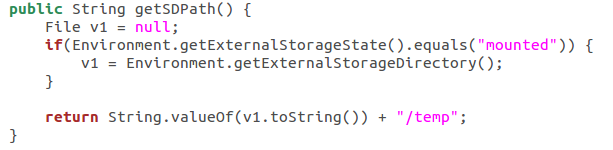
Fig. 12. The location of the temporary folder that the malware app uses to collect signature certificate and keys.
The same zip file is named as “all.zip” to upload to a server and also named as “{PHONE_NUMBER}_npki.zip” to send through Gmail as an attachment.
3. Bank Account Password Theft

Fig. 13. The code to steal personal bank account and password.
Network Traffic
We have intercepted the network traffic of the malicious app in the FireEye Mobile Threat Prevention (MTP) Platform to verify the malicious activities we found in the code above.
1. SMS Message Transmission
Because the destination, including the email address and the password is stored in a cached file on the phone, we have replaced it with a testing email account and redirected a testing SMS to the newly created email address to simulate the scenario of receiving SMS in the MTP platform. Here is an example of the SMS messages that we have intercepted from the testing email account:

Fig. 14. The testing email and SMS we intercepted in the FireEye MTP platform.
The time stamp shows the email address received the content (at 9:39 PM) of the victim’s incoming SMS (at 9:38 PM) within 1 minute.
2. Signature Certificate and Key Transmission
We captured the PCap information in the FireEye MTP platform. The PCap shows that the “all.zip” is uploaded to domain “dhfjhewjhsldie.xicp.net”.

Fig. 15. The PCap of the signature certificate and keys.
The same file is renamed to {PHONE_NUMBER}_npki.zip and sent as Gmail attachment using SSL configuration. The picture below shows the signature certificate file and signature primary key after unzipping from the attachment that the malware app leaks to the SMTP server.

Fig. 16. The content of the signature certificate and keys.
3. Bank Account Password Transmission
We have found email evidence containing victims’ bank accounts and passwords and worked with Google’s Gmail team to take down hacker’s email accounts.
