If an Android Has a Heart, Does It Bleed?

The OpenSSL Heartbleed vulnerability “allows remote attackers to obtain sensitive information from process memory via crafted packets that trigger a buffer over-read” [1]. Heartbleed surprised the public by allowing attackers to steal sensitive information from vulnerable websites by sending crafted SSL heartbeat messages. However, due to the fact that servers can send heartbeats to clients as well, malicious servers can, in turn, attack vulnerable clients and steal sensitive information. For the Android platform, we find that roughly 150M downloads of Android apps contain OpenSSL libraries vulnerable to Heartbleed.

Currently there are about 17 antivirus apps on Google Play branded as “Heartbleed detectors”. Six of them scan the OpenSSL library belonging to the Android platform for vulnerabilities. Unfortunately, this method isn’t sufficient for detecting the Heartbleed vulnerability on Android. Except in limited Android versions (mainly 4.1.0-4.1.1), the majority of Android platforms are not vulnerable, as most versions use OpenSSL libraries that are not vulnerable or simply have the OpenSSL heartbeat functionality disabled.

However, Android apps frequently use native libraries, which either directly or indirectly leverage vulnerable OpenSSL libraries. Therefore, even though the Android platform itself is not vulnerable, attackers can still attack those vulnerable apps. They can hijack the network traffic, redirect the app to a malicious server and then send crafted heartbeats messages to the app to steal sensitive memory contents.

We studied apps with vulnerable OpenSSL libraries and confirmed this attack. Most of the vulnerable apps are games, and some are office-based applications. Although there is not much valuable information in the game apps, attackers can steal OAuth tokens (access tokens and refresh tokens) to hijack the game accounts; as such, the information might be useful for hijacking those linked social network accounts with incorrect configurations. Office apps vulnerable to Heartbleed are much more dangerous due to further potential data leakage.

During our investigation of the office apps that contains a vulnerable version of OpenSSL, we were surprised that they were not vulnerable to the Heartbleed attack. How could it be? A deeper look shows that these apps either make a mistake in the native code linkage, or just contain dead code. Therefore, when they try to invoke SSL functions, they directly use the non-vulnerable OpenSSL library contained within the Android OS, instead of using the vulnerable library provided by the app. The linkage mistake is common for Android applications built with native code. As such, the side-effect of this mistake helps reduce the apps’ overall risk profile.

Within the 17 Heartbleed detector apps on Google play, only 6 detectors check installed apps on the device for Heartbleed vulnerability. Within the 6, 2 report all apps installed as “Safe”, including those we confirmed as vulnerable. One detector doesn’t show any app scan results and another one doesn’t scan the OpenSSL version correctly. Only 2 of them did a decent check on Heartbleed vulnerability of apps. Although they conservatively labeled some non-vulnerable apps as vulnerable, we agree it is a viable report which highlights both the vulnerabilities and the linkage mistakes. We’ve also seen several fake Heartbleed detectors in the 17 apps, which don’t perform real detections nor display detection results to users and only serve as adware.

On April 10th, we scanned more than 54K Google Play apps (each with over 100K downloads) and found that there were at least 220 million downloads affected by the Heartbleed vulnerability. We have notified some of the app developers and library vendors about the OpenSSL Heartbleed vulnerability found in their products. Fortunately, it seems most app developers and library vendors take Heartbleed seriously, as we have started to see apps updated with proper fixes. The total number of vulnerable apps download has since decreased to 150 million on April 17th.
[1] Vulnerability Summary for CVE-2014-0160

Occupy Your Icons Silently on Android

FireEye mobile security researchers have discovered a new Android security issue: a malicious app with normal protection level permissions can probe icons on Android home screen and modify them to point to phishing websites or the malicious app itself without notifying the user. Google has acknowledged this issue and released the patch to its OEM partners.

Normal vs. Dangerous Permissions: A Background

Android Open Source Project (AOSP) classifies Android permissions into several protection levels: “normal”, “dangerous”, “system”, “signature” and “development” [1][2][3].

Dangerous permissions “may be displayed to the user and require confirmation before proceeding, or some other approach may be taken to avoid the user automatically allowing the use of such facilities”. In contrast, normal permissions are automatically granted at installation, “without asking for the user's explicit approval (though the user always has the option to review these permissions before installing)” [1].

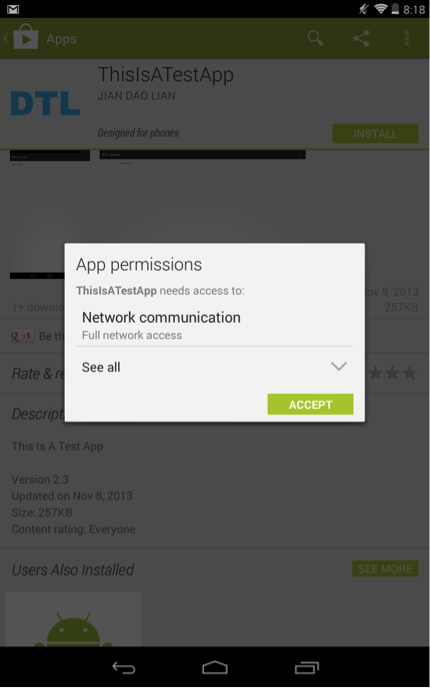
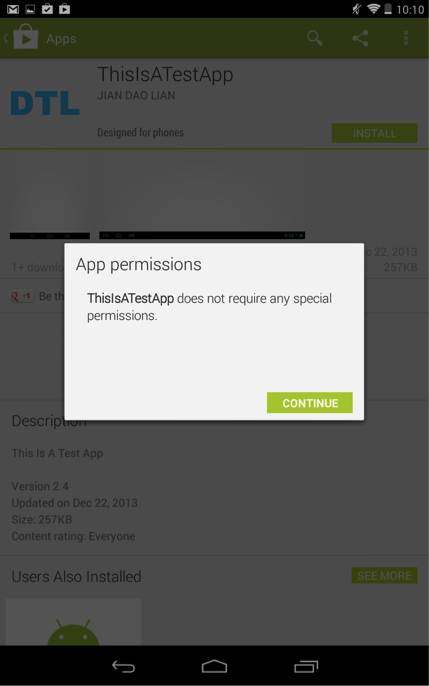
On the latest Android 4.4.2 system, if an app requests both dangerous permissions and normal permissions, Android only displays the dangerous permissions, as shown in Figure 1. If an app requests only normal permissions, Android doesn’t display them to the user, as shown in Figure 2.

Figure 1. An Android app asks for one dangerous permission (INTERNET) and some normal permissions (Launcher’s READ_SETTINGS and WRITE_SETTINGS). Android doesn’t notify the user about the normal permissions.

Figure 1. An Android app asks for one dangerous permission (INTERNET) and some normal permissions (Launcher’s READ_SETTINGS and WRITE_SETTINGS). Android doesn’t notify the user about the normal permissions.

Figure 2. An Android app asks for normal permissions (Launcher’s READ_SETTINGS and WRITE_SETTINGS) only. Android doesn’t show any permission to the user.

Figure 2. An Android app asks for normal permissions (Launcher’s READ_SETTINGS and WRITE_SETTINGS) only. Android doesn’t show any permission to the user.

Normal Permissions Can Be Dangerous

We have found that certain “normal” permissions have dangerous security impacts. Using these normal permissions, a malicious app can replace legit Android home screen icons with fake ones that point to phishing apps or websites.

The ability to manipulate Android home screen icons, when abused, can help an attacker deceive the user. There’s no surprise that the com.android.launcher.permission.INSTALL_SHORTCUT permission, which allows an app to create icons, was recategorized from “normal” to “dangerous” ever since Android 4.2. Though this is an important security improvement, an attacker can still manipulate Android home screen icons using two normal permissions: com.android.launcher.permission.READ_SETTINGS and com.android.launcher.permission.WRITE_SETTINGS. These two permissions enable an app to query, insert, delete, or modify the whole configuration settings of the Launcher, including the icon insertion or modification. Unfortunately, these two permissions have been labeled as “normal” since Android 1.x.

As a proof of concept attack scenario, a malicious app with these two permissions can query/insert/alter the system icon settings and modify legitimate icons of some security-sensitive apps, such as banking apps, to a phishing website. We tested and confirmed this attack on a Nexus 7 device with Android 4.4.2. (Note: The testing website was brought down quickly and nobody else ever connected to it.) Google Play doesn’t prevent this app from being published and there’s no warning when a user downloads and installs it. (Note: We have removed the app from Google Play quickly and nobody else downloaded this app.)

Lastly, this vulnerability is not limited to Android devices running AOSP. We have also examined devices that use non-AOSP Launchers, including Nexus 7 with CyanogenMod 4.4.2, Samsung Galaxy S4 with Android 4.3 and HTC One with Android 4.4.2. All of them have the protection levels of com.android.launcher.permission.READ_SETTINGS and WRITE_SETTINGS as “normal”.

Google acknowledged this vulnerability and has released the patch to its OEM partners. Many android vendors were slow to adapt security upgrades. We urge these vendors to patch vulnerabilities more quickly to protect their users.

References:

  1. http://developer.android.com/guide/topics/manifest/permission-element.html
  2. https://android.googlesource.com/platform/frameworks/base/+/master/core/res/AndroidManifest.xml
  3. https://android.googlesource.com/platform/packages/apps/Launcher2/+/master/AndroidManifest.xml

DLL Side-Loading: Another Blind-Spot for Anti-Virus

Last month, I presented a talk at the RSA USA Conference on an increasingly popular threat vector called “Dynamic-Link Library Side-Loading” (DLL Side-Loading). As with many vulnerabilities, this exploit has existed for a rather long time and is the result of Microsoft looking to make binary updates easier for Windows developers through the Windows side-by-side (WinSxS) assembly feature.

Now, though, advanced persistent threat (APT) developers are using the innocuous DLL Side-Loading method to sneak malware past anti-virus (AV) scanners as the infected files run in-memory. In doing-so, the malicious payload is using a benign application to be built in memory, meaning that the malware does not sit running in the file system where AV scans take place. In the figure below, you can see an example of how this all plays out:

DLLpic

For a real-life example: in 2013, attackers exploited the executable originally developed by Fortune 50 company using this technique in a highly targeted attack. In such an attacks, the malware places a spoofed, malicious DLL file in a Windows’ WinSxS directory so that the operating system loaded the spoofed DLL instead of the legitimate file. Furthermore, because the file in-question was white-listed by hash in a public database, AV simply ignores it altogether.

In response to the growing use of DLL Side-Loading in APTs, we have developed a full paper that describes the history of DLL Side-Loading and its role in the malware and software engineering arenas which you can review here: https://www.fireeyesolution.com/resources/pdfs/fireeye-dll-sideloading.pdf


Amazon’s Mobile Shopping Clients and CAPTCHA

Amazon is a popular online retailer serving millions of users. Unfortunately, FireEye mobile security researchers have found security issues within Amazon’s mobile apps on both Android and iOS platforms through which attackers can crack the passwords of target Amazon accounts. Amazon confirmed our findings and hot fixed the issue. Recently, we found two security issues within Amazon’s mobile apps on both Android and iOS platforms:
  • No limitation or CAPTCHA for password attempts
  • Weak password policy
Attackers can exploit these two security issues remotely against target Amazon accounts. Continue reading »

Background Monitoring on Non-Jailbroken iOS 7 Devices — and a Mitigation

Background monitoring mobile applications has become a hot topic on mobile devices. Existing reports show that such monitoring can be conducted on jailbroken iOS devices. FireEye mobile security researchers have discovered such vulnerability, and found approaches to bypass Apple's app review process effectively and exploit non-jailbroken iOS 7 successfully. We have been collaborating with Apple on this issue.
fig1
Fig.1 Background Monitoring
We have created a proof-of-concept "monitoring" app on non-jailbroken iOS 7.0.x devices. This “monitoring” app can record all the user touch/press events in the background, including, touches on the screen, home button press, volume button press, and TouchID press, and then this app can send all user events to any remote server, as shown in Fig.1. Potential attackers can use such information to reconstruct every character the victim inputs. Continue reading »

Write Once, Exploit Everywhere: FireEye Report Analyzes Four Widely Exploited Java Vulnerabilities

Over the last couple of decades, Java has become the lingua franca of software development, a near-universal platform that works across different operating systems and devices. With its “write once, run anywhere” mantra, Java has drawn a horde of developers looking to serve a large user base as efficiently as possible.

Cyber attackers like Java for many of the same reasons. With a wide pool of potential targets, the platform has become the vehicle of choice for quickly dispersing lucrative crimeware packages.

In our continuing mission to equip security professionals against today’s advanced cyber threats, FireEye has published a free report, “Brewing Up Trouble: Analyzing Four Widely Exploited Java Vulnerabilities.” The report outlines four commonly exploited Java vulnerabilities and maps out the step-by-step infection flow of exploits kits that leverage them.

Download the paper to learn more about these vulnerabilities:

  • CVE-2013-2471, which allows attackers to override Java’s getNumDataElements() method, leading to memory corruption.
  • CVE-2013-2465, which involves insufficient bounds checks in the storeImageArray() function. This vulnerability is used by White Lotus and other exploit kits.
  • CVE-2012-4681, which allows attackers to bypass security checks using the findMethod () function.
  • CVE-2013-2423, which arises due to insufficient validation in the findStaticSetter () method, leading to Java type confusion. This vulnerability employed by RedKit and other exploits kits.

As explained in the paper, Java’s popularity among the developers and widespread use in Web browsers all but guarantees continuing interest from threat actors.

Motivated by the profits, cyber attackers are bound to adopt more intelligent exploit kits. And these attacks will continue to mushroom as more threat actors scramble for a piece of the crimeware pie.

Operation GreedyWonk: Multiple Economic and Foreign Policy Sites Compromised, Serving Up Flash Zero-Day Exploit

Less than a week after uncovering Operation SnowMan, the FireEye Dynamic Threat Intelligence cloud has identified another targeted attack campaign — this one exploiting a zero-day vulnerability in Flash. We are collaborating with Adobe security on this issue. Adobe has assigned the CVE identifier CVE-2014-0502 to this vulnerability and released a security bulletin.

As of this blog post, visitors to at least three nonprofit institutions — two of which focus on matters of national security and public policy — were redirected to an exploit server hosting the zero-day exploit. We’re dubbing this attack “Operation GreedyWonk.”

We believe GreedyWonk may be related to a May 2012 campaign outlined by ShadowServer, based on consistencies in tradecraft (particularly with the websites chosen for this strategic Web compromise), attack infrastructure, and malware configuration properties.

The group behind this campaign appears to have sufficient resources (such as access to zero-day exploits) and a determination to infect visitors to foreign and public policy websites. The threat actors likely sought to infect users to these sites for follow-on data theft, including information related to defense and public policy matters.

Continue reading »

Operation SnowMan: DeputyDog Actor Compromises US Veterans of Foreign Wars Website

On February 11, FireEye identified a zero-day exploit (CVE-2014-0322)  being served up from the U.S. Veterans of Foreign Wars’ website (vfw[.]org). We believe the attack is a strategic Web compromise targeting American military personnel amid a paralyzing snowstorm at the U.S. Capitol in the days leading up to the Presidents Day holiday weekend. Based on infrastructure overlaps and tradecraft similarities, we believe the actors behind this campaign are associated with two previously identified campaigns (Operation DeputyDog and Operation Ephemeral Hydra).

This blog post examines the vulnerability and associated attacks, which we have dubbed “Operation SnowMan.”

Continue reading »

New IE Zero-Day Found in Watering Hole Attack

FireEye Labs has identified a new Internet Explorer (IE) zero-day exploit hosted on a breached website based in the U.S. It’s a brand new zero-day that targets IE 10 users visiting the compromised website-a classic drive-by download attack. Upon successful exploitation, this zero-day attack will download a XOR encoded payload from a remote server, decode and execute it.

This post was intended to serve as a warning to the general public. We are collaborating with the Microsoft Security team on research activities. We will continue to update this blog as new information about this threat is found.

Update: We have posted a full analysis of the attack, which we have dubbed “Operation SnowMan.”

JS-Binding-Over-HTTP Vulnerability and JavaScript Sidedoor: Security Risks Affecting Billions of Android App Downloads

Third-party libraries, especially ad libraries, are widely used in Android apps. Unfortunately, many of them have security and privacy issues. In this blog, we summarize our findings related to the insecure usage of JavaScript binding in ad libraries.

First, we describe a widespread security issue with using JavaScript binding (addJavascriptInterface) and loading WebView content over HTTP, which allows a network attacker to take control of the application by hijacking the HTTP traffic. We call this the JavaScript-Binding-Over-HTTP (JS-Binding-Over-HTTP) vulnerability. Our analysis shows that, currently, at least 47 percent of the top 40 ad libraries have this vulnerability in at least one of their versions that are in active use by popular apps on Google Play.

Second, we describe a new security issue with the JavaScript binding annotation, which we call JavaScript Sidedoor. Starting with Android 4.2, Google introduced the @JavascriptInterface annotation to explicitly designate and limit which public methods in Java objects are accessible from JavaScript. If an ad library uses @JavascriptInterface annotation to expose security-sensitive interfaces, and uses HTTP to load content in the WebView, then an attacker over the network could inject malicious content into the WebView to misuse the exposed interfaces through the JS binding annotation. We call these exposed JS binding annotation interfaces JS sidedoors.

Our analysis shows that these security issues are widespread, have affected popular apps on Google Play accounting for literally billions of app downloads. The parties we notified about these issues have been actively addressing them. Continue reading »