“Operation Clandestine Fox” Now Attacking Windows XP Using Recently Discovered IE Vulnerability

On April 26th, FireEye Research Labs notified the public of a new IE zero-day exploit being used in “Operation Clandestine Fox.” The initial attack targeted users of IE versions 9, 10, and 11 on Windows 7 and 8. Despite attackers only targeting those versions of Microsoft IE and Windows OS, the vulnerability actually impacts all versions of IE from 6 through 11.

Today, FireEye Labs can reveal a newly uncovered version of the attack that specifically targets out-of-life Windows XP machines running IE 8. This means that live attacks exploiting CVE-2014-1776 are now occurring against users of IE 8 through 11 and Windows XP, 7 and 8.

We have also observed that multiple, new threat actors are now using the exploit in attacks and have expanded the industries they are targeting. In addition to previously observed attacks against the Defense and Financial sectors, organization in the Government- and Energy-sector are now also facing attack.

Mitigation

In our tests, disabling VXG.dll blocks this attack on all configurations of IE and Windows OSs. However, we strongly suggest that Windows XP users upgrade to a later Windows operating system to take advantage of new mitigation technologies from Microsoft, such as EMET 5.0 and IE with Enhanced Protected Mode (EPM). Deploying preventative measures now will help mitigate the impact of these exploits until Microsoft patches the underlying vulnerability, and will offer additional protection from future ZeroDay exploits.

Details

The main differences between this new attack targeting Windows XP compared to the original Windows 7/8.1 versions of this attack are the mitigation bypasses. The Windows 7/8.1 version develops its write primitive into read/write access to much of the process space by corrupting Flash vector objects. This is to bypass ASLR by searching for ROP gadgets and building a ROP chain dynamically in memory.

Without ASLR, ROP gadgets can be constructed beforehand with static addresses. Consequently, Flash assistance in the Windows XP version is much simpler. It builds a ROP chain with static addresses to gadgets in MSVCRT, tweaks addresses for a plethora of language packs, and jumps directly to a pivot without developing a write primitive. From there, the ROP chain calls VirtualAlloc to allocate executable memory, copies the shellcode to the allocated chunk, and executes the shellcode.

This new tactic of specifically targeting those running Windows XP means the risk factors of this vulnerability are now even higher. We have been working with Microsoft and they have released an Out of Band patch. FireEye highly recommends users of Microsoft Internet Explorer apply the patch as soon as possible for security reasons.

New Zero-Day Exploit targeting Internet Explorer Versions 9 through 11 Identified in Targeted Attacks

Summary

FireEye Research Labs identified a new Internet Explorer (IE) zero-day exploit used in targeted attacks. The vulnerability affects IE6 through IE11, but the attack is targeting IE9 through IE11. This zero-day bypasses both ASLR and DEP. Microsoft has assigned CVE-2014-1776 to the vulnerability and released security advisory to track this issue.

Threat actors are actively using this exploit in an ongoing campaign which we have named “Operation Clandestine Fox.” However, for many reasons, we will not provide campaign details. But we believe this is a significant zero day as the vulnerable versions represent about a quarter of the total browser market. We recommend applying a patch once available.
According to NetMarket Share, the market share for the targeted versions of IE in 2013 were:

IE 9 13.9%
IE 10 11.04%
IE 11 1.32%

Collectively, in 2013, the vulnerable versions of IE accounted for 26.25% of the browser market. The vulnerability, however, does appear in IE6 through IE11 though the exploit targets IE9 and higher.

The Details

The exploit leverages a previously unknown use-after-free vulnerability, and uses a well-known Flash exploitation technique to achieve arbitrary memory access and bypass Windows’ ASLR and DEP protections.

Exploitation

• Preparing the heap

The exploit page loads a Flash SWF file to manipulate the heap layout with the common technique heap feng shui. It allocates Flash vector objects to spray memory and cover address 0×18184000. Next, it allocates a vector object that contains a flash.Media.Sound() object, which it later corrupts to pivot control to its ROP chain.

• Arbitrary memory access

The SWF file calls back to Javascript in IE to trigger the IE bug and overwrite the length field of a Flash vector object in the heapspray. The SWF file loops through the heapspray to find the corrupted vector object, and uses it to again modify the length of another vector object. This other corrupted vector object is then used for subsequent memory accesses, which it then uses to bypass ASLR and DEP.

• Runtime ROP generation

With full memory control, the exploit will search for ZwProtectVirtualMemory, and a stack pivot (opcode 0×94 0xc3) from NTDLL. It also searches for SetThreadContext in kernel32, which is used to clear the debug registers. This technique, documented here, may be an attempt to bypass protections that use hardware breakpoints, such as EMET’s EAF mitigation.

With the addresses of the aforementioned APIs and gadget, the SWF file constructs a ROP chain, and prepends it to its RC4 decrypted shellcode. It then replaces the vftable of a sound object with a fake one that points to the newly created ROP payload. When the sound object attempts to call into its vftable, it instead pivots control to the attacker’s ROP chain.

• ROP and Shellcode

The ROP payload basically tries to make memory at 0×18184000 executable, and to return to 0x1818411c to execute the shellcode.

0:008> dds eax
18184100  770b5f58 ntdll!ZwProtectVirtualMemory
18184104  1818411c
18184108  ffffffff
1818410c  181840e8
18184110  181840ec
18184114  00000040
18184118  181840e4

Inside the shellcode, it saves the current stack pointer to 0×18181800 to safely return to the caller.

mov     dword ptr ds:[18181800h],ebp

Then, it restores the flash.Media.Sound vftable and repairs the corrupted vector object to avoid application crashes.

18184123 b820609f06      mov     eax,69F6020h
18184128 90              nop
18184129 90              nop
1818412a c700c0f22169    mov     dword ptr [eax],offset Flash32_11_7_700_261!AdobeCPGetAPI+0x42ac00 (6921f2c0)
18184133 b800401818      mov     eax,18184000h
18184138 90              nop
18184139 90              nop
1818413a c700fe030000    mov     dword ptr [eax],3FEh ds:0023:18184000=3ffffff0

The shellcode also recovers the ESP register to make sure the stack range is in the current thread stack base/limit.

18184140 8be5            mov     esp,ebp
18184142 83ec2c          sub     esp,2Ch
18184145 90              nop
18184146 eb2c            jmp     18184174

The shellcode calls SetThreadContext to clear the debug registers. It is possible that this is an attempt to bypass mitigations that use the debug registers.

18184174 57              push    edi
18184175 81ece0050000    sub     esp,5E0h
1818417b c7042410000100  mov     dword ptr [esp],10010h
18184182 8d7c2404        lea     edi,[esp+4]
18184186 b9dc050000      mov     ecx,5DCh
1818418b 33c0            xor     eax,eax
1818418d f3aa            rep stos byte ptr es:[edi]
1818418f 54              push    esp
18184190 6afe            push    0FFFFFFFEh
18184192 b8b308b476      mov     eax,offset kernel32!SetThreadContext (76b408b3)
18184197 ffd0            call    eax

The shellcode calls URLDownloadToCacheFileA to download the next stage of the payload, disguised as an image.

Mitigation

Using EMET may break the exploit in your environment and prevent it from successfully controlling your computer. EMET versions 4.1 and 5.0 break (and/or detect) the exploit in our tests.
Enhanced Protected Mode in IE breaks the exploit in our tests. EPM was introduced in IE10.
Additionally, the attack will not work without Adobe Flash. Disabling the Flash plugin within IE will prevent the exploit from functioning.

Threat Group History

The APT group responsible for this exploit has been the first group to have access to a select number of browser-based 0-day exploits (e.g. IE, Firefox, and Flash) in the past. They are extremely proficient at lateral movement and are difficult to track, as they typically do not reuse command and control infrastructure. They have a number of backdoors including one known as Pirpi that we previously discussed here. CVE-2010-3962, then a 0-day exploit in Internet Explorer 6, 7, and 8 dropped the Pirpi payload discussed in this previous case.

As this is still an active investigation we are not releasing further indicators about the exploit at this time.

Acknowledgement: We thank Christopher Glyer, Matt Fowler, Josh Homan, Ned Moran, Nart Villeneuve and Yichong Lin for their support, research, and analysis on these findings.

NGOs: Fighting Human Rights Violations and, Now, Cyber Threat Groups

With so many non-government organizations (NGOs) in operation today around the world, we asked ourselves a question here at FireEye Labs. Who would think about targeting NGOs? Steal from a nonprofit? It would seem unthinkable to most people. But, as we can see from a few recent examples below, this is a clear reality.

As more NGOs reach out to us, it is clear that the situation for them is not a pretty one. Based on the breaches we have observed in this space, it appears there are more than 15 distinct advanced threat groups active in NGO networks. The sheer volume and variety of threat groups active in NGO environments struck us as unusually high for a single industry and indicates the incredibly difficult threat landscape NGOs face.

Hamstrung by limited budgets to establish strong network defenses and few personnel that understand how and why these threats are materializing, NGOs make a relatively easy target. Even if they aren’t profitable, NGOs use credit cards for donations, transact with cash, store personally identifiable information (PII) and, in some cases, even house intellectual property. Many NGOs also work on political issues—an inviting target for opponents who want to monitor their communications and activities. Weak defenses and a target-rich environment make NGOs an enticing victim to maliciously motivated threat actors.

Cyber Operations at NGOs: An Intelligence Collection Pursuit?

NGOs — particularly those based in the U.S. — have long been perceived as instruments of U.S. government policy. Regimes with a less-than-favorable view of the U.S. frequently consider NGOs’ work as a rallying point for domestic unrest and political opposition. Three nations that fit this description — China, Russia and Iran — are all rumored or known to have existing and growing cyber operations to support their governments’ political agendas. Data acquired from NGOs via network compromises has the potential to grant these nation-states valuable, predictive insights on key policy topics and NGO programming, as well as intelligence on personnel and their contacts.

Over the last few years, we have observed China-based advanced persistent threat (APT) groups frequently target U.S.-based NGOs. Unsurprisingly, they were organizations with programs that touched on Chinese human rights, democratic reforms, and social issues. In these instances, data theft was not just limited to documents about NGO programming, but also included documents on grants, legal proceedings, research programs, and even employee communications. The threat actors and recipients of the stolen data were likely able to gain significant insights into the NGOs’ operations, issues, and personnel. Not only were the threat actors better positioned to understand the NGOs’ values and plans, but, more importantly, they could potentially identify in-country contacts for the NGOs. These domestic contacts could face repercussions for their collaboration with the NGO.

NGO

Figure 1: A sample breakout of the types of documents stolen from an NGO

Sought-After Financial Data Goldmine

Because NGOs are often dependent on donations from large donors and dedicated supporters, they maintain or process financial data of potentially great value to cybercriminals who seek to steal PII. This financial information could be used to perpetrate identity theft and other types of criminal exploitation, including the theft of credit card numbers, bank account information, and other PII of wealthy individuals. There are any number of cases of non-profits who were either breached via network compromise or even experienced the physical theft of devices that gave perpetrators access to databases filled with valuable information such as names, addresses and social security numbers. In one instance, a simple website misconfiguration exposed one nonprofit’s database of donors and their personal information.

The acknowledged wealth of many NGO donors likely contributes to the motivations financial threat groups would have in targeting NGOs. FireEye tracks a number of criminal threat groups who conduct network intrusions to obtain data similar to the kind NGOs manage in large quantities. These threat actors may seek financial gain from cyber operations through direct theft of funds or the resale of data they have stolen. Because NGOs maintain valuable financial data, and perhaps other data they perceive to be valuable, criminal threat actors may target these networks with the intent to profit.

Perception of Weak Defenses

When criminals are looking for an easy target, NGOs’ networks may be perceived to be easy pickings. Just as the common thief would rather steal items of value from a house without an alarm than one with, the same is true with advanced threat actors and cybercriminals. NGOs possess information of value that a variety of threat actors desire, and their networks can sometimes be far easier targets than government institutions or large commercial organizations, due to their typically limited resources when it comes to network security and defense.

Although NGOs face a unique landscape when it comes to advanced threats in terms of the sheer number of threat groups targeting them and the widely varying possible impacts of a breach, their operations and needs share many similarities with those of our small- and medium-sized (SMB) customers. To that end, FireEye Labs recommends reviewing our latest SMB-focused white paper for more insight into what the broader threat landscape looks like for NGO-like organizations. A copy of the paper can be found here: https://www.fireeyesolution.com/smb_five_reasons_wp.html.

If an Android Has a Heart, Does It Bleed?

The OpenSSL Heartbleed vulnerability “allows remote attackers to obtain sensitive information from process memory via crafted packets that trigger a buffer over-read” [1]. Heartbleed surprised the public by allowing attackers to steal sensitive information from vulnerable websites by sending crafted SSL heartbeat messages. However, due to the fact that servers can send heartbeats to clients as well, malicious servers can, in turn, attack vulnerable clients and steal sensitive information. For the Android platform, we find that roughly 150M downloads of Android apps contain OpenSSL libraries vulnerable to Heartbleed.

Currently there are about 17 antivirus apps on Google Play branded as “Heartbleed detectors”. Six of them scan the OpenSSL library belonging to the Android platform for vulnerabilities. Unfortunately, this method isn’t sufficient for detecting the Heartbleed vulnerability on Android. Except in limited Android versions (mainly 4.1.0-4.1.1), the majority of Android platforms are not vulnerable, as most versions use OpenSSL libraries that are not vulnerable or simply have the OpenSSL heartbeat functionality disabled.

However, Android apps frequently use native libraries, which either directly or indirectly leverage vulnerable OpenSSL libraries. Therefore, even though the Android platform itself is not vulnerable, attackers can still attack those vulnerable apps. They can hijack the network traffic, redirect the app to a malicious server and then send crafted heartbeats messages to the app to steal sensitive memory contents.

We studied apps with vulnerable OpenSSL libraries and confirmed this attack. Most of the vulnerable apps are games, and some are office-based applications. Although there is not much valuable information in the game apps, attackers can steal OAuth tokens (access tokens and refresh tokens) to hijack the game accounts; as such, the information might be useful for hijacking those linked social network accounts with incorrect configurations. Office apps vulnerable to Heartbleed are much more dangerous due to further potential data leakage.

During our investigation of the office apps that contains a vulnerable version of OpenSSL, we were surprised that they were not vulnerable to the Heartbleed attack. How could it be? A deeper look shows that these apps either make a mistake in the native code linkage, or just contain dead code. Therefore, when they try to invoke SSL functions, they directly use the non-vulnerable OpenSSL library contained within the Android OS, instead of using the vulnerable library provided by the app. The linkage mistake is common for Android applications built with native code. As such, the side-effect of this mistake helps reduce the apps’ overall risk profile.

Within the 17 Heartbleed detector apps on Google play, only 6 detectors check installed apps on the device for Heartbleed vulnerability. Within the 6, 2 report all apps installed as “Safe”, including those we confirmed as vulnerable. One detector doesn’t show any app scan results and another one doesn’t scan the OpenSSL version correctly. Only 2 of them did a decent check on Heartbleed vulnerability of apps. Although they conservatively labeled some non-vulnerable apps as vulnerable, we agree it is a viable report which highlights both the vulnerabilities and the linkage mistakes. We’ve also seen several fake Heartbleed detectors in the 17 apps, which don’t perform real detections nor display detection results to users and only serve as adware.

On April 10th, we scanned more than 54K Google Play apps (each with over 100K downloads) and found that there were at least 220 million downloads affected by the Heartbleed vulnerability. We have notified some of the app developers and library vendors about the OpenSSL Heartbleed vulnerability found in their products. Fortunately, it seems most app developers and library vendors take Heartbleed seriously, as we have started to see apps updated with proper fixes. The total number of vulnerable apps download has since decreased to 150 million on April 17th.

[1] Vulnerability Summary for CVE-2014-0160

Crimeware or APT? Malware’s “Fifty Shades of Grey”

Some cybercriminals build massive botnets to use unsuspecting endpoints for spam, distributed denial-of-service (DDoS) attacks, or large-scale click fraud. With the aid of banking Trojans, other cybercriminals create smaller, specialized botnets that focus on stealing bank credentials and credit card information.

Remote access tools, or RATs, are an integral part of the cybercrime toolbox. For example, a recent FireEye investigation into XtremeRAT revealed that it had been propagated by spam campaigns that typically distribute Zeus variants and other banking-focused malware. This tactic may stem in part from the realization that compromising retailers can net millions of credit card numbers in one fell swoop.

Malware designed to compromise point-of-sale (POS) systems is not a new phenomenon. But we have seen a recent surge in malware that specifically targets these systems (e.g. Chewbacca, Dexter, BlackPOS and JackPOS). Moreover, POS malware is being deployed in an increasingly targeted manner. For example, some attacks against retailers have been characterized as “APT style” attacks — a designation traditionally reserved for malware-based espionage sponsored on some level by nation-states.

The extent to which such attacks are targeted, and not opportunistic, is unclear. The attackers could be singling out specific retailers in advance. Or they could be targeting an entire industry, simply capitalizing on opportunities that arise.

In this blog post, we examine one case that clearly illustrates the nature of this problem.

Continue reading »

Occupy Your Icons Silently on Android

FireEye mobile security researchers have discovered a new Android security issue: a malicious app with normal protection level permissions can probe icons on Android home screen and modify them to point to phishing websites or the malicious app itself without notifying the user. Google has acknowledged this issue and released the patch to its OEM partners.

Normal vs. Dangerous Permissions: A Background

Android Open Source Project (AOSP) classifies Android permissions into several protection levels: “normal”, “dangerous”, “system”, “signature” and “development” [1][2][3].

Dangerous permissions “may be displayed to the user and require confirmation before proceeding, or some other approach may be taken to avoid the user automatically allowing the use of such facilities”. In contrast, normal permissions are automatically granted at installation, “without asking for the user's explicit approval (though the user always has the option to review these permissions before installing)” [1].

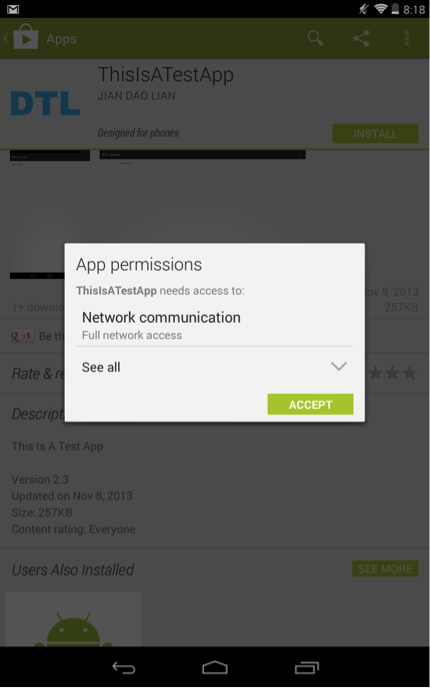
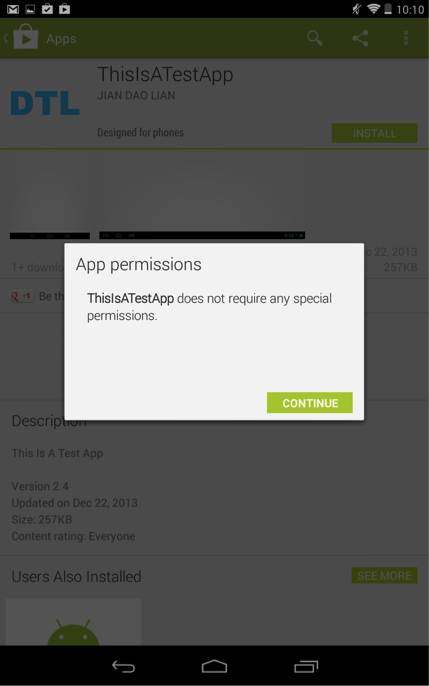
On the latest Android 4.4.2 system, if an app requests both dangerous permissions and normal permissions, Android only displays the dangerous permissions, as shown in Figure 1. If an app requests only normal permissions, Android doesn’t display them to the user, as shown in Figure 2.

Figure 1. An Android app asks for one dangerous permission (INTERNET) and some normal permissions (Launcher’s READ_SETTINGS and WRITE_SETTINGS). Android doesn’t notify the user about the normal permissions.

Figure 1. An Android app asks for one dangerous permission (INTERNET) and some normal permissions (Launcher’s READ_SETTINGS and WRITE_SETTINGS). Android doesn’t notify the user about the normal permissions.

Figure 2. An Android app asks for normal permissions (Launcher’s READ_SETTINGS and WRITE_SETTINGS) only. Android doesn’t show any permission to the user.

Figure 2. An Android app asks for normal permissions (Launcher’s READ_SETTINGS and WRITE_SETTINGS) only. Android doesn’t show any permission to the user.

Normal Permissions Can Be Dangerous

We have found that certain “normal” permissions have dangerous security impacts. Using these normal permissions, a malicious app can replace legit Android home screen icons with fake ones that point to phishing apps or websites.

The ability to manipulate Android home screen icons, when abused, can help an attacker deceive the user. There’s no surprise that the com.android.launcher.permission.INSTALL_SHORTCUT permission, which allows an app to create icons, was recategorized from “normal” to “dangerous” ever since Android 4.2. Though this is an important security improvement, an attacker can still manipulate Android home screen icons using two normal permissions: com.android.launcher.permission.READ_SETTINGS and com.android.launcher.permission.WRITE_SETTINGS. These two permissions enable an app to query, insert, delete, or modify the whole configuration settings of the Launcher, including the icon insertion or modification. Unfortunately, these two permissions have been labeled as “normal” since Android 1.x.

As a proof of concept attack scenario, a malicious app with these two permissions can query/insert/alter the system icon settings and modify legitimate icons of some security-sensitive apps, such as banking apps, to a phishing website. We tested and confirmed this attack on a Nexus 7 device with Android 4.4.2. (Note: The testing website was brought down quickly and nobody else ever connected to it.) Google Play doesn’t prevent this app from being published and there’s no warning when a user downloads and installs it. (Note: We have removed the app from Google Play quickly and nobody else downloaded this app.)

Lastly, this vulnerability is not limited to Android devices running AOSP. We have also examined devices that use non-AOSP Launchers, including Nexus 7 with CyanogenMod 4.4.2, Samsung Galaxy S4 with Android 4.3 and HTC One with Android 4.4.2. All of them have the protection levels of com.android.launcher.permission.READ_SETTINGS and WRITE_SETTINGS as “normal”.

Google acknowledged this vulnerability and has released the patch to its OEM partners. Many android vendors were slow to adapt security upgrades. We urge these vendors to patch vulnerabilities more quickly to protect their users.

References:

  1. http://developer.android.com/guide/topics/manifest/permission-element.html
  2. https://android.googlesource.com/platform/frameworks/base/+/master/core/res/AndroidManifest.xml
  3. https://android.googlesource.com/platform/packages/apps/Launcher2/+/master/AndroidManifest.xml

DLL Side-Loading: Another Blind-Spot for Anti-Virus

Last month, I presented a talk at the RSA USA Conference on an increasingly popular threat vector called “Dynamic-Link Library Side-Loading” (DLL Side-Loading). As with many vulnerabilities, this exploit has existed for a rather long time and is the result of Microsoft looking to make binary updates easier for Windows developers through the Windows side-by-side (WinSxS) assembly feature.

Now, though, advanced persistent threat (APT) developers are using the innocuous DLL Side-Loading method to sneak malware past anti-virus (AV) scanners as the infected files run in-memory. In doing-so, the malicious payload is using a benign application to be built in memory, meaning that the malware does not sit running in the file system where AV scans take place. In the figure below, you can see an example of how this all plays out:

DLLpic

For a real-life example: in 2013, attackers exploited the executable originally developed by Fortune 50 company using this technique in a highly targeted attack. In such an attacks, the malware places a spoofed, malicious DLL file in a Windows’ WinSxS directory so that the operating system loaded the spoofed DLL instead of the legitimate file. Furthermore, because the file in-question was white-listed by hash in a public database, AV simply ignores it altogether.

In response to the growing use of DLL Side-Loading in APTs, we have developed a full paper that describes the history of DLL Side-Loading and its role in the malware and software engineering arenas which you can review here: https://www.fireeyesolution.com/resources/pdfs/fireeye-dll-sideloading.pdf


Android.MisoSMS : Its Back! Now With XTEA

FireEye Labs recently found a more advanced variant of Android.MisoSMS, the SMS-stealing malware that we uncovered last December — yet another sign of cybercriminals’ growing interest in hijacking mobile devices for surveillance and data theft.

Like the original version of the malware, the new variant sends copies of users’ text messages to servers in China. But the newest rendition adds a few features that make it harder to detect, including a new disguise, encrypted transmissions, and command-and-control (CnC) communications that are handled natively rather than over email.

FireEye Mobile Threat Prevention customers are already protected from both variants.

Continue reading »

A Little Bird Told Me: Personal Information Sharing in Angry Birds and its Ad Libraries

Many popular mobile apps, including Rovio’s ubiquitous Angry Birds, collect and share players’ personal information much more widely than most people realize.

Some news reports have begun to scratch the surface of the situation. The New York Times reported on Angry Birds and other data-hungry apps last October. And in January, the newspaper teamed up with public-interest news site ProPublica and U.K. newspaper the Guardian for a series of stories detailing how government agencies use the game (and other mobile apps) to collect personal data. Even the long-running CBS show 60 Minutes reported earlier this month that Rovio shares users’ locations.

The Android version of Angry Birds in the Google Play store, updated on March 4, continues to share personal information. In fact, more than a quarter billion users who create Rovio accounts to save their game progress across multiple devices might be unwittingly sharing all kinds of information—age, gender, and more — with multiple parties. And many more users who play the game without a Rovio account are sharing their device information without realizing it.

Once a Rovio account is created and personal information uploaded, the user can do little to stop this personal information sharing. Their data might be in multiple locations: Angry Birds Cloud, Burstly (ad mediation platform), and third-party ad networks such as Jumptap and Millennial Media. Users can avoid sharing personal data by playing Angry Birds without Rovio account, but that won’t stop the game from sharing device information.

In this blog post, we examine the personal information Angry Birds collects. We also demonstrate the relationships between the app, the ad mediation platform, and the ad clouds — showing how the information flows among the three. We also spell out the evidence, such as network packet capture (PCap) from FireEye Mobile Threat Prevention (MTP), to support our information flow chart. Finally, we reveal how the multi-stage information sharing works by tracking the code paths from the reverse-engineered source code.

Continue reading »

Spear Phishing the News Cycle: APT Actors Leverage Interest in the Disappearance of Malaysian Flight MH 370

While many advanced persistent threat (APT) groups have increasingly embraced strategic Web compromise as a malware delivery vector, groups also continue to rely on spear-phishing emails that leverage popular news stories. The recent tragic disappearance of flight MH 370 is no exception. This post will examine multiple instances from different threat groups, all using spear-phishing messages and leveraging the disappearance of Flight 370 as a lure to convince the target to open a malicious attachment.

“Admin@338” Targets an APAC Government and U.S. Think Tank

The first spear phish from group “Admin@338” was sent to a foreign government in the Asian Pacific region on March 10, 2014 – just two days after the flight disappeared. The threat actors sent a spear-phishing email with an attachment titled, “Malaysian Airlines MH370.doc” (MD5: 9c43a26fe4538a373b7f5921055ddeae). Although threat actors often include some sort of “decoy content” upon successful exploitation (that is, a document representing what the recipient expected to open), in this case, the user is simply shown a blank document.

The attachment dropped a Poison Ivy variant into the path C:\DOCUME~1\admin\LOCALS~1\Temp\kav.exe (MD5: 9dbe491b7d614251e75fb19e8b1b0d0d), which, in turn, beaconed outbound to www.verizon.proxydns[.]com. This Poison Ivy variant was configured with the connection password “wwwst@Admin.” The APT group we refer to as Admin@338 has previously used Poison Ivy implants with this same password. We document the Admin@338 group’s activities in our Poison Ivy: Assessing Damage and Extracting Intelligence paper. Further, the domain www.verizon.proxydns[.]com previously resolved to the following IP addresses that have also been used by the Admin@338 group:

IP Address First Seen Last Seen
103.31.241.110 2013-08-27 2013-08-28
174.139.242.19 2013-08-28 2013-08-31
58.64.153.157 2013-09-03 2014-03-07
59.188.0.197 2014-03-07 2014-03-19

Continue reading »